


I didn’t want to rely on marketing pages or feature lists, so I tested both n8n and Flowise with real workflows. From pulling emails with Gmail triggers, to building AI-powered decision flows, I got to see how each tool performs when you’re under pressure to deliver.
To give you a clear picture, here’s a quick summary before we dive into the details.
n8n vs Flowise: Quick Summary
| Category | n8n | Flowise |
|---|---|---|
| Ease of Use | Visual editor is polished with node-by-node execution and built-in AI debugging. | Intuitive drag-and-drop interface, but more geared toward AI workflows. |
| Workflow Testing and Debugging | Excellent debugging tools: test individual nodes, see exact error messages, and use AI assistant for fixes. | Node editor works well for AI chains, but less advanced debugging features. |
| Integrations and Flexibility | 400+ prebuilt nodes, plus custom node development. | Strong focus on LLM and AI integrations. Simpler for AI prototyping. |
| Pricing and Scalability | Pay-per-execution model (cloud from $20/mo). Free self-hosting option with unlimited potential. | Free tier available. Paid plans from $35/mo. Pricing tied to predictions, storage, and users. |
| Support and Community | Comprehensive docs, structured learning paths, active forum, GitHub, YouTube tutorials. | Vibrant Discord with organized channels. |

Quick Overview of n8n and Flowise
What is n8n?
n8n is an open-source automation platform that lets you connect your apps, APIs, and databases into smart, repeatable workflows. Unlike many “black-box” tools, it gives you full control. You can self-host, extend with custom code, and scale from simple automations to enterprise-grade processes. Ideal if flexibility and ownership matter to you.
What is Flowise?
Flowise is an open-source low-code/no-code platform visual builder for AI-driven workflows and chatbots. It’s tailored for teams working with large language models (LLMs). It lets you connect LLMs, vector databases, and APIs using a simple drag-and-drop interface. Perfect for anyone wanting to embed AI into products quickly. You can also self-host Flowise.
1. Sign-Up and Onboarding
When I review an automation tool, the sign-up and onboarding process is the first thing I test deliberately. Why? Because it sets the tone. A good onboarding flow tells me the company understands its users. It should be fast, frictionless, and transparent.
My Experience with n8n
n8n offers three ways to get started:
- n8n Cloud (hosted by n8n)—their managed, hosted version.
- Self-hosted Community Edition—install it yourself with npm, Docker, or cloud deployment.
- Enterprise self-hosted—with extras like SSO, version control, and scaling.
For my first run, I chose the cloud option because I wanted to get into the platform as fast as possible.
I went to the n8n homepage and clicked the “Get started for free” button.

The registration form was refreshingly straightforward:
- Full name
- Company email + confirmation
- Password
- Account name (this also becomes part of your subdomain, e.g., yourname.n8n.cloud)
I liked that they didn’t overcomplicate things. No endless fields asking for “role” or “company size.”
Crucially, no credit card was required. This immediately gave me confidence because many platforms hide behind “free trials” that actually demand card details up front.
Once I hit submit, I was instantly inside. No delays. Within seconds, I was on the dashboard.
Here’s what stood out:
- Minimalist dashboard layout: A slim top navigation bar with just Dashboard, Manage, and Help Center.
- Trial status clearly displayed: “14 days left” and “1,000 workflow executions/month.”
- Instance preview: My account name displayed with a large “Open Instance” button, making the next step obvious.

Clicking Open Instance launched me into the Workflow Dashboard. This page is far more detailed, showing:
- The workflow canvas (where you drag, drop, and connect nodes).
- Execution logs.
- Left-hand panel with triggers, integrations, and community nodes.

No tutorials popped up to block me. If I wanted help, the Help Center was just a click away, but I appreciated the fact that n8n trusted me to explore first.
Later, I dug into the self-hosting route. Using Docker or npm, you can spin up n8n on your own infrastructure. It’s well-documented.
If you’re thinking of doing the same, Hostinger is one of the easier providers to start with, especially since there are Hostinger n8n hosting coupon codes and discounts available that can lower your initial costs.
My Experience with Flowise
Flowise also offers two main ways to start:
- Flowise Cloud—a hosted option.
- Self-hosting from GitHub—for full control.
Like with n8n, I began with the cloud route.
From the Flowise homepage, I clicked “Get Started.”

That took me to the sign-up page where the form asked for:
- Full name
- Email (this becomes your login)
- Password
- Confirm password
Here’s the key difference: Flowise requires email verification. After submitting, I had to open my inbox, find their email, and click the verification link. Until I did that, I couldn’t log in.
It’s a small step, but it adds friction compared to n8n’s instant entry.
Once I verified my email, I was in. The Flowise dashboard was clean and modern.
On the left sidebar, I saw:
- Chatflows → for chatbot workflows.
- Agentflows → for multi-agent systems.
- Executions → to monitor past runs.
- Assistants, Marketplace, Tools, Credentials, Variables, API Keys, and Document Stores neatly stacked below.

In the center, the main canvas greeted me with “No Chatflows Yet”.
At the top right, a big “Add New” button practically shouted the next step. I liked this. Even as a new user, I immediately knew where to begin.
The overall feel was like opening a fresh whiteboard. Clean, distraction-free, encouraging me to create from scratch. Unlike n8n, Flowise doesn’t throw templates at you right away. It leaves you space to think, which can be either refreshing or intimidating depending on your style.
Side Note: Self-Hosting
Clicking the GitHub option from the homepage took me directly to their repository. From there, I had clear instructions:
- Quick start with Node.js: npm install -g flowise, then npx flowise start (access at http://localhost:3000).
- Docker setup: docker compose up -d with the provided config.
- Cloud deployment guides: AWS, GCP, Azure, DigitalOcean, and Alibaba.
- One-click hosting: Zeabur and other platforms.

Self-hosting Flowise is doable, but it demands more setup work compared to n8n’s polished documentation and larger community.
And the Winner is n8n!
For me, n8n edges out Flowise in onboarding. The sign-up was quicker, clearer, and gave me immediate hands-on control.
2. Visual Editor and Workflow Design
Once I was inside both platforms, my next goal was simple: could I actually build something useful, and how smooth was the process?
For n8n, I built a personal email triage bot. For Flowise, I tried their Deep Research Debate Bot template to see how AI-focused flows would run.
My Workflow in n8n
n8n’s visual editor is node-based. Every new action you add is a node on the canvas, and each node passes structured data (JSON) to the next. The beauty of n8n is that you can test each node in isolation before moving forward. That means you’re never building blindly. You always know what data is flowing through your system.
Here’s how I built my workflow step by step.
I started by dragging in the Gmail Trigger node. After connecting my Gmail account, I clicked “Fetch Test Event.”
This instantly pulled a handful of recent emails from my inbox and displayed their details:
- from (sender)
- subject
- text / html snippet
- date
- messageId
What’s important here is that n8n shows you the actual JSON schema of the data coming from Gmail. You can expand and inspect it right inside the editor.

By testing the node first, you already have real sample data flowing. When you add the next node, you can simply drag and drop these existing fields into whatever property you’re mapping. There’s no guesswork.
With my test data available, I added a Switch node right after Gmail. The editor let me open the schema from Gmail and map fields directly.
For example, I grabbed the subject field from the Gmail trigger and set conditions:
- If subject contains “invoice” → route to Invoice branch.
- If subject or snippet contains “job” → route to Job branch.
- If subject contains “urgent” → route to Urgent branch.
- Otherwise → route to General branch.

Again, I executed the Switch node with the test email data. Right away, I could see which branch each email would take. This iterative testing gave me confidence that the logic worked before moving on.
From the Switch node, I connected the Invoice branch to a Google Sheets node. Mapping was straightforward: I opened the Gmail fields (from the test event) and dragged them into the sheet fields. For example:
- Gmail date → Google Sheets “Date” column.
- Gmail from → “From.”
- Gmail subject → “Subject.”
- Gmail text snippet → “Snippet.”
- Hard-coded value → “Category = Invoice.”

Then I executed it. In real time, a row appeared in my Google Sheet.
For job-related emails, I wanted summaries. After the Switch, I added a Gemini node. I mapped the Gmail text field into the Gemini input and used this prompt:
“Summarize the job posting in 2 sentences and classify it as Inquiry, Offer, or Other.”
When I executed the node, Gemini produced an output like:
Summary: “This is a job offer for a Data Analyst role requiring SQL and Python. It is classified as an offer.”
This summary was then mapped into the ai_summary column of my Google Sheet. Running the node showed me the exact data flow: email → AI summary → log entry.
For urgent messages, I added two nodes in parallel:
- A Google Sheets node to log the details.
- A Slack node for instant alerts.
Again, I mapped Gmail fields into Slack’s message template. That alert appeared instantly in Slack while the same record was written into Sheets.
Finally, everything else was funneled into the General branch. Even low-priority emails were logged, giving me a searchable archive in one place.
What makes n8n different is how natural the data mapping feels. Because every node can be executed and tested individually:
- You pull in real data (e.g., Gmail test emails).
- You see the exact JSON schema.
- You drag and drop those fields into the next node.
This makes building workflows transparent, iterative, and low-risk. You’re never guessing. You’re building with live data at each step.
My Workflow in Flowise: AI Debate Research Bot
When I first signed in to Flowise, I was welcomed by a clean but almost empty dashboard. On the left sidebar, I saw the main navigation options:
- Chatflows. Where you design conversational AI flows.
- Agentflows for multi-agent systems.
- Execution logs of what has run.
- Tools. Utilities and integrations.
The middle of the screen, however, was just a blank canvas. No prompts, no starting blocks. Just an empty space inviting me to begin. On one hand, it felt exciting, like a blank whiteboard waiting for ideas. On the other, it felt slightly overwhelming. Without prior knowledge, it’s not immediately clear what the first step should be.
Since I didn’t want to spend my first session dragging blocks at random, I went straight to the Marketplace option in the sidebar. Flowise offers prebuilt templates, and one caught my eye immediately: “Deep Research With Multi-turn Conversations.”

On paper, it sounded brilliant. The idea was simple but powerful:
- Input a research topic.
- Have two AI agents debate it back and forth.
- Get a polished whitepaper-style summary at the end.
Here’s how the template was structured:
- Start Node → This is where you enter your research topic. For testing, I used: “The future of humans in the era of Artificial Superintelligence.”
- Topic Enhancer Node → Before the debate began, the input topic was expanded into a richer version with more nuance. This meant the agents weren’t starting with a vague prompt, but with a strong foundation.
- Agent 0 and Agent 1 Nodes → These were the “debaters.” Each one represented a separate AI model instance (I chose Google Gemini). They exchanged arguments for five iterations, simulating a structured discussion.
- Iteration Controller → This node handled the loop. It checked how many rounds had been completed and pushed the agents back into the cycle until the debate was done.
- Agent 2 (Summarizer Node) → After the debate ended, this agent read through the transcript and produced a whitepaper-like report with structured insights.
So in practice, the flow looked like:
Topic → Enhanced Query → Debate Loop (Agent 0 ↔ Agent 1) → Summarized Report
Visually, the canvas was striking. The debate loop was clearly shown with arrows bouncing back and forth between Agent 0 and Agent 1. It genuinely felt like I was watching a “map” of two digital minds sparring over a topic.

My experience setting it up.
This is where things got complicated.
- Model Naming Confusion. My first challenge was choosing which LLMs the agents should use. You’d expect Gemini to show up as “Gemini,” but instead it was labeled as ChatGooglegenerativeAI. Similarly, ChatGPT appeared as ChatOpenAI.
If I didn’t already know that, I would have thought Flowise didn’t support these models at all. It felt like I needed insider knowledge just to pick the right node.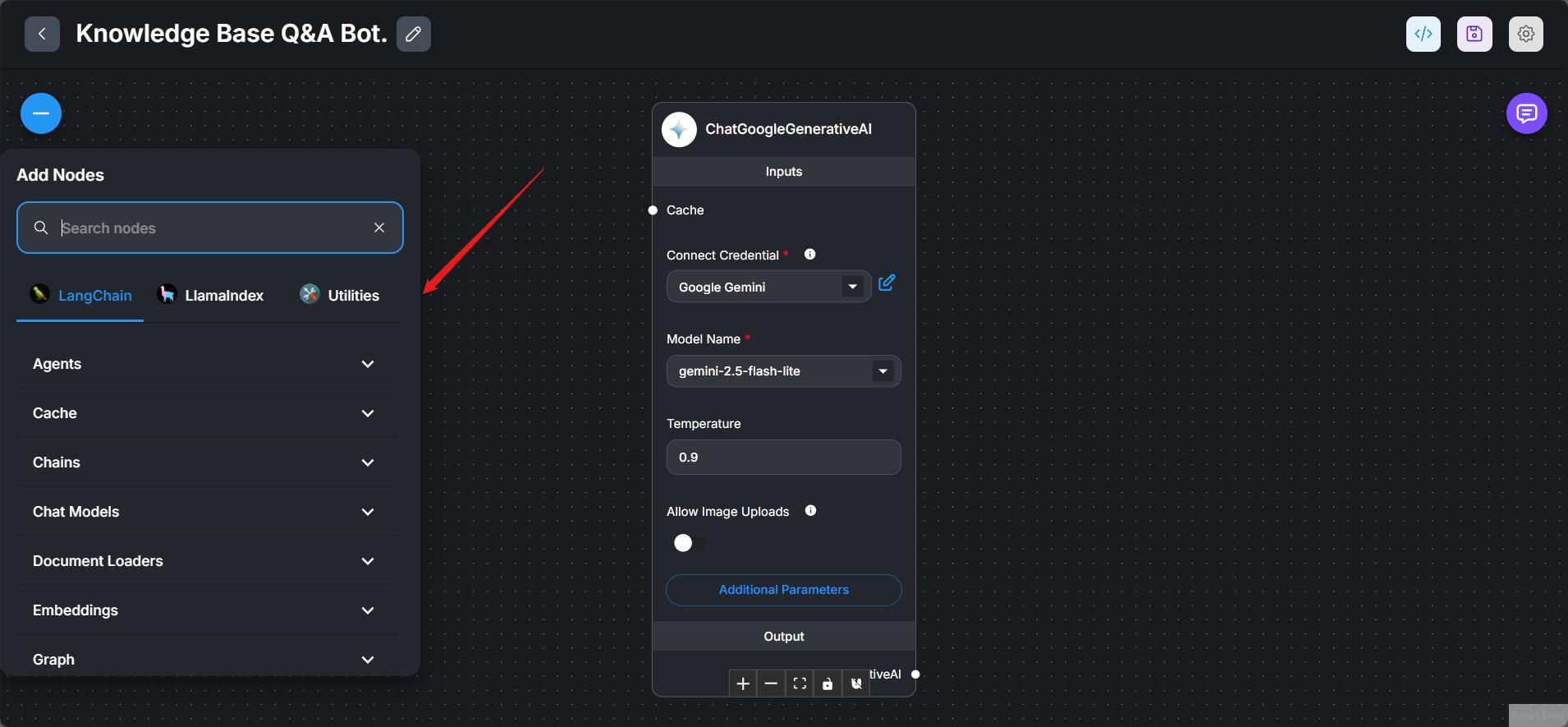

- Execution Isn’t Obvious. Once I configured the models, I expected a big “Run” button like in n8n. Instead, Flowise scattered icons across the editor, and it wasn’t always clear which one actually triggered the workflow. Sometimes I clicked and nothing happened, leaving me unsure whether it was running or not.
- Not Plug-and-Play. Even though I started with a prebuilt template, I still had to do a lot of manual fixing:
- Adjusting the prompts in the Topic Enhancer node.
- Making sure both Agent nodes were properly configured.
- Debugging red error icons that appeared over certain nodes.
- Until I resolved all of that, the flow wouldn’t run. It wasn’t the smooth, out-of-the-box experience I was hoping for.
One standout feature Flowise does offer is its AI Assistant for flow creation. Instead of manually adding nodes, I could just type in plain English what I wanted. For example, I asked:
“I want a bot that scrapes job postings and creates a market report.”
Within seconds, Flowise generated a skeleton workflow with the right nodes connected: a scraper, a processor, and a reporting step.

However, you still need to go in and configure the details like credentials and prompt instructions, but it gives you a huge head start. This feature feels unique to Flowise and shows its strength as an AI-first tool.
Running the Debate Bot
After wrestling with the model names and fixing errors, I finally got the debate bot to run. Watching the agents exchange arguments round after round was fascinating. It felt dynamic, not static like a single AI response.
At the end, the Summarizer node delivered a structured report that pulled the whole discussion together into clear insights. It felt less like a raw transcript and more like a thoughtful research paper.
The output was genuinely impressive. I could see how this could be used for brainstorming, market research, or policy analysis, where you want multiple perspectives distilled into one digestible document.
And the Winner is n8n!
For real-world productivity, n8n is the clear choice. Its step-by-step execution, JSON-based mapping, and drag-and-drop data handling made building my workflow feel reliable and transparent.
3. Debugging and Testing
One of the first things I check in an automation platform is how it handles failure. In real life, workflows rarely run flawlessly forever. APIs change, credentials expire, models throw errors, or data comes in malformed.
So I decided to deliberately break a workflow in both n8n and Flowise to see:
- How clearly does the tool show where the error occurred?
- How much detail does the error message provide?
- Can I re-run just the failing step, or do I need to re-run the whole workflow?
- What kind of logging and monitoring is available?
Debugging in n8n
For this test, I used one of my more complex workflows, a Generate AI Viral Videos workflow that uses Seedance to create ideas and then uploads finished content to TikTok, YouTube, and Instagram.
Since I wanted to simulate a failure, I deliberately disconnected my ChatGPT credentials in one of the nodes. Specifically, this was a sub-node in Node 2, the one responsible for generating raw content ideas using GPT-4.
With credentials missing, I hit “Execute Workflow” to see if n8n would detect the failure and, more importantly, show me where and why it failed.
The workflow started, and nodes lit up one by one as expected. But almost instantly, the second node turned red, and I got a pop-up error message:
Error in sub-node ‘LLM: Generate Raw Idea (GPT-4.1)’
404 status code (no body)
Troubleshooting URL: https://js.langchain.com/docs/troubleshooting/errors/MODEL_NOT_FOUND/
This first pop-up already impressed me. Instead of just saying “AI node failed,” it pinpointed the exact sub-node and gave me both the HTTP error and a link to the relevant troubleshooting documentation.

Next, the panels at the bottom of the editor updated in real time (the logs and output panel):
- Trigger: “Start Daily Content Generation” → ✅ Passed.
- AI Agent: “Generate Creative Video Idea” → ❌ Failed.
- Sub-node (LLM: Generate Raw Idea – GPT-4.1): Highlighted in red, showing where exactly the chain broke.
This step-by-step execution trace gave me a clear picture: the workflow started fine, but the issue was specifically with the LLM sub-node inside the creative idea generator.

On the Output Panel (right side of the editor), I saw the full error:
The resource you are requesting could not be found
404 status code (no body)
Troubleshooting URL: https://js.langchain.com/docs/troubleshooting/errors/MODEL_NOT_FOUND/
And below that was a button: “Ask Assistant.” Curious to see how useful this would be, I clicked it.
Immediately, a chat panel opened on the right side of the screen. The assistant introduced itself and began analyzing the error for me. Within seconds, it produced a detailed explanation:
Here is my top solution to fix the error in your LLM: Generate Raw Idea (GPT-4.1) node
Model Not Found Error: Invalid Model Name (gpt-4.1) The error message you are seeing:
The resource you are requesting could not be found – 404 status code (no body)
Troubleshooting URL: https://js.langchain.com/docs/troubleshooting/errors/MODEL_NOT_FOUND/
indicates that the model name you have selected, gpt-4.1, is not recognized or available via the OpenAI API.
Actionable Solution:
Check the model name in your node configuration. The correct model names for OpenAI’s GPT-4 series are typically gpt-4, gpt-4-32k, gpt-4-turbo, or gpt-4o. The model name gpt-4.1 is not valid….

This whole experience was excellent for several reasons:
- Immediate pinpointing of the error. The failing node turned red, the pop-up gave me the exact sub-node and error code, and the execution panel showed precisely where in the workflow things failed. No hunting or guessing.
- Rich, layered detail. Instead of a vague “bad request,” I got:
- The failing sub-node (LLM: Generate Raw Idea).
- The HTTP status (404 Not Found).
- A direct troubleshooting URL from LangChain docs.
- Iterative debugging workflow. I didn’t have to re-run the whole process. In n8n, you can click “Execute Node” on just the failing node. That means once I fixed the model name, I could re-run only that step using the cached input data, instead of restarting the entire flow.
- Built-in AI assistant. This was the cherry on top. The assistant’s answer wasn’t generic fluff — it gave me the exact cause (invalid model name) and actionable steps (change to a supported model like gpt-4o). It even cited references. This turned what could have been a 20–30 minute troubleshooting session into a quick fix.
- Production safety nets. Beyond debugging in the editor, n8n also lets me set up Error Workflows to notify me (e.g., via Slack) when something breaks during scheduled runs. That means I don’t have to sit and watch every flow. I’ll get alerted automatically.
Beyond live debugging, n8n also keeps a permanent executions log. From the top menu, I opened the failed run in read-only mode. It showed me the exact state of the workflow at the time of failure, without affecting my editor. This makes it great for post-mortem analysis if something fails while I’m away.

Lastly, n8n has a killer feature: the Error Workflow. I created a second workflow with an Error Trigger node. Anytime my main AI workflow fails during scheduled runs, this error workflow automatically fires.
I connected a Slack node that pushes me a notification with details of the failure. Now, even if I’m not watching the dashboard, I’ll get pinged when something breaks. That’s production-grade monitoring.

Debugging in Flowise
For Flowise, I wanted to test how it reacts when a node breaks. So I deliberately introduced an error in the AI Debate Research Bot template.
Specifically, I disconnected the Topic Enhancer node (which takes the raw input topic and expands it into a richer query for the agents). Without this, the agents would be missing context, and I wanted to see how Flowise would flag the issue.
When I hit Run, Flowise immediately showed an error on the right-hand process panel:
Error in LLM node: [GoogleGenerativeAI Error]:
Error fetching from
https://generativelanguage.googleapis.com/v1beta/models/AngusLazan@proton.me:streamGenerateContent?alt=sse
[400 Bad Request] * GenerateContentRequest.model: unexpected model name format

How Flowise Displayed the Error
- On the canvas, the Topic Enhancer node lit up with a red error marker. This made it obvious which step failed.
- On the process flow panel (right side), Flowise listed the nodes in order. The Start node had a green check, while the Topic Enhancer had a red dot. This clearly showed that the error originated at Topic Enhancer and that the Start node had succeeded.
- The error message itself included the underlying API call to Google’s LLM endpoint, along with the HTTP 400 Bad Request and a very specific detail: “unexpected model name format.”
This was both good and bad:
- Good: It pointed directly to the model naming issue, so I knew I had to fix my configuration.
- Bad: The error wording was highly technical. A beginner would have no idea what GenerateContentRequest.model means or why gemini-2.5-flash didn’t match the expected format.
Unlike n8n, Flowise didn’t let me easily re-run just that one node with cached input data. Instead, I had to fix the model name and restart the flow. Also, while the process panel showed a clear success/failure map, Flowise doesn’t yet offer hierarchical logs or permanent execution history for deeper analysis.
That means if something fails while you’re away, you won’t get detailed breadcrumbs the way you do in n8n.
And the Winner is n8n!
For debugging and testing, n8n is far ahead. Its error handling is informative and actionable.
4. Integrations and AI Capabilities
A slick editor is nice, but if the platform can’t connect to the apps and systems I rely on, or if its AI features are shallow, the workflows won’t deliver real value.
n8n: Systems-Level Integrations + AI as a Core Building Block
n8n’s strength lies in the sheer breadth and technical depth of its integrations. Out of the box, it supports over 1,100 connections, but what really stood out to me wasn’t the number. It was the quality and control those nodes give you.

n8n isn’t just about consumer apps. Alongside staples like Slack, Gmail, Telegram, Google Sheets, and Notion, it includes:
- Databases: Postgres, MySQL, MongoDB with read/write/query-level control.
- Developer Tools: GitHub, GitLab, Supabase.
- Protocols: Webhooks, GraphQL, raw HTTP Request.
That last one, the HTTP Request node, deserves a special mention. If n8n doesn’t already have a dedicated integration, you can call any API directly with full control over headers, body, authentication, and responses.
This means you’re never really limited by n8n’s native library. You can extend it to touch anything on the internet.
Unlike some automation platforms that give you “light” integrations (e.g., Slack = only send a message), n8n exposes far more of the underlying API. For example:
- With Google Sheets, I wasn’t limited to “append row.” I could read, filter, update, and structure data in advanced ways.
- With Gmail, I could retrieve metadata, headers, attachments, and not just subject/body.
This granularity makes n8n feel like a developer’s tool disguised as a no-code editor.
AI as a Core Category
Where n8n really impressed me was how it treats AI. Instead of sprinkling in a few OpenAI nodes, it has a full AI category in the node library. This includes:
- Language Models: Connectors for OpenAI, Google Gemini, Anthropic (Claude), and Hugging Face.
- Agents: Build autonomous AI agents that can make decisions and call tools.
- Memory: Give your agents short-term and long-term memory for contextual conversations.
- Vector Stores: Pinecone, Weaviate, Supabase, and others for building RAG (Retrieval-Augmented Generation) workflows.
- Document Loaders: Pull in PDFs, websites, Notion docs, databases, and preprocess them for AI.
- Embeddings + Output Parsers: Control how text is embedded, chunked, and structured.

To me, this was the biggest differentiator. In n8n, AI is treated like infrastructure. You can build your own custom AI-powered systems from the ground up: a content pipeline, a chatbot with memory, or a knowledge assistant that queries multiple databases.
Flowise: AI-Oriented Integrations + Visual LLM Orchestration
Flowise takes the opposite approach. Where n8n starts as a general-purpose automation platform and layers in AI deeply, Flowise was built from the ground up for AI orchestration.
Flowise supports just over 100 integrations, but the focus is razor-sharp: everything revolves around Large Language Models (LLMs), memory, and external tools.
Key integrations include:
- LLM Frameworks: LangChain, LlamaIndex.
- Cloud AI Services: OpenAI, Google Vertex AI (Gemini), Hugging Face, Replicate, Anthropic, Ollama for local models.
- Memory Modules: Buffer Memory, Buffer Window, Conversation Summary.
- Search + RAG Tools: Tavily for real-time search, vector database connectors.
- Business Apps via Zapier: Slack, Airtable, Google Docs, Gmail, Discord, Outlook, Zoho Mail, etc.
- APIs + SDKs: JavaScript/Python SDKs and embeddable widgets for deploying flows inside apps.

Where n8n leans into APIs and databases, Flowise leans into AI ecosystems.
AI Capabilities at the Core
Flowise excels at enabling users to create complex AI-powered applications without the need for coding.
- Visual LLM Workflow Builder: Connect LLMs, vector stores, data loaders, and tools in a drag-and-drop canvas.
- Multi-Agent Support: Run multiple autonomous agents that debate, collaborate, or perform parallel tasks.
- RAG Workflows: Combine external data (PDFs, websites, SQL, etc.) with LLM reasoning.
- Memory + Planning: Add memory persistence across conversations for context retention.
- Branching and Logic: Support for loops, conditional routing, and even embedding custom code.
- Deployment Options: Self-hosted or cloud-based, with APIs and widgets to embed flows directly into apps or websites.

In practice, this means Flowise is excellent for building:
- Chat assistants grounded in your company data.
- Content generation pipelines that rely on AI agents.
- SQL query bots that can understand natural language and output queries.
- Customer support AIs that use memory and retrieval to answer FAQs.
Flowise feels less like a general automation platform and more like a specialist AI workshop.
And the Winner is n8n!
n8n’s integrations are broader, deeper, and more production-ready. It’s the tool I’d trust if I needed to wire AI into the rest of my business systems.
5. Pricing and Scalability
Some platforms seem cheap until you start running serious workloads, and suddenly you’re paying through the nose.
n8n Pricing: Pay Per Execution
n8n’s model is refreshingly simple:“Build as much as you want. Pay only when your workflows run.”
The key term here is execution. An execution is a single run of your workflow, regardless of whether that workflow has 2 steps or 200 steps.
This is a huge advantage if you’re building multi-step automations. Complex workflows don’t cost extra per node. They cost the same as a simple one.
n8n offers two main hosting structures:
- Cloud Plans (hosted by n8n). Start at $20/month for the Starter tier. Every plan comes with a 14-day free trial. No credit card required.
- Self-Hosted (Open Source)
- Community Edition: 100% free. You can host it on your own server, VPS, or even your laptop. You’re only limited by your hardware.
- Business/Enterprise Edition: For teams that self-host but need enterprise extras like SSO, audit logs, dedicated support, and scaling options.
- But remember: Self-hosting isn’t truly “free.” You’ll need to account for the cost of:
- Cloud servers (AWS, DigitalOcean, etc.) or on-premise hardware.
- Maintenance and monitoring.
- Backups and scaling.
Still, for developers or businesses with IT resources, self-hosting can be extremely cost-effective because you avoid per-seat or per-node pricing traps.
n8n’s execution-based model scales predictably. You don’t get punished for complexity, only for volume. If your business grows and you’re suddenly processing thousands of emails or transactions a day, you’ll know exactly how much extra that will cost you.
If you’re considering self-hosting n8n instead of relying on the cloud, you’ll want reliable servers. We tested popular options, and you can also check out some of the best n8n hosting providers to see which setup works best for your needs.
Flowise Pricing
Flowise takes a different approach. Its pricing is built around predictions. Each prediction is essentially a model call or response generated by your workflow.
Here’s how the tiers break down:
- Free Plan ($0/month)
- Starter Plan ($35/month – Most Popular)
- Pro Plan ($65/month)
- Enterprise (Custom Pricing)
Flowise’s scalability hinges on predictions per month. If you’re running agents that call an LLM repeatedly (e.g., a 5-round debate bot), those predictions add up fast. You may hit the cap much sooner than expected.
The upside: Flowise allows team scaling with workspaces, RBAC, and enterprise controls. The downside: costs can climb quickly if you’re experimenting heavily with AI models, since every call counts toward your quota.
And the Winner is n8n!
n8n comes out on top. Its per-execution pricing model, self-hosting option, and scalability for complex workflows make it far more cost-effective and predictable long-term.
6. Support and Community Experience
When evaluating automation platforms, support is just as critical as features or pricing.
Even the most polished tool will throw errors, integration quirks, or performance issues once you put it into production.
To make this clearer, let’s start with a side-by-side overview:
| Category | n8n | Flowise |
|---|---|---|
| Documentation | Extensive, official docs with structured learning paths, hosting guides, and API usage. | Comprehensive official docs with setup, integrations, and troubleshooting guides. |
| Community Forum | Dedicated community forum + GitHub issues. Active peer-to-peer help. | GitHub issues + informal Reddit threads. No formal forum outside Discord. |
| Chat/Discord | Active presence on Discord, Twitter, and LinkedIn for quick engagement. | Highly active Discord server with dedicated channels (announcements, support, feature requests, bugs). |
| Email Support | Paid tiers get priority email + enterprise support. | Available for direct help but not emphasized in free tier. |
| Tutorials/Guides | YouTube channel, structured learning paths, plus community-built tutorials. | YouTube tutorials, masterclasses, and community walkthroughs. |
| Response Quality | Strong peer validation. Bug reports often acknowledged by other users within hours. Fixes may take longer but the crowd support is strong. | Developer presence in Discord. Many questions answered quickly, but advanced issues can require trial/error. |
My Experience with n8n’s Support
What stood out to me with n8n was how mature and reliable the ecosystem feels when you’re stuck.
For example, when I came across a bug report about the Zep Memory node, I followed the thread in the forum. Within just a few hours, multiple users had jumped in to confirm they were seeing the same issue.
That kind of peer validation is incredibly helpful. It reassures you that the problem isn’t unique to your setup and often surfaces workarounds before the dev team even replies.

I also tested how usable the docs really are. Instead of generic API references, I found structured guides that walked me through tasks like self-hosting with Docker and even advanced use cases like building AI agents with memory.
I didn’t feel like I was left piecing things together from random sources. The docs gave me a clear path forward.

On top of that, the GitHub repo is alive with activity. Issues aren’t buried; you can see discussions, contributions, and fixes moving forward in real time.
Even though I only stuck to free support (forums, GitHub, docs, tutorials), I never felt blocked. Between official guides and a responsive community, I always found a way to move forward.
n8n’s support is well-documented, battle-tested, and backed by an active community that actually helps.
My Experience with Flowise’s Support
Flowise felt very different—less “established,” but far more real-time and interactive.
The Discord server became my main hub. The support channels are clearly structured. I didn’t have to dig around to find where to ask something. And when I checked in, I saw real users asking things like:
- “How do I upsert via API?”
- “How do I access an uploaded image in a custom tool?”

These weren’t left hanging. Replies came in quickly, sometimes from community members, sometimes from the core team.
The announcements channel was another plus. That’s where I saw the news about Flowise being acquired by Workday (August 2025). The fact that updates like this are communicated openly shows that the team is invested in keeping users informed.

The documentation is useful, but I noticed I leaned more on Discord when I had nuanced, “how exactly do I…” type of questions.
Tutorials exist (YouTube, blog posts, community videos), but they’re not as structured as n8n’s learning paths yet.
Flowise’s support shines in real-time responsiveness and collaborative energy, but it doesn’t yet have the same depth of historical knowledge or structured resources that n8n offers.
And the Winner is n8n!
n8n edges ahead because of its maturity, breadth of documentation, and stability of its community forum.
Who Wins? Our Recommendation
Based on my real-world tests, n8n is the clear winner.
The pricing model alone sets it apart. Paying per execution makes it incredibly cost-effective, especially for complex, multi-step workflows. Beyond that, n8n impressed me with:
- Ease of debugging: When I deliberately broke my GPT node, n8n’s error handling instantly flagged the exact sub-node, displayed clear 404 details, and even gave me the option to test nodes individually. The built-in AI assistant provided actionable fixes, making troubleshooting smooth and educational.
- Scalability and flexibility: You can run anything from small personal automations to enterprise-grade pipelines, with the choice of cloud hosting or fully free self-hosting.
- Mature ecosystem: Between structured learning paths, extensive documentation, and a vibrant forum where issues get validated quickly, I never felt stuck
- AI + automation integration: Unlike Flowise, which shines mainly in AI workflows, n8n combines strong AI integrations with powerful traditional automation nodes, giving you the best of both worlds in one platform.
And the Winner is n8n!
Flowise is exciting, especially with its fast-moving community on Discord and its Workday backing, but it still feels younger and narrower in scope. If you need a stable, feature-rich platform that can grow with your automation needs, n8n is the platform to choose.

