




- 30-Day Money-back Guarantee
- Custom-Built WP Optimization Stack and LiteSpeed Cache
- Excellent 24/7/365 Customer Support


- Over 500 Professionally Designed Website Templates
- Drag and Drop Website Builder for Total Design Freedom
- Free Trial with No Credit Card Required
Hostinger vs. Wix: Quick Summary
After testing both, Hostinger comes out on top. Its setup is beginner-friendly, it’s cheaper ($3.99/mo vs Wix’s $17), and AI-powered tools make building a site easy.
Performance is solid too: Hostinger loads in 4.3s with a 3.0s time-to-interactive, beating Wix’s 4.8s and 4.3s.
Wix has more templates (800+ vs 150+) and deeper customization, but it’s pricier and takes more time to learn.
1. Prices and Plans Comparison
At first glance, Wix looks expensive, but it does offer a more advanced website builder with built-in business tools, a massive template library, and a vast app marketplace. It might be worth considering if you’re looking for an all-in-one business platform with deep customization.
However, I found Hostinger to be the better value for most users. Its Plus plan costs only $5.99/month and comes with:
- AI-powered website builder that generates a complete site in minutes
- 100 GB of storage (more than enough for most websites)
- Multi-site support, allowing you to manage multiple websites under one account
- A free domain for the first year, saving you additional costs
- Ecommerce support and AI tools
Hostinger’s plans provide more than enough features at a fraction of Wix’s cost for businesses or freelancers looking to create a professional website without breaking the bank.
2. Customer Support Comparison: Who’s Got Your Back?
Hostinger provides faster and more responsive customer support.
Hostinger Customer Support Experience
Hostinger provides 24/7 live chat support, and my experience with their support team was fast and responsive. Initially, I was connected to Kodee, their AI chatbot, which provided a quick answer to my query.

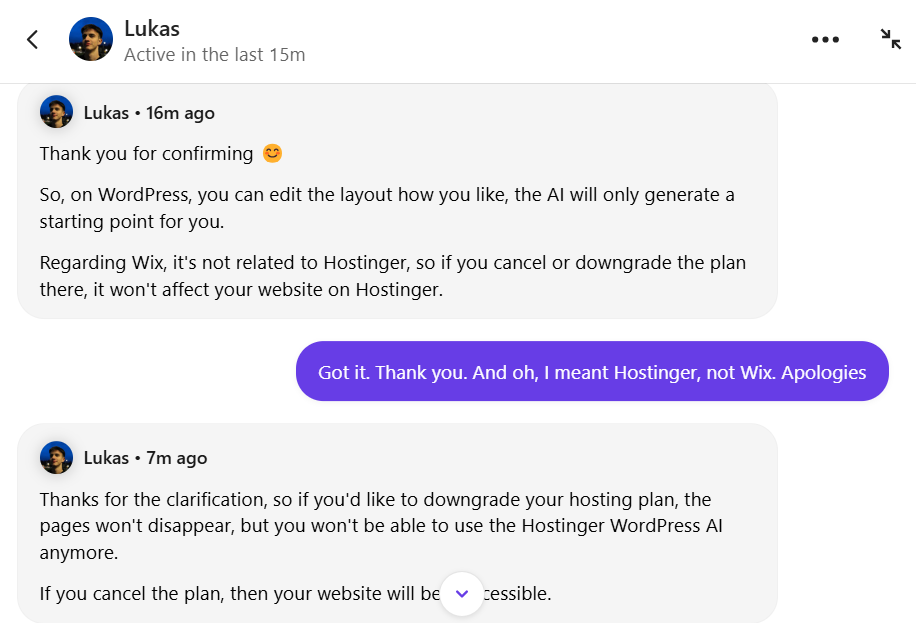
When I requested a human agent, I was connected to Lukas in about 7 minutes.
The response was detailed, polite, and solution-focused, with Lukas clarifying the AI builder’s capabilities and how downgrading would affect my website. Although there was a short delay, the overall experience was smooth and professional.

Hostinger also offers video tutorials via Hostinger Academy and a comprehensive knowledge base, making it easy to find self-help resources.
Overall, Hostinger’s support is highly efficient, especially for users who prefer live chat over phone calls.
Wix Customer Support Experience
Wix also offers 24/7 support, but it relies heavily on its AI chatbot before allowing users to connect with a human expert. I asked a question about downgrading my plan and whether my content would be saved.

The chatbot answered my question, but when I requested a human, I was placed in a queue with no estimated wait time.
After several minutes of waiting, I was finally given the option to request a live chat or callback, but Wix did not immediately connect me with a support agent. This shows that while Wix has multiple support options, including phone callbacks, it can take longer to get direct assistance.

Wix also provides an extensive help center, video tutorials, and community forums, making it a good option for users who prefer self-service solutions.
3. Features Comparison
Wix provides a vast template library, advanced customization, and better eCommerce tools.
Hostinger Website Builder Features
What stood out immediately was how fast and effortless the setup process was. The AI-powered builder took just a few minutes to generate a fully functional website based on my input (my brand name and a few sentences describing my project), which was impressive.

Alternatively, instead of generating a site with AI, I saw that you can just start with pre-made templates—over 150 modern designs to choose from. It was easy to pick a template that fit my needs.

The drag-and-drop editor was intuitive, allowing me to rearrange elements easily.
For eCommerce, Hostinger makes selling online simple, with built-in product listings and ability to set up online payment gateways. However, I noticed it lacks advanced tools like abandoned cart recovery and POS integration, which Wix offers.

SEO tools were basic but functional, with AI-assisted meta tags and descriptions. The biggest downside I found was the lack of third-party integrations—there’s no dedicated app marketplace, meaning you’re mostly limited to the built-in features.
Overall, I found Hostinger’s website builder to be an excellent choice for beginners. If you need a fast, affordable, and AI-driven solution to build a website without a steep learning curve, it’s a great option. But if you want full creative control, deep integrations, and advanced marketing features, Wix might be the better fit.
Wix Website Builder Features
Wix offers one of the most feature-packed website builders I’ve tested, giving users an impressive 800+ templates to choose from.

Right from the start, I noticed how visually stunning these designs are—perfect for businesses, bloggers, and creatives looking to make an impact.
Unlike Hostinger, Wix’s drag-and-drop editor gives full creative control—you can move elements anywhere on the page without restrictions. This makes it ideal for users who want pixel-perfect designs. However, this flexibility comes with a learning curve, and it took me longer to fine-tune my site compared to Hostinger’s AI-powered setup.
Wix also excels in eCommerce. It includes abandoned cart recovery, POS integration, and multiple payment gateways—essential features for serious online stores.

Plus, the Wix App Market offers 800+ third-party apps, allowing you to expand your site’s functionality with live chat, booking tools, and analytics.
For SEO and content-driven websites, Wix goes a step further with structured data support, AI-driven SEO recommendations, and built-in blogging tools. While it requires more effort to master, Wix is the better choice for those who need advanced customization and business tools.
4. Website Performance Comparison
Wix provides a more responsive browsing experience with faster interactivity and zero blocking time, making it feel smoother for users.
To get a real-world look at how Hostinger and Wix perform, I tested actual websites built with each platform using GTmetrix. This way, I could see firsthand how each builder handles speed, responsiveness, and overall efficiency.
For Hostinger, I tested a website built with Hostinger Website Builder—cgem.org.in. For Wix, I tested a website built with Wix Website Builder—maneethical.com.
Here’s what I found.
Hostinger Website Builder Performance (cgem.org.in)
I ran a GTmetrix test on cgem.org.in, a live website built using Hostinger Website Builder. The results were solid, showing that Hostinger delivers fast and efficient performance.
- Largest Contentful Paint (LCP): 710ms: This means that the most important visual element on the page loads in less than a second, which is excellent.
- Total Blocking Time (TBT): 376ms: There was some delay in responsiveness, likely due to script execution, but nothing major.
- Time to Interactive (TTI): 1.3s: The site became fully interactive within 1.3 seconds, making it fast and usable.
- Cumulative Layout Shift (CLS): 0: There were no unexpected content shifts, ensuring a smooth experience.

Hostinger’s website builder performs well, with a fast LCP and a fully interactive site in just 1.3s. While the total blocking time is a bit high (376ms), the site loads smoothly, and user experience remains fluid.
Wix Website Builder Performance (maneethical.com)
Next, I tested maneethical.com, a real website built with Wix Website Builder. Wix delivered an outstanding performance score, but there were a few trade-offs.
- Performance Score: 100%: This was impressive. The site was fully optimized with almost no slowdowns.
- Largest Contentful Paint (LCP): 804ms: Slightly slower than Hostinger’s 710ms but still under Google’s recommended 1-second target.
- Total Blocking Time (TBT): 0ms: Unlike Hostinger, Wix had zero blocking time, meaning the site responded instantly.
- Time to Interactive (TTI): 760ms: Wix was fully interactive in just 760ms, much faster than Hostinger’s 1.3s.
- Fully Loaded Time: 2.1s: This was longer than Hostinger’s 1.4s, but it didn’t impact responsiveness.

Wix had the best performance score (100%) and zero blocking time, making it extremely responsive. However, the fully loaded time was slower than Hostinger, meaning some background elements took longer to complete loading.
5. Ease of Use Comparison: Which Platform Is Easier to Use?
Hostinger is more beginner-friendly.
Getting Started & Registration
Hostinger
Signing up is simple. You choose a plan, create an account, and are taken directly to the website builder.

After signing up, I was immediately guided through an AI-powered website setup that asked me a few basic questions about my site. In less than a minute, the AI generated a complete website with images, text, and layout suggestions.
If I didn’t want to use AI, I could also pick from 150+ templates and manually build my site.

Wix Website Builder
Signing up was just as easy, but choosing between Wix ADI (AI-powered builder) and the Wix Editor added an extra step. The ADI option built a site for me in minutes—similar to Hostinger—but if I wanted more control, I had to use the Wix Editor, which had a steeper learning curve.

User Interface and Dashboard
Hostinger
The dashboard felt clean and minimal, with a step-by-step guide that walked me through each part of the setup. I never felt lost, and every tool was labeled clearly. If you’re a complete beginner, this setup makes the process stress-free.

Wix
The interface felt much busier in comparison. It’s packed with features and customization options, which is great for flexibility—but for a beginner, it can be overwhelming. I found myself clicking around a lot, trying to figure out where everything was.

Website Customization & Editor
Hostinger: The drag-and-drop editor was easy to use, but customization felt limited. It follows a smart grid layout, so I couldn’t place elements anywhere I wanted—only within the grid’s structure. That said, for quick and clean designs, it worked well.
Wix: The editor was way more flexible. I could move elements freely and customize every detail—fonts, colors, animations, and even small design tweaks. But this level of control comes at a cost: it takes longer to learn. I had to dig into settings and experiment before I felt comfortable.
Adding Pages & Sections
Hostinger
Adding pages was straightforward, thanks to pre-designed sections that made everything look polished. However, deep customization options were limited compared to Wix.

Wix
I had complete control over pages and sections. I could freely add, move, and resize elements anywhere. While that sounds great, it took more time to structure everything from scratch.

Mobile Optimization
Hostinger: Every template was mobile-responsive, but customization for mobile layouts was basic. The site looked good on mobile, but I had little control over how elements resized.
Wix: Wix gave me a separate mobile editor, allowing me to fine-tune how my site looked on phones. This was a big plus, especially if you care about perfecting the mobile experience. I found that even when you edit the mobile version, Wix makes it clear that your changes won’t affect the desktop layout.
SEO & Marketing Setup
Hostinger
Hostinger’s SEO tools were basic but beginner-friendly. It offered an AI-powered SEO Assistant that suggested meta titles, descriptions, and keywords for my pages. The AI even flagged missing elements, like focus keywords or image alt text, and provided real-time feedback on how to improve them.
For example, if I tried to publish a page without a meta description, the AI would prompt:
- “Meta description should not be empty”
- “SEO title should include a focus keyword”

This made SEO optimization simple, but there were no advanced options like structured data or deep keyword customization. If you’re serious about SEO, you might find this limiting.
Wix
Wix took SEO a step further. It had a built-in SEO Setup Wizard that guided me through optimizing each page. Unlike Hostinger, Wix automatically structured data for search engines and allowed custom schema markup, which can help pages rank better in search results.
Wix also stood out with its marketing tools. The Wix App Market had hundreds of SEO and marketing apps, including:
- Site Booster (to help with rankings)
- Wix Forms (for lead generation)
- Privy (for email pop-ups and promotions)
- Google Tag Manager & Google Analytics integration
I found it useful to have everything in one place, from SEO tweaks to email marketing and automation tools.

eCommerce Setup
Hostinger
Hostinger made it easy to set up an online store, but it felt limited if you’re planning to scale. I was able to add products and set up payments without any transaction fees, which is a plus. However, I quickly noticed the missing advanced features.
For example:
- No abandoned cart recovery – If a customer leaves their cart, there’s no built-in way to remind them via email.
- No multi-channel selling – I couldn’t sync my products with platforms like Facebook, Instagram, or Amazon.
Hostinger works if you just need a simple store with basic product listings and checkout options.
Wix
Wix was built for serious online selling. I could manage inventory, pricing, and fulfillment all from the dashboard. It also allowed me to:
- Offer subscriptions and memberships
- Add multiple payment gateways (PayPal, Stripe, Wix Payments)
- Automate emails for abandoned cart recovery
One downside? The setup process took longer than Hostinger’s. Wix gives you full control over product pages, checkout flows, and marketing tools—but that also means more manual setup. If you need a highly customizable store, Wix is the better option.
Third-Party Integrations
Hostinger: Hostinger kept integrations minimal. It worked with Google Analytics and Meta Pixel, which helped with tracking visitor behavior. But beyond that, options were limited.
For example, I couldn’t find built-in CRM tools, email marketing integrations, or live chat support apps. If you rely on third-party tools to run your business, this might be a dealbreaker.
Wix: Wix had a massive advantage here. The Wix App Market offered hundreds of third-party apps, making it easy to expand a website’s functionality.
Some apps I found useful:
- Common Ninja Charts & Graphs – For adding charts and graphs to your website
- Omnisend – For automated email marketing
- Poptin – For smart pop ups and form overview
I liked that I didn’t have to leave Wix to integrate these tools. If you want flexibility and access to a wide range of add-ons, Wix is the better choice.
Hostinger and Wix Alternatives
| Provider | Overview | Expert & User Reviews | |
|---|---|---|---|
 | Offers scalable hosting solutions with high-speed performance, free domain and SSL, AI-powered WordPress tools, and 24/7 expert support | IONOS Review | Visit IONOS |
 | Provides web, WordPress, VPS & dedicated hosting with secure, scalable servers and enterprise grade VPS option | Hosting.com Review | Visit Hosting.com |
 | Features shared, WordPress & VPS hosting with free domain, entry-level friendly plans, and eco-friendly green hosting initiatives | HostPapa Review | Visit HostPapa |
Hostinger Website Builder vs Wix: The Bottom Line
After testing both platforms, Hostinger comes out on top if you want a fast, hassle-free website-building experience. Its AI-powered setup makes getting started effortless, generating a fully functional website within minutes. The drag-and-drop editor is easy to use, and everything feels streamlined.
While Wix wins in design flexibility, offering 800+ templates and deep customization options, I found that the extra creative control comes at a cost—it requires more time and effort to master. Wix also stands out with advanced eCommerce tools and hundreds of third-party apps.
However, for most users, Hostinger is the better overall choice. It’s faster, more affordable, and easier to use.
| Parameter | Winner | Why |
| Pricing & Plans | Hostinger | More affordable plans with essential features included |
| Features | Wix | More templates, better eCommerce tools, and app integrations. |
| Ease of Use | Hostinger | AI-powered builder and a simple interface for beginners. |
| Performance | Wix | Faster load times and better optimization. |
| Design & Customization | Wix | More design flexibility and a wider range of templates (over 800). |
| Customer Support | Hostinger | Faster response times and reliable live chat support. |

