


Email marketing platforms are powerful tools for digital marketers. They help businesses connect with customers and increase Return On Investment (ROI).
Top email marketing platforms can create campaigns, guide customers, and drive profit. Read on to discover the best platforms and learn about their features and pricing.

What to Look for in an Email Marketing Platform
When it comes to email marketing, it’s easy to find good platforms, but hard to decide which one to use. Consider the following factors when making a decision.
Essential Email Marketing Features Every Platform Should Have
Ensure your preferred platform provides all the following features:

- List management tools that can help you organize your subscriber base.
- Customizable registration forms and landing pages that can grow your audience.
- Effective segmentation to target specific groups by behavior and demographics.
- Email automation for workflows like welcome sequences and cart recovery.
- Detailed analytics to track and improve results.
- A/B testing to improve your campaigns.

Infrastructure and Deliverability
Deliverability refers to the ability of emails to reach inboxes and not end up in spam folders. It depends on the platform’s network. Effective email marketing platforms have good sender reputations and support authentication protocols.
Check the platform’s sending limits to ensure they align with your needs. Understanding limits will help you avoid restrictions during campaigns. Confirm whether the platform offers a dedicated IP address. You might need one when your volume increases.
Pricing Considerations

Most platforms charge by subscriber count or monthly volume. Consider future costs and avoid platforms with steep price increases between tiers. Check the available features for each plan. Many email service providers reserve special features for expensive plans.
Before choosing a platform with a free plan or trial, understand what they mean. Free plans offer few functions, whereas free trials provide full access for a while. Comparing free plans and trials can help you choose a starting point.
16 Best Email Marketing Platforms

Here are trending email marketing platforms with unique features that deliver great results.
1. Flodesk – Best for Brand-First Small Businesses

Flodesk is a design-first email marketing platform built for small businesses, solopreneurs, and creators who want every email to feel on-brand. Founded in 2019 and bootstrapped to $36M+ ARR, it serves over 100,000 businesses globally.
Key Features
Flodesk’s standout feature is its patented layout technology, which renders custom fonts and complex designs consistently across Gmail, Apple Mail, Outlook, and mobile — something most platforms can’t reliably do.
Its marketing automations include multi-trigger workflows, split paths, real-time reactions, and behavior-based ecommerce triggers. Workflow analytics with per-step drop-off tracking show exactly where subscribers fall off.
Flodesk includes built-in subject line A/B testing directly in the campaign send flow. Write two subject line variations, send both to a portion of your list, and Flodesk automatically delivers the winner — determined by open rate after 24 hours — to the remaining recipients. No manual analysis required.
Flodesk recently launched Flodesk Studio, a standalone AI design app that generates fully on-brand emails from a text prompt in under five minutes. Built on a foundation of professional designer templates — not generic AI output — Studio lets you refine designs via AI chat, drag-and-drop, or pixel-level control. Finished designs export as clean HTML to any email platform or send directly through Flodesk. Free during beta at studio.flodesk.com, no account required.
Flodesk offers eight fully branded form types — including spin-the-wheel, video, countdown timer, and link-in-bio — with no website required. These forms average 2× the industry conversion rate.
For ecommerce, Flodesk Checkout lets users sell products and digital goods with zero platform fee, Buy Now Pay Later support, one-click upsells, and abandoned cart recovery — all without a separate website.
Pricing
Flodesk offers four plans, all with unlimited email sends on paid tiers:
- Free Plan: Unlimited forms and landing pages, no email sending
- Lite: $25/month for up to 25K subscribers and 1 automation workflow
- Pro: $35/month for up to 255K subscribers, unlimited automations, and 1 checkout
- Everything: $54/month for up to 255K subscribers, unlimited checkouts, subscriptions, BNPL, and abandoned cart recovery
All prices are for 1,000 subscribers and scale by list size. All paid plans include a 30-day free trial with no credit card required.
Pros
- Best-in-class email design with custom font rendering and patented layout technology
- Flodesk Studio: AI-generated, on-brand emails from a text prompt in under 5 minutes — free in beta, no account required
- Subject line A/B testing with automatic winner delivery after 24 hours
- Unlimited sends on all paid plans with simple, predictable pricing
- Unique form types (spin-the-wheel, video, countdown) not available on most platforms
- Native ecommerce checkout with zero platform fee and BNPL support
- ~99% platform-wide deliverability — nearly 10 points above industry average
Cons
- Smaller native integration library than Mailchimp; extends via Zapier and API
- Email-only platform — no SMS, WhatsApp, or push notifications
- English-only platform and support
Best For
Flodesk is ideal for small business owners, solopreneurs, creators, and coaches who want beautiful, on-brand emails without needing a designer or developer. It’s especially well-suited for those who also sell products or services directly and want email, forms, and checkout in one place.
2. Sender – Best Platform for Small to Medium Businesses
Sender is the top choice for businesses that want strong features and affordability. It offers creative campaign tools and email solutions for businesses of all sizes.
Key Features

Sender has great automation tools. Its free plan includes pre-built workflows for re-engaging customers and recovering carts.
Its segmentation tools help target ads based on users’ behavior and engagement. This approach provides relevant content and boosts open and conversion rates.
You also get real-time analytics. Sender uses a visual heatmap to show where new subscribers click within your emails. With this data, you can adjust content placement.
Sender offers one dashboard for monitoring email and Short Message Service (SMS) campaigns. This layout supports robust multi-channel marketing strategies without platform switches.
Pricing

Sender’s pricing pattern is simple and competitive:
- Free Plan: Supports 2,500 subscribers and 15,000 emails per month.
- Starter: $8 per month for 1,000 subscribers and 12,000 emails.
- Growth: $20 monthly for 5,000 subscribers and 60,000 emails.
- Pro: $45 for 10,000 subscribers and 120,000 emails per month.

Pros
- It balances advanced features with usability
- Provides automation workflows on the free plan
- Intuitive user interface for beginners
- Great customer support and fast responses
- Strong deliverability across email providers

Cons
- Limited template design options
- The mobile app needs improvement
- Only premium plans have advanced reporting features
Best For
Sender works well for e-commerce stores that need cart recovery and product recommendations. It also helps startups and small to medium-sized businesses. Content creators and bloggers who use newsletters and segmentation tools can also use this tool.

3. Omnisend – Best for E-commerce Stores
Omnisend is the top email marketing solution for online retailers. Being a niche-based service, its design suits e-commerce businesses. It offers useful integrations and custom email sequencing.
Key Features
Omnisend is great for omnichannel marketing. It coordinates messages through push notifications, email, and SMS, all from one platform. This setup delivers a stable customer experience across communication channels.

The platform’s e-commerce-focused sequences include pre-made workflows for abandoned carts and product recommendations. These campaigns run in the background and prevent lost sales.
Product suggestions show relevant items based on a subscriber’s behavior and previous purchases. By displaying relevant items, Omnisend improves click-through and conversion rates.
Omnisend also collects automatic reviews. It requests feedback after purchases, which helps to create social proof.

Pricing
Omnisend prices based on subscriber count:
- Free Plan: Allows 250 subscribers and 500 emails per month
- Standard: $11 per month for up to 1,000 contacts and 12,000 emails
- Pro: $41 monthly for 3,500 contacts and unlimited emails
- Enterprise: Custom pricing for high-volume

Pros
- Integration with Shopify, WooCommerce, and other apps
- Free email marketing tools and core features for online retailers
- A single customer experience across communication channels
- Segmentation based on product interactions and shopping history
Cons
- It’s costlier than general-purpose email platforms
- Lower value for non-e-commerce businesses
- It’s hard for beginners to use
Best For
Omnisend ranks high among the top email marketing platforms for Shopify store owners who need specialized e-commerce features. It also helps business-to-consumer brands that want a consistent customer journey and subscription-based businesses.
4. Brevo – Top Choice for Multi-Channel Marketing
Brevo, formerly Sendinblue, is a good marketing platform. It supports business communication across channels.

You’ll enjoy using this platform for email, WhatsApp, and SMS interactions. Its intuitive interface allows for campaign monitoring.
Key Features
Brevo lets you reach customers through email, SMS, and WhatsApp. You can use the same branding and message across all channels. Brevo shows real-time results and reveals people’s reactions to your emails and messages.

You can track each step a customer takes, from first contact to purchase. This function helps you identify things to adjust. Brevo lets you group subscribers by how they shop and act. You can then send personalized messages based on their likes and interests.
Brevo includes a built-in CRM tool to manage customer info. It keeps everything in one place, so you don’t need extra software.
Pricing
Brevo’s pricing structure depends on email volume:
- Starter: $8 per month for up to 5,000 emails
- Business: $16 a month allows 20,000 emails
- Enterprise: High-volume senders negotiate fees

Pros
- A single marketing inbox for managing interactions
- Clean, accessible interface that’s easy to use
- Aligns with multi-channel marketing needs
- It uses behavioral triggers to send marketing emails
- Unpaid WhatsApp marketing functions and tools

Cons
- Less focus on design and limited template options
- Few third-party integrations compared to competitors
- Only premium plans support many user accounts
Best For
Brevo’s features are suitable for developing e-commerce brands, businesses that use SMS marketing, and retailers with repeat customers.
5. Klaviyo – Smart E-commerce Email Automation
Klaviyo is the best choice for data-driven digital businesses. Although its pricing is expensive, it offers more useful features for online retailers.
Key Features
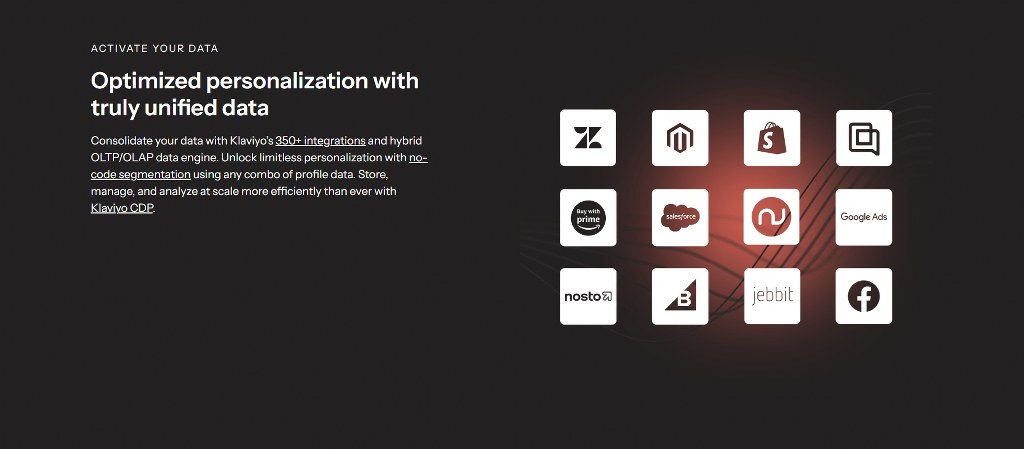
Klaviyo uses customer behavior to prompt automatic emails. These emails arrive when customers browse products or leave their carts. The platform also uses data to predict customer needs, sales, and revenue.

Klaviyo connects with online stores like Shopify, WooCommerce, and Magento. This setup pulls data from those stores. You can also see how customers interact with your store and send them targeted messages.
It uses AI to guess what customers will do. It shows when someone might buy or stop using your store. These insights enable proactive marketing.
You can fix issues before customers ask or get upset. Klaviyo can tell how much each customer will spend over time. This feature helps you spot top customers and improve your email marketing strategy.

Pricing
Klaviyo’s pricing is expensive and increases with the number of subscribers. Here are its packages:
- Free Plan: Up to 250 contacts and 500 emails each month
- Paid Plans: Starting at $45 per month for up to 1,000 contacts and 15,000 monthly emails
- Enterprise: Custom pricing for businesses with larger lists

Pros
- Collects detailed insights from customers for data tracking
- Powerful segmentation function for targeted campaigns
- Useful for automating tasks with customizable rules and conditions
- Clear reports that show how marketing efforts influence sales features

Cons
- Higher price packages compared to competitors
- It’s difficult to learn how to use all the features
- It’s a perfect fit for e-commerce but less suitable for other businesses
Best For
Klaviyo works best for large retailers, subscription businesses, and e-commerce brands that need data-informed strategies.

6. HubSpot – Best All-in-One Marketing Suite
HubSpot goes beyond email marketing. This platform offers a suite of marketing, service, content management, and sales solutions. The holistic approach enables businesses to use coordinated efforts and unified customer data.
Key Features
HubSpot links email marketing with its CRM, connecting sales and marketing. It uses existing customer data to create email campaigns. The CRM records subscriber engagement to enable better communication.

The platform has a marketing Hub with automation tools. You can use these tools to build step-by-step email workflows. These workflows include emails, lead scores, alerts, and CRM changes.
Its AI tool can write messages that fit each recipient’s needs. After sending emails, HubSpot tracks engagement patterns.
It uses this data to generate subject lines and suggests the best times to send emails. It reviews your email lists and recommends what kind of content to send.
The platform generates revenue reports that link marketing activities to sales outcomes. It shows which emails and campaigns help your business grow.
Pricing
HubSpot’s pricing is high as it offers one-of-a-kind tools for enterprise-level brands:
- Free Plan: This plan delivers 2,000 emails each month. However, it offers limited features.
- Starter: $20 per month for 1,000 contacts and 5,000 emails
- Professional: $800 monthly for innovative marketing features
- Enterprise: $3,600 per month to access all tools and functions

Pros
- Offers several tools and features that cover many marketing aspects
- Excellent CRM features that record contact data
- Automated marketing that simplifies complex business processes
- Provides business insights that reveal the results of marketing and inform decision-making.
Cons
- Expensive for growing businesses
- It has a complex interface that’s difficult to learn and interact with for solutions
- Access to all functions requires subscribing to many service options.
Best For
HubSpot doesn’t suit all business types, but you can use it for enterprises with large teams that manage cross-functional workflows. It also helps business-to-business (B2B) brands that align marketing and sales efforts.

You can also use this platform for businesses seeking to integrate CRM and email marketing.
7. Mailchimp – Most Recognized Email Marketing Solution
Mailchimp is one of the best email marketing platforms. It’s popular and offers a full feature set with many design options.
Key Features
Mailchimp’s customer guide builder has a visual canvas for creating automated campaign series. Subscriber behavior can trigger email sending and reminders. Another plus is using engagement to personalize the user experience.

Mailchimp connects with and allows over 500 third-party app integrations. With such a network, you can connect email marketing with different technologies.
The platform uses AI-powered email tools to create messages, designs, and subject lines. This feature saves time for businesses that lack copywriters. Mailchimp enables you to create landing pages and websites.
Pricing
Mailchimp’s price tiers have increased in recent years:
- Free Plan: Permits 500 contacts and 1,000 emails per month
- Essentials: $13 monthly for 500 contacts and 15,000 emails
- Standard: $20 a month for 500 contacts and 18,000 emails
- Premium: $350 per month for testing and list division

Pros
- User-friendly interface with responsive drag-and-drop function
- Large template library with new, responsive d]esigns
- Robust analytics insight and detailed performance metrics
- Marketing solutions for email and other digital channels
Cons
- High scaling costs that increase with subscriber growth
- Limited automation features in cheaper plans
- The free account has had fewer functions in recent years
- No customer support for the free plan
Best For
Businesses that can use Mailchimp are:
- Businesses seeking third-party integrations
- Service-based firms that use email to schedule appointments
- Teams familiar with the platform’s system

8. Selzy – Best for Small Business and Solopreneurs
Selzy is an email marketing and marketing automation platform built for small and midsize businesses that want an affordable, beginner-friendly way to create, automate, and optimize campaigns. It combines email creation, audience management, automation, AI tools, analytics, forms, SMS, and deliverability features in one platform, without requiring coding or design experience.
Key Features
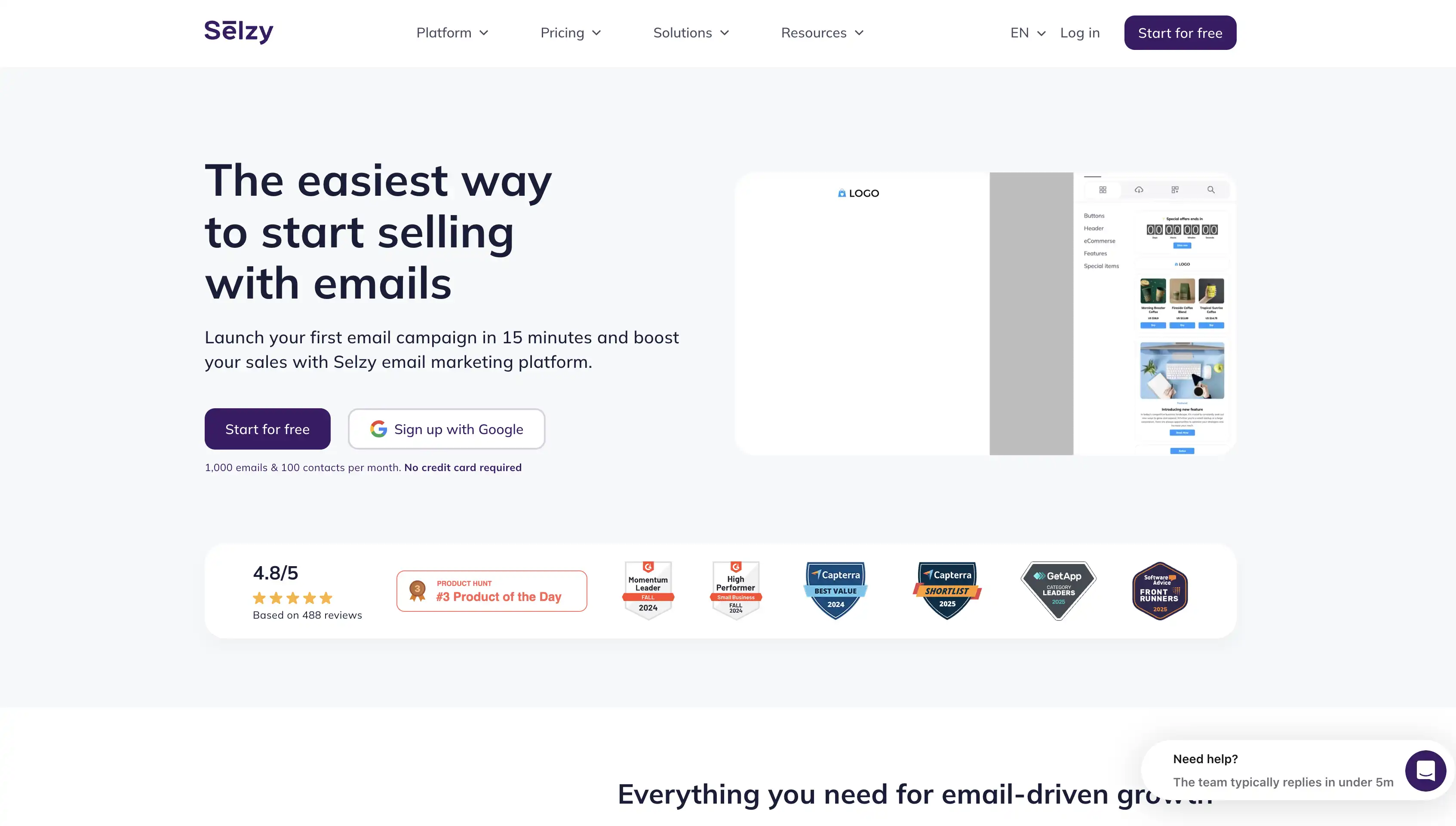
Selzy’s drag-and-drop email builder comes with 140+ responsive templates for newsletters, promotions, product announcements, and other common campaign types. Users can customize layouts without HTML knowledge, create separate mobile versions when needed, and use built-in AI tools to generate email copy, headlines, CTAs, and visuals.
Audience segmentation is another strong part of the platform. Selzy supports 70+ segmentation criteria, including demographic data, interests, customer behavior, and other subscriber attributes. This allows marketers to create more targeted campaigns instead of sending the same message to an entire database.
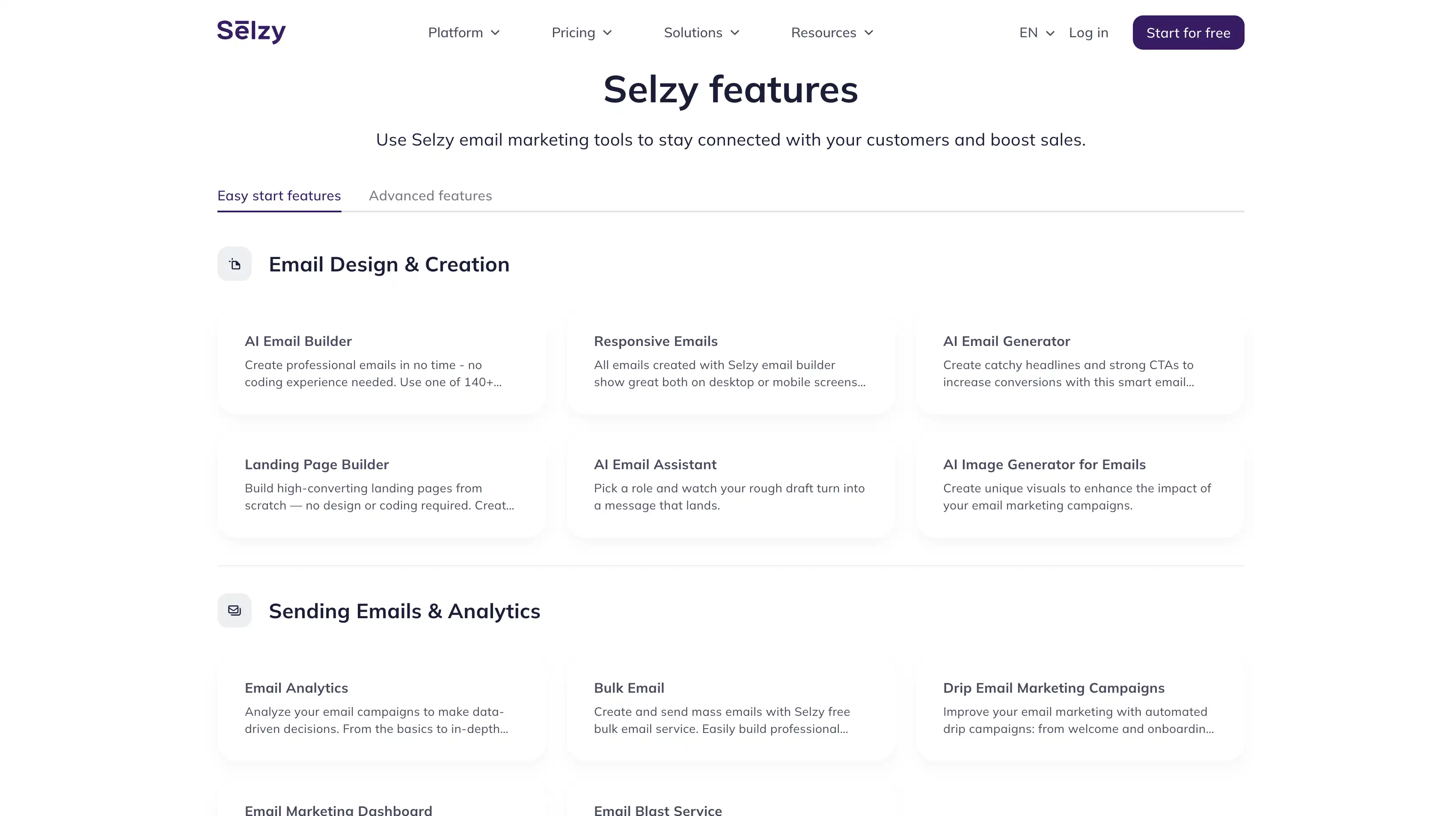
Selzy also includes A/B testing for testing subject lines, send times, content, and other campaign elements. Campaign analytics provide data on opens, clicks, unsubscribes, conversions, and other performance indicators, while click maps and aggregated reports help users understand which content performs best.
For deliverability, Selzy provides an email verifier, dedicated IP options, authentication guidance, and tools designed to identify potential deliverability and spam-related issues before sending. The company currently advertises email deliverability of up to 99.8% on its feature pages.
Selzy has 24/7 customer support, available through chat, email, and phone. Selzy says its average support response time is around five minutes and that support is available even to users on the free plan.
Selzy extends beyond standard email marketing with bulk and transactional SMS, Telegram chatbots, landing pages, signup forms, pop-ups, transactional email, API access, and integrations with CRM, CMS, and ecommerce tools.
The platform also scores well in third-party user reviews. Selzy currently has a 4.7/5 rating on G2 and a 4.8/5 rating on GetApp, where reviewers frequently highlight its ease of use, customer support, and value for money.
Pricing
Selzy offers both a permanent free plan and a 14-day trial for new users. Its standard contact-based plans include unlimited email sends on the paid Lite and Standard tiers.
- Free: $0/month for up to 100 contacts and 1,000 emails per month
- Lite: From $7.50/month on monthly billing, with unlimited email sends
- Standard: From $15/month on monthly billing, adding deliverability-focused tools and additional features
- Enterprise: Custom pricing for businesses with 500,000+ contacts, including a dedicated manager and additional performance support
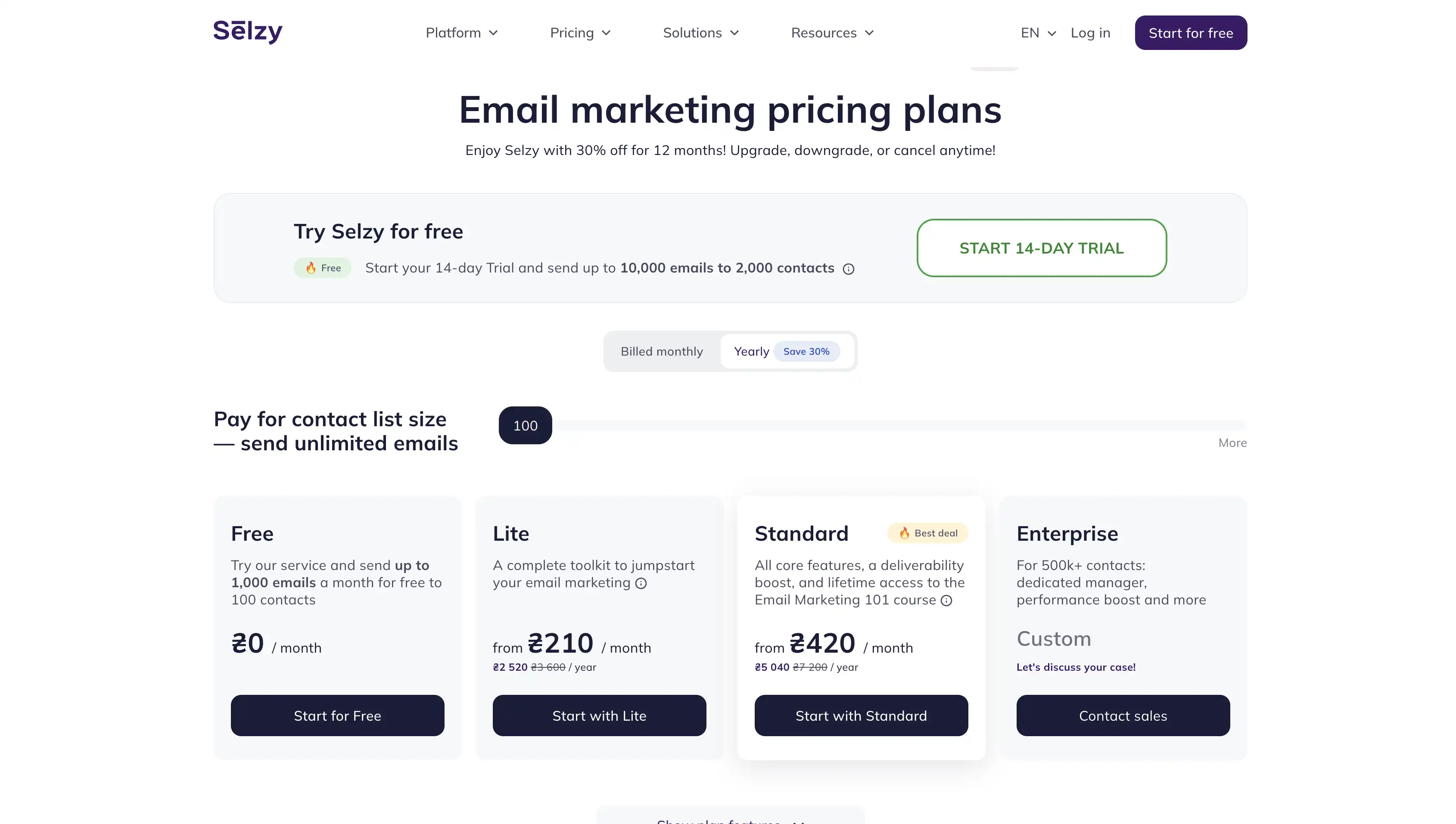
Annual billing currently reduces the starting price to $5.25/month for Lite and $10.50/month for Standard, reflecting Selzy’s advertised 30% annual discount. New users can also access a 14-day trial with up to 2,000 contacts and 10,000 emails.
Pros
- Affordable entry pricing for small businesses and growing teams
- Beginner-friendly drag-and-drop builder with 140+ responsive templates
- 70+ audience segmentation criteria for more precise targeting
- Visual automation workflows for welcome, reactivation, abandoned cart, and other triggered campaigns
- Built-in AI tools for writing email copy, headlines, CTAs, and generating images
- A/B testing, campaign analytics, click maps, and aggregated reporting
- Email verification, dedicated IP options, and deliverability optimization tools
- 24/7 support through chat, email, and phone, including on the free plan
- SMS, transactional messaging, chatbots, forms, pop-ups, and landing pages available within the broader platform
- Up to 99.8% advertised email deliverability
Cons
- Smaller native integration ecosystem than some larger email marketing platforms
- Some advanced deliverability and campaign optimization features are reserved for higher-tier plans
- Businesses that need a very large ecosystem of third-party apps may need to rely on integration platforms or API connections
Best For
Selzy is ideal for small and midsize businesses, solopreneurs and marketers that want an affordable email marketing platform without sacrificing automation, segmentation, AI tools, or hands-on support.
It is great for beginners and lean marketing teams that want to get campaigns running quickly, while still having access to more advanced features such as A/B testing, automated workflows, deliverability tools, transactional messaging, and multichannel communication as their needs grow.
9. ActiveCampaign – Best for Advanced Automation
ActiveCampaign uses sophisticated marketing automation. Businesses that need conditional workflows use ActiveCampaign.
Key Features
ActiveCampaign has powerful marketing and sales automation tools. These tools use conditional logic to create workflows and perform split testing.

The platform includes CRM functions for observing prospects. You can track potential customers from the first contact until the sale. This feature helps marketing and sales teams to collaborate.
ActiveCampaign’s split testing features include email content tests and automation sequence tests. Hence, you can optimize individual messages and customer journeys.
Another notable feature is predictive sending. The platform uses customer patterns to deliver emails when they’re likely to engage.
Pricing

ActiveCampaign sets monthly fees considering subscriber count and special features:
- Starter: $15 for 1,000 contacts and 10,000 emails
- Plus: $49 for CRM functionality with 1,000 contacts
- Professional: $79 for 1,000 contacts and advanced features
- Enterprise: Negotiable fee with dedicated support
Pros
- A graphical workflow builder and high automation functions
- Seamless CRM integration
- Complete customer journey mapping
- Broad reporting ability that links marketing to outcomes

Cons
- Complex features and a steep learning curve
- Requires an expensive subscription to access advanced functions
- It’s overwhelming for startups and small businesses
Best For
Users who enjoy ActiveCampaign include e-commerce brands that watch customer behavior. B2B and Software As A Service (SaaS) brands that nurture leads can also use this tool. It can also help marketing agencies that manage client campaigns.
10. MailerLite – Most User-Friendly Platform
MailerLite provides users with simplified versions of essential functions. Its simple interface and approach entice beginners. Those who prefer efficiency to complex features also like MailerLite.

Key Features
MailerLite’s drag-and-drop editor is great for drafting professional emails. The interface provides important customization options without distraction.
On this platform, you can build a website and a landing page builder that reflects your brand’s identity. MailerLite also provides tools for building entire marketing funnels. These tools help you create structures without coding knowledge.
MailerLite’s automation workflows are simple but great. You can create surveys and collect subscriber feedback via email using this platform. This data can drive upcoming campaigns and decisions.

Pricing
MailerLite’s monthly pricing rates are as follows:
- Free Plan: 12,000 emails for 1,000 subscribers
- Growing Business: $10 for endless emails to 500 subscribers
- Advanced: $20 for 500 subscribers and premium features
- Enterprise: Custom pricing for users with large lists
Pros
- Easy to understand and use
- Simple and interactive interface
- Value-based pricing on all tiers
- Responsive email support even on cheaper plans

Cons
- No free templates
- Limited advanced features compared to enterprise platforms
- Fewer third-party integrations than competitors
Best For
Suitable users for MailerLite are those learning email marketing, small businesses with direct needs, and solopreneurs and freelancers with limited marketing time.
11. GetResponse – Best for Webinars and Email Marketing
GetResponse is a complete digital marketing toolkit with robust features that competitors lack. One such feature is the webinar functionality.

Key Features
GetResponse’s built-in webinar tool allows you to host live events on the platform. This platform also handles email marketing, registrations, reminders, and follow-ups.
The conversion path builder offers professional templates for effective marketing journeys. A structured path for leads is an efficient strategy that saves setup time.
GetResponse features a website creator with conversion automation templates. This integration provides consistency in messaging from the first click to checkout.
The platform also has autoresponders that handle welcome series and behavior-triggered campaigns.

Pricing
The following are GetResponse’s monthly price tiers:
- Free Plan: Unlimited emails for 500 contacts
- Starter: $15 for 1,000 contacts
- Marketer: $48 for advanced features and 1,000 contacts
- Enterprise: Flexible pricing with superior support
Pros
- All-in-one marketing solution
- Strong automation and a visual workflow creator
- Integrated webinar hosting
- High deliverability rates across email providers

Cons
- Less intuitive interface compared to competitors
- High pricing for advanced features
- Basic website creation tools compared to dedicated builders
Best For
GetResponse is a great choice that suits the following:
- Businesses that use webinars to generate leads
- Companies that need full marketing funnels on a single platform
- Teams that need a compact solution

12 Constant Contact – Best for Events and Nonprofits
Constant Contact has decades of email marketing experience. This platform owns custom features for the nonprofit sector. Its solutions also suit businesses that run events.
Key Features
Constant Contact’s event management tools cover email announcements and registrations. Businesses use the platform to receive payments, automate reminders, and check attendance.
With Constant Contact, nonprofits can collect donations from the public. Its features help organizations customize donation forms, add amount suggestions for donors, and track fundraisers.
Social media scheduling is another valuable feature that coordinates online messaging. You can use Constant Contact to brand your messages for all social media platforms.

Subscribing enables you to collect feedback for future initiatives through polls and surveys.
Pricing
Here is Constant Contact’s price list:
- Lite: $12 monthly for 500 contacts and 10,000 emails
- Standard: $35 a month for 1,000 contacts and advanced features
- Premium: $80 a month for special needs
Pros
- Event planning and fundraising tools
- Easy-to-use interface for non-technical users
- High deliverability rate
- Different customer support channels

Cons
- High starting price
- Fewer automation features
- Limited advanced functions for complex businesses
Best For
Constant Contact’s services are best for charitable organizations and nonprofits. It serves businesses that host regular events and local businesses that preference for phone support.
13. Mailtrap – Best for Developers and Technical Teams
Mailtrap prioritizes technical excellence and email deliverability. It provides detailed analytics that benefit technical teams.

Key Features
Mailtrap’s high deliverability is a built-in core design. The platform’s infrastructure boosts performance by ensuring that messages arrive in inboxes.
With industry-standard analytics, Mailtrap provides great open and click rates. Its informative delivery metrics help users spot and fix potential issues.
Email testing tools provide campaign previews across clients and devices before sending. So, you can maintain user experience by discovering and fixing display issues.
Mailtrap allows developers to adjust the Application Programming Interface (API) and control sending.
Pricing

Mailtrap uses sending volume to determine pricing. Here are its price plans:
- Free Plan: 100 contacts, 1,000 emails, and 100 emails monthly for sending and testing
- Basic: $15 per month for 10,000 emails and 5,000 contacts
- Business: $85 a month for 100,000 emails and advanced features
- Enterprise: Negotiable pricing
Pros
- Great technical infrastructure
- Strong focus on compliance and deliverability
- Constant human support for all plans
- Easy API access

Cons
- Less intuitive marketing features
- Limited template designs
- The free plan works for single users alone
Best For
Mailtrap GetResponse is a leading email marketing platform that’s ideal for SaaS companies, Technical marketers, and developer teams that use marketing and transactional emails.

14. EmailOctopus – Most Affordable for Growing Lists
EmailOctopus is ideal for businesses with increasing subscriber lists. The platform uses efficient infrastructure to deliver key email marketing functions. Its pricing is fair and less than the industry average.
Key Features
EmailOctopus integrates with Amazon Simple Email Service (SES) to provide cost-effective email services. You must create an Amazon Web Services (AWS) account to activate SES.
The platform sends pre-written welcome email sequences and drip campaigns. EmailOctopus has a functional, interactive interface that streamlines campaign creation for non-technical users.
Segmentation helps target subscribers by engagement level, signup source, and custom fields.

Pricing
EmailOctopus’s prices are as follows:
- Free Plan: 10,000 emails a month and 2,500 contacts
- Pro: $9 per month for 10,000 emails and 500 contacts
- Enterprise: Volume-based pricing
Pros
- A generous free plan
- Excellent value for money across all plans
- Distraction-free interface
- Good deliverability rates
- Responsive customer support
Cons
- Restricted automation options
- Fewer integrations with third-party tools
- Basic custom templates and email design options
Best For
EmailOctopus is perfect for budget-conscious companies, freelancers, and creators. It also serves small businesses with simple email needs.

15. Salesforce – Best for AI-Powered Personalization
Salesforce is a premium email marketing platform that helps businesses create personalized campaigns at scale. It connects directly with Salesforce CRM, allowing you to use existing customer data to improve targeting and performance.

Key Features
Salesforce’s platform includes advanced automation tools that react to how customers engage with your business. These workflows can then send follow-ups, reminders, or product suggestions based on what someone has viewed or purchased.
Segmentation builds on the same data. Audience groups update automatically as customers browse, buy, or interact, and the platform’s generative AI adjusts the content to match each group.

You can also check how each email performs in real time. With open and click patterns, you can see what people respond to, making it easier to adjust your content and timing.
All activity sits in one place. Email, SMS, and messaging campaigns run from a single dashboard, which helps maintain a consistent experience across channels.
Pricing
Pricing sits within the wider Marketing Cloud Engagement suite, which includes the tools used to build and manage email campaigns.
- Free trial: 30 days to try the platform for free
- Professional: $1,250 per month for personalized email marketing, content creation tools, and analytics
- Corporate: $4,200 per month for cross-channel marketing, mobile messaging, and AI-powered insights
- Enterprise: Custom pricing for complex setups that need multi-brand journeys, global support, and an advanced setup

Pros
- Deep CRM integration for accurate segmentation
- AI-powered automation and personalization
- Multi-channel messaging options
- Detailed performance tracking and reporting

Cons
- More expensive than most competitors
- Complex setup for beginners
- Requires Salesforce CRM to use
- Steeper learning curve for small teams
Best For
Salesforce suits mid-sized to enterprise businesses that want a CRM connected platform and need advanced personalization and multi-channel communication.
16. SendX: Best for High-Volume Senders Who Need Reliable Inbox Placement
SendX is a full-stack email marketing platform built for senders who can’t afford to land in the spam folder. While most platforms in this space rely on third-party infrastructure to deliver emails, SendX runs its own proprietary sending engine and deliverability stack end-to-end, giving senders far more control over inbox placement and sender reputation.

Key Features
SendX includes a built-in deliverability suite that most competitors either skip or sell as expensive add-ons. The platform packs 20+ addons directly into the product, covering email list cleaning, inbox testing, IP and domain reputation tracking, auto warmup, smart routing, bot open and click filtering, and spread sending.

The visual workflow builder supports 48+ triggers across 15 integration providers, including Shopify, Stripe, WooCommerce, and HubSpot. Users get 5 campaign types covering broadcasts, A/B split tests, drip sequences, auto-trigger emails, and RSS-to-email automation.
The drag-and-drop editor offers 1000+ templates, and SendX provides unlimited email sends on every plan along with multi-team and whitelabel support, which makes it a strong fit for agencies managing multiple brands.
Pricing
SendX offers a 14-day free trial. You can avail it without giving any credit card details. For paid plans, it has subscriber-based pricing with unlimited emails on every plan:

- Annual plans start at $7.49/month for up to 1,000 subscribers
- 5,000 subscribers: $29.99/month (annual)
- 10,000 subscribers: $44.99/month (annual)
- Enterprise: Custom pricing for senders with over 1M subscribers
Pros
- Proprietary sending infrastructure for reliable inbox placement
- 20+ built-in deliverability addons that most platforms charge extra for
- Unlimited emails on every plan, with pricing tied to subscriber count only
- Multi-team and whitelabel architecture for agencies
- Full feature access across all pricing tiers, no feature gating
Cons
- No built-in CRM or product recommendation engine
- SMS and WhatsApp channels are still in beta
Best For
SendX works best for high-volume senders, ecommerce brands running large promotional campaigns, agencies managing multiple client accounts, and businesses that treat deliverability as critical to revenue. It’s a strong fit for senders who want enterprise-grade inbox placement control without enterprise pricing or complexity.
Detailed Comparison Tables
Compare the prices and features of all 16 platforms before deciding.
Pricing Comparison
This table compares plans, prices, and features on the top email marketing platforms.
| Platform | Free Plan | Starting Price | Email Limit | Key Premium Features |
| Flodesk | Free (forms only) | $25 | Unlimited | Custom fonts, AI Studio design, subject line A/B testing, native checkout, BNPL, spin-the-wheel forms |
| Sender | 2,500 subscribers, 15,000 emails | $8 | 12,000 | Advanced automation, premium templates. |
| Omnisend | 250 subscribers, 500 emails | $20 | 12,000 | Product recommendations, SMS marketing |
| Brevo | 300 emails/ day, 500 contacts | $8 | 5,000 | WhatsApp marketing, unlimited landing pages |
| Klaviyo | 250 contacts, 500 emails | $45 | 15,000 | Predictive analytics, mobile push |
| HubSpot | 2000 emails, 1M contacts | $20 | 5,000 | CRM integration, revenue attribution |
| Mailchimp | 500 contacts, 1,000 emails | $29 | 18,000 | Customer journey mapping, AI content |
| Kit | 10,000 contacts (limited) | $25 | Unlimited | Monetization tools, creator network |
| ActiveCampaign | 14-day trial only | $15 | 10,000 | CRM, sales automation, lead scoring |
| MailerLite | 1,000 subscribers, 12,000 emails | $10 | Unlimited | Website builder, advanced reports |
| GetResponse | 500 contacts, unlimited emails | $19 | Unlimited | Webinars, conversion funnels |
| Constant Contact | Trial only | $30 | 10,000 | Event tools, donation collection |
| Mailtrap | 100 contacts, 1,000 emails | $15 | 10,000 | Advanced analytics, deliverability focus |
| EmailOctopus | 2,500 contacts, 10,000 emails | $12 | 10,000 | Basic automation, Amazon SES option |
| Salesforce Email Marketing | 30-day trial only | $1,250 | Unlimited | AI personalization, CRM-driven segmentation |
Feature Comparison
This table outlines the features of each platform.
| Platform | Drag-and-Drop Editor | Automation | Landing Pages | SMS Marketing | CRM Integration | A/B Testing |
| Flodesk | ✅ | ✅ | ✅ | ❌ | ❌ | Subject lines only |
| Sender | ✅ | ✅ | ✅ | ✅ | ✅ | ✅ |
| Omnisend | ✅ | ✅ | ✅ | ✅ | ✅ | ✅ |
| Brevo | ✅ | ✅ | ✅ | ✅ | ✅ | ✅ |
| Klaviyo | ✅ | ✅ | ✅ | ✅ | ✅ | ✅ |
| HubSpot | ✅ | ✅ | ✅ | ✅ | ✅ | ✅ |
| Mailchimp | ✅ | ✅ | ✅ | ❌ | ✅ | ✅ |
| Kit | ✅ | ✅ | ✅ | ❌ | ❌ | ✅ |
| ActiveCampaign | ✅ | ✅ | ✅ | ✅ | ✅ | ✅ |
| MailerLite | ✅ | ✅ | ✅ | ❌ | ❌ | ✅ |
| GetResponse | ✅ | ✅ | ✅ | ❌ | ✅ | ✅ |
| Constant Contact | ✅ | ✅ | ✅ | ❌ | ✅ | ✅ |
| Mailtrap | ✅ | ❌ | ❌ | ❌ | ✅ | ❌ |
| EmailOctopus | ✅ | ✅ | ❌ | ❌ | ❌ | ❌ |
| Salesforce Email Marketing | ✅ | ✅ | ✅ | ✅ | ✅ | ✅ |
Best Free Email Marketing Platforms
Free email marketing software allows users to test-run campaigns without subscribing. Let’s see which platforms have the best free plans with notable features.
Top 5 Free Email Marketing Services
Not all free plans offer the same level of functionality. Find below five email marketing platforms with the best free services.
1. Sender

Sender has the best free plan in the industry, providing automation and segmentation. It sends up to 15,000 emails to 2,500 subscribers every month.
Its unique features enable businesses to create advanced campaigns without spending. The platform doesn’t collect your credit card details when signing up for the free plan.
Using the free plan will prevent unexpected billing. Sender lets users register for the free plan without collecting credit card information.
2. MailerLite

MailerLite’s free plan supports 12,000 monthly emails for 1,000 subscribers. It features a drag-and-drop email editor that enables beginners to create professional-looking emails.
MailerLite provides limited automation, allowing simple welcome sequences and other basic workflows. Its responsive design makes it suitable for businesses new to email marketing.
3. EmailOctopus
EmailOctopus’s unpaid plan provides 10,000 emails for 2,500 subscribers per month. The platform has a simple email builder that is easy to use. It offers basic analytics that beginners can use.
4. HubSpot
HubSpot’s free plan enables 2,000 emails monthly and allows users to store 1,000,000 contacts. It has CRM integration tools for managing customer relationships while running email campaigns.
The free plan also has simple automation functions and a form builder. These free features provide a solid foundation for businesses developing their digital marketing plans.
5. Brevo
Brevo’s free plan sends 300 emails daily and 9,000 monthly and saves 500 contacts. The platform provides many email templates with professional, customizable designs.

Brevo also has a WordPress plugin that integrates signup forms on your website. The platform’s modern interface and intuitive workflow make it accessible.
Best Practices for Email Marketing
Using reliable email marketing practices improves campaigns. Good practices produce impactful campaigns that generate a high ROI.
Growing Your Email List
Create many signup opportunities with different forms across your digital platforms. Use discounts, free guides, and templates to attract leads and improve conversion rates.

Ask subscribers to confirm their subscription to build a high-quality email list. This practice improves engagement and deliverability.

Promote your newsletters on social media and run referral campaigns with rewards. Rewards encourage subscribers to refer potential customers.
Improving Email Deliverability

Authenticate emails and verify your identity so email providers can trust your message. Verification protocols you can use are:
- Sender Policy Framework (SPF),
- Domain Keys Identified Mail (DKIM) and
- Domain-Based Message Authentication, Reporting, and Conformance (DMARC)
Declutter your list by deleting inactive subscribers who can harm your reputation as a sender. Track engagement metrics to detect signs of deliverability issues.
Avoid spam trigger words or unclear subject lines. Test your emails before sending them in bulk to identify potential issues.

Creating Engaging Email Content
Use first names and advanced segmentation to personalize content. Subscriber data reveals important needs and pain points that you can address. Create compelling calls to action that prompt subscribers to act.
Optimize campaigns for mobile devices as people view emails on smartphones. Use GIFs, polls, and other interactive elements to boost engagement.
How to Choose the Right Email Marketing Platform for Your Business
Some of the best email marketing platforms may not be the right fit. Compare your needs to each platform’s solutions to gain clarity.
Evaluate Your Marketing Needs

Find out how many subscribers you have. Confirm your monthly email volume and growth prediction to choose a scalable platform. Consider your automation needs. Are they basic or complex workflows? Confirm the provision of necessary features.
Ensure the platform integrates with your tools. Assess your team’s expertise and create a budget that aligns costs with potential ROI. Determine if you need multi-channel marketing functions.
Matching Platforms to Business Types
Small brands and startups need accessible and affordable platforms with essential features. Platforms that track behavior, recommend products, and offer cart recovery suit e-commerce companies.

Bloggers and content creators need platforms that grow audiences and offer monetization features. Platforms with CRM integration that nurture leads fit B2B email marketing companies. Solid and secure solutions that provide advanced reporting are perfect for enterprises.

Ensure The Platform Can Integrate With Your Website
Select an email marketing platform that integrates with your website for efficient monitoring. This feature provides a unified platform that promotes consistency across channels.
If you haven’t created a website yet, do so now. Choose the best web hosting service to enjoy seamless integration. Good hosting ensures your website runs smoothly without downtime, despite increasing traffic. It also secures your website, protecting user data. Remember to create a business email to improve your professionalism.
Conclusion
Good email marketing platforms improve customer engagement strategy and encourage business growth. The best platforms have friendly interfaces, powerful automation tools, and detailed analytics.
These features ensure better campaigns that work best with efficient websites. Create a website with email signup forms and begin sending personalized email campaigns.
Next Steps: What Now?
If you’re ready to start your email marketing journey, here are the steps to follow:
- Study your business needs and choose a suitable email marketing platform.
- Ensure the platform has the features you need.
- Register to use the free trial or plan.
- Create content and launch email campaigns.
- Upgrade to a paid plan as your list grows.
Further Reading & Useful Resources
If you’re new to digital marketing, read these resources to learn more.
- Learn how to design and use an email marketing strategy.
- Understand what is and how to use a digital marketing funnel.
- Explore these must-have digital marketing tools.

