


YouTube is a popular website for reaching and engaging huge audiences. Learning YouTube marketing can help you profit from this large market. It’ll help push your brand to new heights.
This complete guide discusses the full YouTube marketing process. You’ll learn how to create a channel and optimize your videos for wider reach. The article will also teach how to promote YouTube video content by running video ads.
Top Website Builders to Complement Your YouTube Marketing Strategy
| Provider | User Rating | Recommended For | |
|---|---|---|---|
 | 4.6 | Beginners | Visit Hostinger |
 | 4.4 | Pricing | Visit IONOS |
 | 4.2 | Design | Visit Squarespace |
What is YouTube Marketing?
You must have told yourself, ‘I want to learn how to advertise my YouTube video’ before finding this article. You need to know what YouTube marketing is to use it properly.
Understanding YouTube Marketing
YouTube marketing uses the platform’s reach and engagement to achieve your video marketing aims. It’s about creating and promoting videos your target audience enjoys. YouTube marketing is creating brand awareness and pushing desired actions.
At its core, YouTube marketing is about reaching your audience using videos. The video content you create must be educational and entertaining. It should answer the needs and interests of your viewers.
Why is YouTube Marketing Important?

A YouTube marketing strategy is vital in today’s world because it allows you to:
Reach a huge audience: YouTube’s user base is big. It has over 2.5 billion monthly active users. You can reach various people from different cultures.

Enhance your search visibility: YouTube videos usually appear in Google and YouTube search results. Your videos can show when people search for information related to your business. This feature enhances your website’s visibility and brings traffic.
Increase brand awareness: Creating engaging and informative videos tells people about your brand offerings. The more exposed you are, the more customers you can get.
Build trust and credibility: Your videos connect with audiences. This connection helps build trust with potential customers. When people see how helpful you are, they’ll want to do business with you.
Push sales and traffic: YouTube can bring traffic to your website and generate leads. You can add links to your website in your video descriptions. This approach brings in viewers to learn more and potentially buy your product.
Make extra revenue: Monetize your videos using advertising or selling goods or services. YouTube offers a Partner Program. The program lets you earn from ads on your videos.
Creating a YouTube Channel
Knowing how to create a YouTube channel is the first step. Read on to learn how to create a new YouTube channel.

Setting Up Your Channel

Your YouTube channel is where you publish videos. It’s like creating your store on YouTube to start uploading videos. Here’s how:
- Create a Google account: You need a Google account to create a YouTube channel. So, go over to Google to create an account if you don’t have one.
- Open YouTube: Sign in to YouTube using a phone or computer. Be sure to sign in with the device you used to open the Google account.
- Add or Manage YouTube Channel: Click on your Google Profile picture once on YouTube. Next, click on Settings.
- Create a Channel: Under the Settings, click Add or manage your channel(s). Then, click on Create a channel to create your YouTube channel.
- Customize Channel: Click Customize Channel to set it up. You can add a channel description, banner image, and other details. Now, you can start uploading videos.
Creating High-Quality YouTube Videos

High-quality YouTube videos make a successful channel. Your YouTube content attracts viewers and keeps them engaged.
They help you achieve your marketing goals. Creating compelling content is being detailed. You need to understand your audience and try to deliver value. Let’s discuss the key elements of producing quality videos.
Types of Videos for a YouTube Channel
YouTube has many video types for audience engagement:
Tutorial/How-To Videos show step-by-step processes. These explainer videos teach your YouTube audience particular skills or solutions. These valuable resources attract viewers seeking information. They establish your authority in your niche.
Reviews assess goods, services, and experiences. These short videos help viewers make better decisions. Truthful and detailed reviews create trust with your audience. The reviews can also earn partnerships with brands.
Vlogs (Video Blogs) follow daily life, journeys, or special events in a genuine, personal format. They connect using storytelling and behind-the-scenes clips that humanize your channel.
Interviews are talks with experts and influencers in your field. They add new perspectives and expand your audience.

Educational Content simplifies difficult topics. These videos show your expertise. Unlike tutorials, they center on concepts rather than particular actions.
Entertainment Videos like challenges, skits, or reaction videos are amusing and emotional. Their shareable nature can boost channel visibility. They have less preparation than educational content.
List Videos collect information in easily consumable formats (“Top 10” or “5 Ways to…”). They satisfy viewers who want quick and organized content. These videos do well in search results and help introduce topics to new audiences.
Unboxing Videos show the pleasure of opening new products. Such videos appeal to viewers thinking of similar products. They benefit from expectations and genuine real-time reactions.

Behind-the-scenes content shows how you make videos or projects. These videos build community by showing fans your creative process.
Live Streams allow real-time contact with viewers through Q&As. These streams create real connections and quick feedback.
Case Studies show the processes and results of particular projects. You display your expertise while offering valuable tips for problems.

Compilations collect related videos into thematic collections. It is remaking existing content into something fresh and engaging.
Documentary-style videos tell detailed stories about people, places, or topics. Such videos use study and narrative styles. It appeals to fans seeking immersive content.
Planning and Pre-Production: Laying the Groundwork
Any successful YouTube video needs thorough planning. Take time to outline your objectives before any video creation.
Defining Your Objectives
Begin by clearly recognizing what you hope your video achieves. Do you want to improve brand awareness or drive sales? Is education or entertainment your goal? Your marketing strategy must answer these questions.
Understanding Your Audience
Knowing your target audience’s wants is vital to creating a marketing strategy. What demographic are you making videos for? What are their interests and viewing habits? Understanding your target audience helps you make valuable and engaging content.

Developing Your Concept and Script
Video strategy is important. After understanding your objectives and audience, you must script a good concept. A good script ensures a clear and brief message. A video strategy outlines the video’s main points. This approach keeps you on track during filming.
Production: Bringing Your Vision to Life
The next step is bringing your vision to life. Here, you film high-quality footage and audio that will engage your audience. Follow these tips for good production:
Equipment Selection
Picking the right equipment is necessary for creating good YouTube content. Examine your budget and your particular needs before picking cameras, microphones, lighting, and other gear. Getting quality equipment boosts your video’s production value.
Set Design and Location
Your video setting impacts your YouTube content. Select a location or design a set that matches your video’s message and theme. Consider lighting, background distractions, and general ambiance when picking a filming location.

Filming Techniques
Use different camera angles, shots, and movements. This technique can enhance visual interest and energy in your videos. Try different techniques to create engaging video content for your YouTube audience.
Audio Recording
You need clear and high-quality audio to create great videos. Ensure that your audio recording doesn’t have distractions and background noise. Use a quality microphone. You can even use audio editing software to adjust your sound.
Post-Production: Refining Your Masterpiece
Post-production entails editing your footage and adding the needed elements. Here, YouTube creators polish the final product. Read below for post-production tips:
Video Editing
Video editing software lets you sharpen up your video content. You can delete needless parts, add transitions, and make it flow better. You can hire an expert video editor to help you edit.

Sound Mixing
Sound mixing is adjusting and adding sound effects to improve the viewing experience. Music and sound effects can evoke different emotions. This technique adds depth and impact to your video.
Visual Effects and Graphics
Visual effects and graphics can add a unique aspect to your videos. They can highlight key points, though use them sparingly.
Color Correction and Grading
Color correction and grading ensure your video content looks consistent. This process entails altering colors to improve the aesthetic appeal of your video.

Optimizing Your Videos for Search
Creating videos is just the start. You need to optimize your videos so audiences can see them in search results.
Understanding YouTube SEO
YouTube is the second biggest search engine. It’s important to optimize your videos for search engines. YouTube SEO ensures that your videos are easy to find.

Optimizing Video Metadata
Metadata provides information on YouTube videos to both viewers and search engines. They include:
- Video title: Use relevant keywords. Your video title should be catchy and attention-grabbing.
- Video Description: Write a brief video description. Include links to your site and social media profiles.
- Tags: Have a variety of specific keywords to help people find your video. Tags help sort your video.
- Category: Pick the category that best fits your video. This way, YouTube can recommend it to the ideal audience.
- Video Thumbnail: Your thumbnail must entice people to click on your video.
- Subtitles and closed captions: Ensure to add subtitles and closed captions. This approach makes it accessible to deaf people.
Optimizing metadata helps YouTube’s algorithm to push our videos to viewers.
Using Info Cards and End Screens
Info cards and end screens are engaging elements. They are like little pop-ups you can add to your video.

- Info cards: They help promote other videos, playlists, channels, or websites. Info cards keep viewers engaged and direct them to relevant content.
- End screens: End screens show up at the end of your video. You can use them to encourage channel subscriptions from viewers. End screens also show viewers more videos they can watch.
Creating Playlists
Create playlists to organize your videos. They also encourage viewers to watch more of your content. They’re like a group of videos on a particular topic. If you create playlists, viewers will remain on your channel longer. Here’s how to create a playlist on YouTube:
- Go to the You tab and click your profile picture.
- Under the “Playlists” area, tap New Playlist.
- Select any videos you want to add to the playlist.
- Tap NEXT to name your new playlist and set privacy.
- Select CREATE to finish creating.
You can also add videos to a playlist from the watch page. Here’s how to:
- Navigate to the watch page of the video you want in your playlist.
- Under the video, click on Save. This action will save it to the previous playlist you saved to.
- You can save the video to another playlist by tapping Change on the pop-up menu.
- Select New Playlist, then input a name.
- Pick a privacy setting for your playlist. A private setting means only you can see it.
- Tap CREATE to finish the process.
Promoting Your YouTube Channel
You need to promote even after you create great videos. A solid YouTube marketing strategy can push your channel. Here are some YouTube marketing tips for reaching a wider audience:
Sharing on Social Media
Social media marketing is important. Post your videos on your other social media channels. Facebook, Twitter, and Instagram have audiences you can direct to your YouTube channel. You can share relevant videos on these platforms.

Engaging with Your Audience
Respond to comments and questions. You can host live Q&A sessions to engage your audience. More interactions build loyal fans.
Running Contests and Giveaways
Contests and giveaways attract new subscribers and reward your current ones. They can also help create excitement and boost your reach. You can even partner with YouTube influencers for these contests. This tactic will push your brand.
YouTube Advertising
YouTube advertising can enhance your reach to more audiences.
Understanding YouTube Ads

YouTube has many ad formats for different needs and budgets. You can place these ads on relevant videos to attract channel subscribers. They include:
- Skippable in-stream ads: These ads show before, during, or after other videos. Viewers can skip them after a few seconds.

- Non-skippable in-stream ads: These ads are a must-watch. They appear as a featured video at the start of another video. The viewer watches them before they can continue to their original video.
- Bumper ads: These are brief, non-skippable ads. They are 6 seconds long and grab attention.
- Overlay ads: These ads are a semi-transparent overlay at the bottom of the video. They’re less invasive than other ad formats but are still effective.

You can create a channel trailer and place them as ads on videos. Ensure the channel trailer captures the essence of your YouTube channel. With paid advertising, your channel will reach more viewers.
Creating Effective YouTube Ads
To create effective YouTube ads, you must:
- Define your target audience: Identify who your ads are reaching. Be specific to get better results.
- Set a budget: What amount can you spend on your ads? YouTube has many budgeting options for different needs.
- Create gripping ad creatives: Your ads grab the eye. They should send clear messages and push viewers to take action.

Analyzing Your Results

You need video analytics to see how your YouTube channel is doing.
Using YouTube Analytics
YouTube Analytics is a good tool for insights into video content performance. It can help monitor metrics, including:
- Watch time: Watch time is the total time duration people watch your videos.
- Audience retention: This metric shows how long people watch your videos before closing them.
- Engagement: This metric tracks people’s interactions. It tracks things such as liking, commenting, and sharing. You can make improvements after seeing why your popular videos did better. The data helps your general YouTube marketing strategy.
YouTube Marketing Tools to Boost Your Channel
YouTubers need the right tools to implement their marketing strategy. There are some tools available to assist your YouTube marketing efforts. Here are a few popular ones:
1. TubeBuddy: Your YouTube Swiss Army Knife

TubeBuddy is a browser extension with a layer of tools for the YouTube interface. The tool helps with keyword research, competitor analysis, and video optimization. Here are some of TubeBuddy’s main features:
- Keyword Explorer: This feature locates relevant keywords with high searches and little competition.
- Video Optimization: Optimize your video titles, descriptions, tags, and video thumbnails. The tool improves search visibility and video performance.
- Competitor Analysis: This tool observes your competitors. It reveals what’s working for them.
- Productivity Tools: This tool helps save time. It assists in tasks like adding cards and end screens.
- A/B Testing: With this tool, you can test different titles, video thumbnails, and descriptions. It identifies the ones that perform best.
TubeBuddy has a free version with limited features. It also offers advanced features with paid plans.
2. vidIQ: Your YouTube Analytics Guru
vidIQ is another common YouTube marketing tool. It is similar to TubeBuddy. The tool offers detailed analytics and insights. It helps enhance your channel’s performance. Here are VidIQ’s main features:

- Channel Audit: This tool fully overviews your channel’s performance.
- Keyword Research: Use this tool to find relevant keywords and monitor your rankings.
- Competitor Analysis: Track how your competitor’s channel differs with this tool.
- Trend Alerts: Remain updated on the latest YouTube trends.
- Social Media Management: You can schedule videos with this tool. It also helps track your YouTube videos on social media.
VidIQ has a free version with limited tools. You can access advanced tools with their paid plans.
3. Canva: Your Design Wizard
Canva is a graphic design tool for designing eye-catching thumbnails and channel art. The tool has various templates and design elements. With these templates, you can create good visuals without any design skills. Here are some of Canva’s key features:
- Drag-and-drop interface: The tool is easy to use.
- Wide variety of templates: Select from various templates for YouTube thumbnails. You can also pick channel art, a YouTube banner, and other social media graphics.
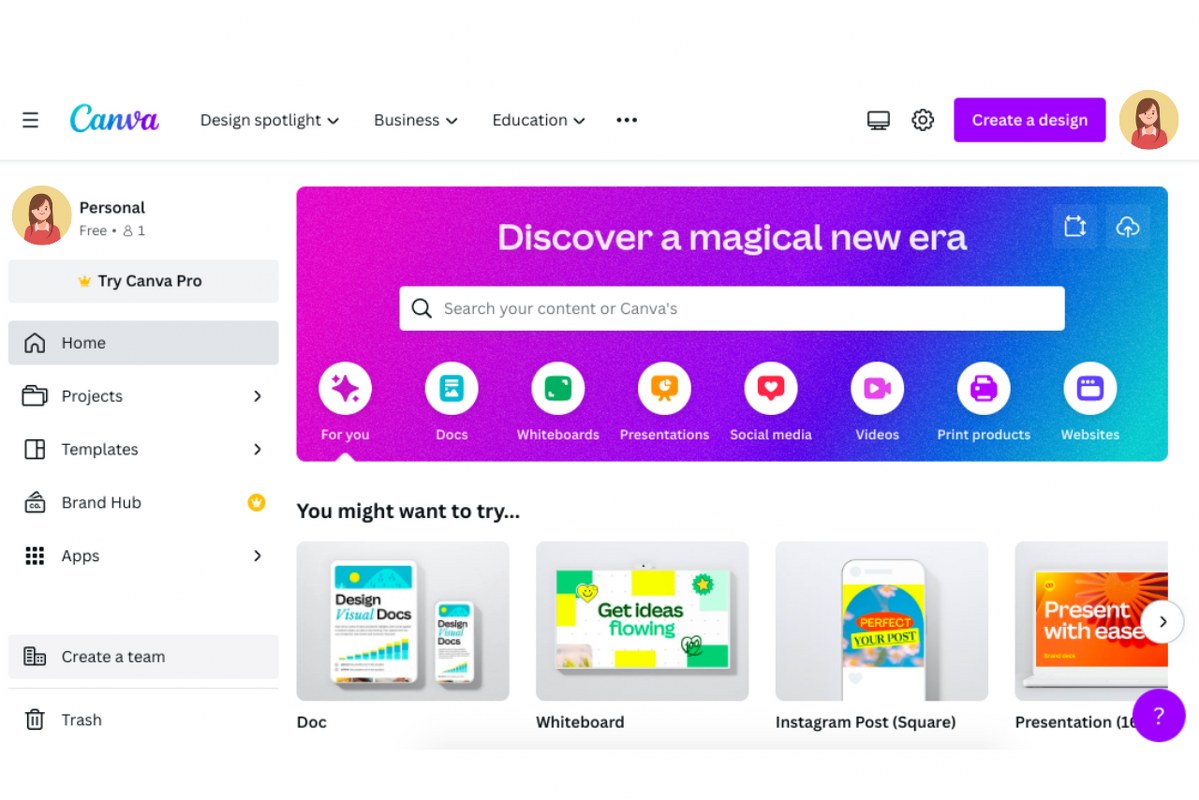
- Customization options: You can design using images, text, video watermark, and colors.
- Brand kit: Use a brand kit to ensure your designs match your brand identity.

Canva has a free version with limited capabilities. You can unlock extra features with its paid plans.
4. Google Keyword Planner: Your Keyword Research Assistant
Google Keyword Planner is a free tool. It assists in relevant keyword research for your videos. The tool produces data on search volume, competition, and others. This data helps you choose the right keywords. Here are some of Google Keyword Planner’s main features:
- Keyword ideas: Receive keyword ideas related to your website or a specific topic.
- Search volume data: Track the number of people looking for a particular keyword.
- Competition data: This feature lets you see how competitive a keyword is.
- Forecasting: Get predictions on keyword performance in the future.

Google Keyword Planner is a good tool for optimizing videos for search.
The YouTube Studio app also helps you manage your online presence. It is available for Android and IOS.
How to Market your YouTube Channel using Blog Posts
You can transform your video content into blog posts to promote your channel. Having a website is vital for this marketing strategy. You can still run ads or sponsored posts on your blog posts to earn more.
An active website will benefit your brand, and creating one is important. You don’t even need coding knowledge to build a website. You can check the best website builders for the ideal option to build your website.
Good hosting is important too. It improves website speed and scalability. This ensures that your web visitors enjoy a good user experience on your site. It also prevents downtime and keeps your website running, and accommodates huge traffic. Choose a reliable web hosting provider to build a user-friendly website.
Conclusion
YouTube marketing is a powerful way of reaching a wide audience. It can help build brand awareness and push sales. Produce high-quality videos and enhance them for search. With effective promotions, you can succeed on YouTube. Always interact with your viewers. Try to analyze results and seek ways you can improve.
If creating and promoting videos on YouTube is too much work, you can try other online side hustles. Check out these other simple ways to make money online.

Next Steps: What Now?
YouTube marketing is a simple process. Here are some actionable steps to guide you:
- Create a YouTube channel.
- Create high-quality videos.
- Optimize your videos for search engines.
- Share your videos on social media platforms.
- Engage with your viewers to build loyalty.
- Place YouTube ads strategically.
- Use marketing tools to enhance your marketing.

