


HostArmada is known for its support-first approach and managed hosting experience. It works well if you want helpful support, easy migrations, and a hosting setup that keeps day-to-day management simple.
Still, HostArmada may not be the right fit if you need more flexibility, lower pricing, deeper server control, or infrastructure built for heavier scaling.
If you want more control over your server environment, better long-term pricing, or a setup designed for scaling and customization, these HostArmada alternatives are worth comparing.
Short on Time? Discover the Top 3 HostArmada Alternatives
Start with these three providers if you want the quickest picks.
| Provider | User Rating | Recommended For | |
|---|---|---|---|
| Hostinger | 5.0 | User-friendly hosting with strong performance | Visit Hostinger |
| IONOS | 4.7 | Affordable hosting for small businesses and long-term value | Visit IONOS |
| ChemiCloud | 5.0 | Reliable hosting with strong customer support | Visit ChemiCloud |
Here is the full list if you want to compare more options.
The 7 Best HostArmada Alternatives
If HostArmada is not the right fit, these providers are the best places to start.
- Hostinger: Best For User-Friendliness
- IONOS: Best For Value
- ChemiCloud: Best For Support-Focused Hosting
- Verpex: Best For Managed Hosting Experience
- Namecheap: Best For Budget Hosting
- Kamatera: Best For Scalability
- Hosting.com: Best For Feature-Rich Hosting
7 Best HostArmada Alternatives
1. Hostinger
Best for: User-Friendliness

Why Choose Hostinger over HostArmada
Hostinger is a great pick if you want hosting that feels simple to launch and manage without relying heavily on support.
- Affordable Pricing Plans: Lower entry pricing makes it easier to start without a large upfront investment.
- Easy-to-Use Control Panel: hPanel keeps day-to-day site management simple and accessible.
- Fast and Reliable Performance: LiteSpeed servers improve loading speed and consistency.
- Built-In Website Tools: AI builder and automation tools help you launch faster.
Features
Hostinger keeps hosting simple, fast, and easy to manage for beginners and growing sites.
- LiteSpeed Web Server: Improves speed and reduces server load for better performance
- Managed WordPress Optimization: Includes caching and tuning for smoother operation
- AI Website Builder: Helps create websites quickly with guided setup
- hPanel Dashboard: Centralizes control for hosting, domains, and email
Hostinger Pros & Cons
Hostinger is easy to use and budget-friendly, but entry plans may feel limited for larger projects.
- Affordable pricing for budget users
- Beginner-friendly custom control panel
- Reliable performance with LiteSpeed
- Built-in tools simplify setup
- Limited resources on entry plans
- No cPanel for traditional users
- Not ideal for complex projects
- Advanced features require upgrades
Read our full Hostinger review for more details about its hosting performance, features, pricing, and support.

Hostinger: Best User-Friendly HostArmada Alternative
2. IONOS
Best for: Value

Why Choose IONOS over HostArmada
IONOS is a better fit if you want cost efficiency with a broader hosting package.
- Low Starter Pricing: Keeps upfront costs low for new websites and small businesses.
- All-in-One Feature Bundle: Includes email, SSL, and security tools by default.
- Scalable Hosting Options: Supports growth with flexible upgrades.
- Reliable Infrastructure: Built for stable performance and uptime.
Features
IONOS gives users practical hosting value with bundled tools and flexible upgrade paths.
- Georedundant Infrastructure: Improves reliability through mirrored data systems
- Integrated Email Hosting: Provides professional email with hosting plans
- Built-In Security Layers: Protects against DDoS attacks and common threats
- Flexible Hosting Types: Offers shared, VPS, and cloud hosting options
IONOS Pros & Cons
IONOS offers strong value, but renewals and plan differences can make comparisons less simple.
- Low introductory pricing plans
- Email and SSL included
- Stable and consistent uptime
- Flexible hosting and scaling options
- Higher renewal pricing after term
- Interface less intuitive for beginners
- Features vary by selected plan
- Support quality may vary
Read our full IONOS review for more details about its hosting performance, features, pricing, and support.

IONOS: Best Value-Focused HostArmada Alternative
3. ChemiCloud
Best for: Support-Focused Hosting

Why Choose ChemiCloud over HostArmada
ChemiCloud is ideal if you want strong support combined with reliable performance.
- Responsive Customer Support: Fast assistance helps resolve issues with minimal downtime.
- Reliable Hosting Performance: Cloud infrastructure supports stable uptime.
- Free Migration Services: Makes switching from another provider easier.
- User-Friendly Experience: Clean interface simplifies daily management.
Features
ChemiCloud combines support-focused hosting with useful tools for stable day-to-day site management.
- Cloud-Based SSD Infrastructure: Improves speed and consistency
- Daily Backup System: Protects data with automatic restore points
- Free CDN Integration: Enhances performance across global locations
- Managed Hosting Environment: Reduces the need for manual server management
ChemiCloud Pros & Cons
ChemiCloud is support-focused and easy to manage, but it may cost more than basic budget hosts.
- Strong and responsive customer support
- Stable performance with cloud infrastructure
- Free migration for easy switching
- Clean and beginner-friendly interface
- Higher pricing than budget providers
- Limited advanced customization options
- Focused more on ease of use
- Not ideal for complex projects
Read our full ChemiCloud review for more details about its hosting performance, features, pricing, and support.

ChemiCloud: Best Support-Focused HostArmada Alternative
4. Verpex
Best for: Managed Hosting Experience

Why Choose Verpex over HostArmada
Verpex is a strong option if you want managed hosting with more flexibility.
- Fully Managed Hosting: Reduces the need for technical maintenance.
- Global Server Locations: Improves performance with better regional coverage.
- Fast Setup Process: Helps you launch websites quickly.
- Flexible Plans: Supports freelancers and growing businesses.
Features
Verpex focuses on managed hosting, daily backups, and easier onboarding for growing sites.
- Cloud Hosting Infrastructure: Provides stable and scalable performance
- Free Website Migration: Simplifies switching providers
- Daily Backups: Protects data with regular restore points
- Developer-Friendly Tools: Supports modern workflows and deployment
Verpex Pros & Cons
Verpex reduces hosting effort, but advanced users may find the managed setup restrictive.
- Fully managed hosting reduces effort
- Global server locations improve performance
- Simple and fast onboarding process
- Flexible plans for different users
- Higher renewal pricing over time
- Lacks advanced enterprise-level features
- Limited deep server customization options
- Advanced users may find restrictive
Read our full Verpex review for more details about its hosting performance, features, pricing, and support.

Verpex: Best Managed Hosting HostArmada Alternative
5. Namecheap
Best for: Budget Hosting
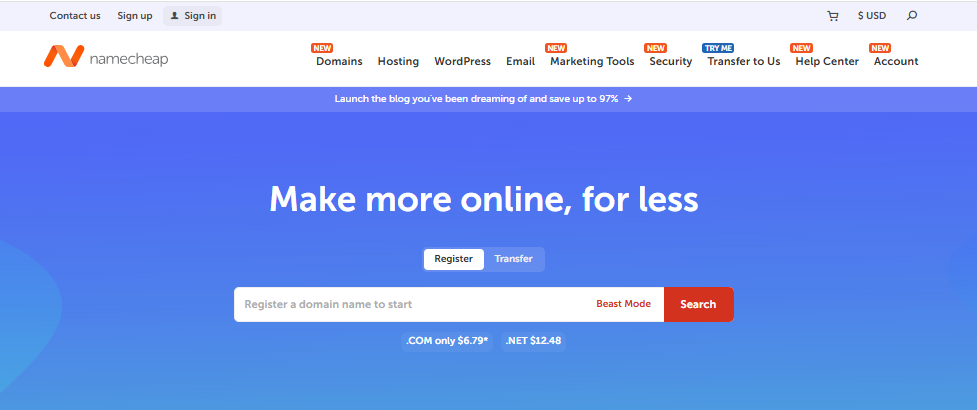
Why Choose Namecheap over HostArmada
Namecheap is a strong choice if your priority is minimizing hosting costs.
- Budget-Friendly Pricing: Keeps hosting affordable for small websites.
- Simple Setup Process: Makes it easy to launch without technical skills.
- Domain + Hosting Integration: Combines management in one platform.
- Essential Features Included: Covers basic hosting needs.
Features
Namecheap keeps hosting affordable and simple for small websites and basic projects.
- Shared Hosting Plans: Suitable for small and medium websites
- Free SSL Certificates: Provides basic website security
- Domain Management Tools: Simplifies domain handling
- Beginner Dashboard: Makes navigation easy for new users
Namecheap Pros & Cons
Namecheap is affordable and easy to start with, but it is not ideal for demanding sites.
- Very affordable hosting for beginners
- Easy setup and management process
- Domain and hosting integration included
- Essential features like SSL included
- Limited performance on lower-tier plans
- Not ideal for high-traffic websites
- Basic features compared to premium hosts
- Limited advanced tools and optimizations
Read our full Namecheap review for more details about its hosting performance, features, pricing, and support.

Namecheap: Best Budget HostArmada Alternative
6. Kamatera
Best for: Scalability

Why Choose Kamatera over HostArmada
Kamatera is ideal if you need full control and scalable infrastructure.
- Custom Server Configuration: Lets you define CPU, RAM, and storage precisely.
- Instant Scalability: Allows quick resource expansion without downtime.
- Global Data Centers: Improves performance across regions.
- Flexible Billing Model: Charges based on actual usage.
Features
Kamatera gives technical users cloud infrastructure built for control, scaling, and custom workloads.
- Cloud Infrastructure: Supports high-performance workloads
- Customizable Resources: Adjust server capacity on demand
- Global Deployment: Multiple regions for optimized latency
- Advanced Networking: Enables complex configurations
Kamatera Pros & Cons
Kamatera gives you deep control and scalability, but it requires technical knowledge.
- Full server customization for workloads
- Instant scaling for growing needs
- Global data centers improve performance
- Flexible billing based on usage
- Requires technical knowledge to manage
- Not beginner-friendly for new users
- Costs increase without resource control
- Higher learning curve than shared hosting
Read our full Kamatera review for more details about its hosting performance, features, pricing, and support.

Kamatera: Best Scalable HostArmada Alternative
7. Hosting.com
Best for: Feature-Rich Hosting

Why Choose Hosting.com over HostArmada
Hosting.com is a good fit if you want performance-focused hosting with more built-in tools.
- Performance Optimization: Faster load times with optimized server stack.
- Feature-Rich Plans: Reduces reliance on third-party tools.
- Free Website Migration: Makes switching easier.
- Developer-Friendly Environment: Supports advanced workflows.
Features
Hosting.com combines speed-focused infrastructure with useful tools for developers and growing sites.
- Turbo Server Technology: Improves performance for demanding websites
- Advanced Security Layers: Protects against common threats
- Developer Tools: Supports modern development workflows
- Free SSL and Migration: Simplifies setup and improves security
Hosting.com Pros & Cons
Hosting.com brings stronger performance tools, but it may feel complex for very simple sites.
- Strong performance for speed-focused websites
- Many built-in features included
- Free migration simplifies switching process
- Developer tools support advanced use
- Higher renewal pricing after term
- Platform may feel complex initially
- Features vary depending on plan
- More than needed for simple sites
Read our full Hosting.com review for more details about its hosting performance, features, pricing, and support.

Hosting.com: Best Feature-Rich HostArmada Alternative
What Are the Main Drawbacks of HostArmada
HostArmada is a strong managed host, but a few limits can push users toward another provider.
- Limited Scalability: The platform is not built for highly flexible cloud environments where you need to scale resources dynamically.
- Higher Pricing vs Budget Hosts: Plans are generally more expensive than entry-level providers offering similar baseline features.
- Managed Environment Limitations: The managed setup reduces the level of control available for advanced configurations.
- Limited Developer Flexibility: It lacks deeper customization options needed for complex or specialized workloads.
For a detailed overview of HostArmada, see our full HostArmada review.
How to Choose the Right HostArmada Alternative
Finding the right HostArmada alternative depends on more than price. It comes down to your technical needs, budget, and long-term goals.
- Ease of Use: Choose Hostinger or ChemiCloud if you want a simple, beginner-friendly setup with minimal technical effort.
- Budget: Namecheap or IONOS work well if you need affordable plans and lower upfront costs for smaller projects.
- Scalability: Kamatera is ideal if you expect growth and need flexible resources that can scale with your workload.
- Managed Hosting: Verpex is a good option if you prefer a hands-off experience with less server management.
- Performance-Focused: Hosting.com suits projects where speed, uptime, and consistent performance are critical.
Final Word
HostArmada is a strong choice if you value managed hosting and responsive support, but it may feel limiting if you need more control, lower pricing, or scalable infrastructure.
If your priority is ease of use, Hostinger is a practical starting point. For cost efficiency, IONOS or Namecheap can work well. If you need scalability and control, Kamatera is the better fit.
The right choice depends on how much flexibility, performance, and support your project actually needs. Choosing based on long-term requirements, not just entry pricing, will help you avoid switching providers later.
If you still haven’t found what you need, you can always check our complete list of top web builders.
