Expert Analysis with Verified Hostinger User Reviews
I logged into Hostinger's hPanel, mapped its full sidebar, customized it with Favourites and Search, walked through Account Sharing and Security settings, reviewed Billing and VPS monitoring, and asked Kodee a real account question to see how the control panel actually holds up.
I logged into Hostinger's hPanel, mapped its full sidebar, customized it with Favourites and Search, walked through Account Sharing and Security settings, reviewed Billing and VPS monitoring, and asked Kodee a real account question to see how the control panel actually holds up.
Hostinger built hPanel as its in-house replacement for cPanel, the single control panel that sits underneath every hosting plan, domain, VPS instance, and app the company sells.
Reach, Connector, VPS, WordPress hosting, OpenClaw, and several other Hostinger products already have their own dedicated reviews on this site, and all of them live inside hPanel rather than beside it.
This hPanel review stays focused on the control layer itself, navigation, account tools, security, and billing, and on how it ties that whole ecosystem together, rather than repeating what those product-specific reviews already cover.
I logged into a live multi-service account to see whether hPanel actually earns its reputation as the more usable alternative to cPanel, and rather than force a control panel into the shape of a hosting-plan review, I’m covering it the way I actually explored it, one area at a time, with my own take at the end of each.
Hostinger hPanel
Manage your website effortlessly with Hostinger hPanel, an intuitive hosting control panel designed for simplicity and speed. Handle domains, emails, files, databases, backups, security, and website performance from one convenient dashboard.
Nested sidebars stay consistent across every service
VPS monitoring includes real historical usage graphs
Security and billing sit one click away
Cons
Account Sharing cannot scope to one website
No reseller layer to isolate client accounts
Tip Pin your most-used sections to Favourites and try Search before digging through the sidebar manually. Search blends real account results with direct actions, and it can save real navigation time once an account has more than a couple of services attached to it.
Rating Breakdown
To evaluate hPanel, I applied our hosting review methodology, the same structured approach used consistently across every review on this site to keep scores grounded in real testing rather than marketing claims. Since hPanel is a control panel rather than a hosting plan, Performance does not get its own row here, there is no server to benchmark. The categories below reflect what actually matters when judging a panel like this against something like cPanel.
Parameter
Score
Why This Score
Value
9.6/10
hPanel costs nothing on its own and comes bundled automatically with every Hostinger plan, so there is no separate fee, tier, or upgrade path to weigh against a competitor’s panel.
Feature Depth
9.3/10
Account Sharing, two-factor authentication, granular notification controls, live VPS resource graphs across four time ranges, and an AI model gateway under Dev tools go past what a traditional control panel usually offers, though Account Sharing still cannot scope down to a single website outside the Agency plan.
Navigation and Usability
9.6/10
Favourites, a search bar that remembers recent and most-used pages, and a nested sidebar that repeats the same layout logic from a VPS instance down to a single website all held up under real use, not just at a glance.
Built-In Support
9.5/10
Kodee answered a real Account Sharing question correctly on the first try, reachable from a chat box on Home or a persistent panel on every other page, and the interface itself independently confirmed the answer.
Overall
9.5/10
hPanel delivers on its core promise, a control panel that is actually easier to use than cPanel, with feature depth that goes past traditional hosting administration and support built into the navigation itself rather than bolted on.
Hostinger hPanel
Take full control of your hosting with Hostinger hPanel. Its clean and user-friendly dashboard makes it easy to manage websites, domains, email accounts, databases, backups, security tools, and other essential hosting features.
hPanel is not a product you buy separately. It’s bundled automatically into every Hostinger plan, shared hosting, cloud, VPS, or otherwise, so there is no dedicated hPanel tier, trial, or refund policy to evaluate here.
What you pay for is the underlying service, hosting, a VPS instance, a domain, and hPanel is simply how you manage whatever you already have.
The one pricing-adjacent thing worth flagging from inside the panel itself is the Billing section, covered in full under Features below, since it is where subscriptions, renewal dates, and payment methods actually live.
Features
Account Sharing with Admin or Collaborator roles
Two-factor authentication and device verification toggles
Searchable command palette across the whole account
Pinned Favourites persist across every login
Granular notification controls per channel and category
Detailed VPS usage graphs across time ranges
Billing page with subscriptions, invoices, and methods
Consistent nested sidebar for every connected service
Built-in AI Router gateway to major LLMs
Hostinger
Simplify website management with Hostinger hPanel, Hostinger’s easy-to-use hosting dashboard. From managing domains and files to monitoring performance, creating backups, and configuring security, everything is available in one centralized control panel.
I started here because it’s the first thing anyone using hPanel actually sees, and first impressions on a control panel used daily matter more than they do on a page visited once during setup.
The AI Chat and Quick Actions
Logging in dropped me straight onto Home, and the first thing on the page was an AI chat box asking what I needed, with quick-action pills underneath for the tasks Hostinger clearly expects most people to want first, get a domain, create a website, get email, get a VPS.
Your To-Dos and Your Business
Scrolling down, the page kept giving me things to do rather than things to read.
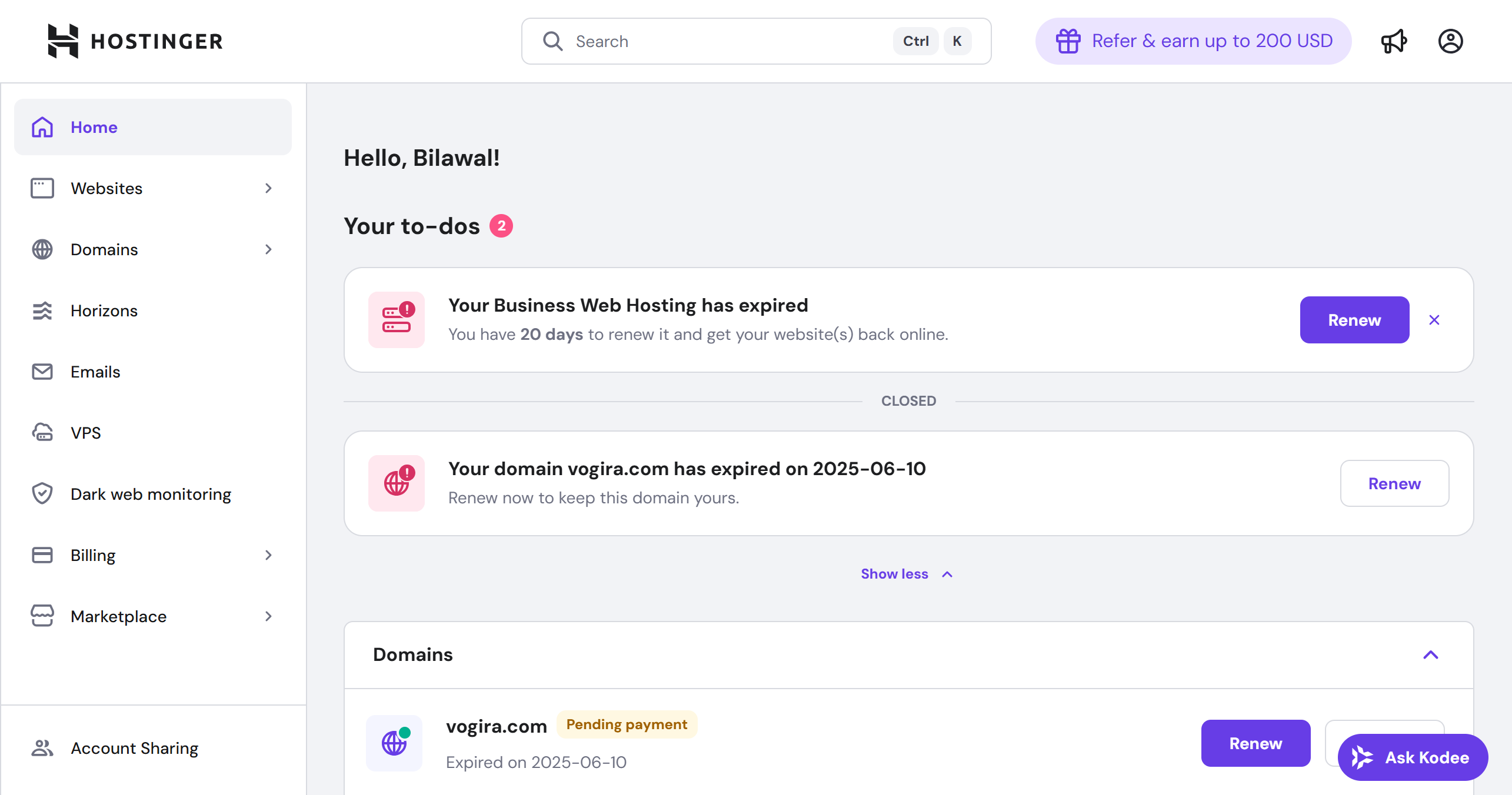
A “Your to-dos” section carried its own count badge, nine items on this account, with each entry dismissible on its own and a “Show more” link rather than dumping the full list at once
A “Your business” section listed every live site and service on the account, WordPress installs, Website Builder projects still on temporary domains, a production site with its own mailbox, each with inline warnings where something needed attention, a domain not connected to a site, a temporary domain still in use
A full VPS table sat further down the same page, three running instances with their own IP addresses, status, and expiration dates, plus a “Manage all” link, rather than buried a few clicks deep
Nothing here required me to go looking. The page surfaced what needed fixing before I asked.
What I Think
For an account running three active VPS instances alongside half a dozen websites, having the to-do list, the full business overview, and a live VPS table all sitting on one screen is a real shortcut. Most control panels make Home a static welcome page. This one behaves more like a status report.
Sidebar, Search, and the Wider Ecosystem
Next, I tested how well hPanel actually helps you find things, since a control panel this dense lives or dies on navigation rather than any single feature.
Favourites and Search
The sidebar groups everything under a few collapsible headers, Hostinger apps, AI agents, Dev tools, and each group remembers whether I had collapsed it the next time I loaded the page.
I pinned one item, OpenClaw, by hovering over it and clicking the pin icon that appeared, and it immediately showed up in a new Favourites section at the top of the sidebar, exactly where a shortcut should live.
Search turned out to be the more powerful of the two tools. Typing “API” into the search bar in the top right returned a mix of real account resources, each VPS instance’s own API page, and direct action suggestions, “Deploy Wakapi on a new VPS,” filterable by category, with an “Ask Kodee about API” handoff sitting right at the bottom of the results.
Search and the AI assistant are not separate systems here, one leads directly into the other.
That search result also led me somewhere worth flagging on its own, a “Connect your IDEs to Hostinger MCP” page, the exact setup covered in full in our Hostinger Connector review.
Opening the search bar before typing anything revealed something else. It does not start blank. A Recent section listed my last search, API, ready to reopen with one click, and a Most used section sat right below it, Web Hosting under Marketplace, Subscriptions under Billing, Emails, Account information, each a shortcut to a place I had actually visited before, not a generic starter list.
Search remembers behavior across sessions rather than resetting every time the panel loads, which matters for anyone who keeps ending up in the same three or four sections of hPanel every week.
The Marketplace
Clicking “More services” in the sidebar opened a full marketplace, tabbed across All, Hosting & VPS, Websites, Domains, Email & marketing, AI & automation, and Other, with its own search bar at the top.
A banner for hireable AI agents sat above everything else, Customer Comms, Marketing Planner, Creative writer, Business Advisor, Legal advisor, SEO Consultant, Sales & Outreach, each one a distinct agent rather than a single generic assistant.
Below that, every card pointed at a product this site has already reviewed on its own, Reach, Business Email, Web Hosting, Cloud Hosting, VPS Hosting, Website Builder, Horizons, domain registration, alongside a handful of third-party extras bundled in, NordVPN, NordPass, Square, TailBrands.
AI Router, an Unexpected Find
A traditional control panel gives you files, databases, DNS, and email, the same core toolset cPanel has offered for two decades. hPanel covers all of that too, but Dev tools is where it stops looking like a normal control panel entirely.
One item there surprised me more than anything else in the panel, AI Router, branded as nexos.ai.
It positions itself as one gateway to every major AI model, a single API key against Anthropic, OpenAI, DeepSeek, xAI, Mistral, Moonshot, MiniMax, StepFun, and Z.ai, billed from one shared pool of AI credits rather than a separate account per provider, with built-in integration into Hostinger’s own AI apps like OpenClaw and Hermes Agent.
That is a developer-facing LLM routing product sitting in the same sidebar as DNS management, something no cPanel install has ever offered.
What I Think
The marketplace is a genuine cross-sell surface, but it lives on its own page rather than interrupting the management screens, so it never got in the way of the task I was actually there to do.
A cPanel install, even a well-run one, tops out at files, databases, DNS, and email. hPanel now ships an AI model gateway in the same sidebar. That’s not a small gap between the two panels, it is a different idea of what a control panel is supposed to do.
The VPS Panel, Explored in Full
The sidebar logic looked consistent from a distance, but I wanted to test that claim against a real service, so I clicked into one of the three running VPS instances.
The Overview Page
The Overview page opened on the instance’s actual state, AlmaLinux 10, Running, with the SSH username, root, the IPv4 address, and a full root access command shown inline with its own copy icon, plus a direct “Reset password” link for anyone who has forgotten it.
Reboot and Terminal sat right there as buttons, no submenu required, and Terminal opened a working shell in a new tab rather than a simulated one.
Below that, six resource cards gave a real-time read on the server rather than a static spec sheet.
CPU usage at 1 percent, with a small trend line
Memory usage at 12 percent
Disk usage at 2 GB of 50 GB
Incoming traffic at 0.8 MB
Outgoing traffic at 0.1 MB
Bandwidth at 0.001 TB of a 4 TB allowance
Four more cards sat underneath as direct shortcuts, SSH key management, firewall rules showing zero configured, snapshot and backup count at two, and malware scanner status, active.
Server Usage and Historical Monitoring
Clicking into Backups & Monitoring, then Server Usage, took the resource cards from a single live number to a full history.
Five separate charts, CPU Usage, RAM Usage, Disk Space, Outgoing Traffic, Incoming Traffic, each switchable across Last 24 hours, Last week, Last month, and Last 6 months, with a Terminal shortcut still sitting in the top corner and a Related Articles section at the bottom for anything the charts themselves did not explain.
What I Think
This is not a performance review of the VPS itself, that lives in its own dedicated review on this site, but it is a real answer to whether hPanel’s own monitoring is worth trusting day to day. It is.
Most hosts either bury this kind of history behind a third-party add-on or do not offer it at all, and here it sat two clicks from Home.
The nested sidebar for this one instance, Overview, Docker Manager, Settings, OS & Panel, Backups & Monitoring, Security, API, DNS Manager, mirrored the top-level structure closely enough that learning one section of hPanel really did teach me the shape of the next.
Account Sharing in Practice
Then I went looking for the feature I actually wanted to test properly, Account Sharing, since it is the kind of setting a reader would search for by name rather than stumble onto.
The page splits into two tabs, Request Access, for pulling in access to someone else’s account, and Give Access, for handing out access to mine.
I went with Give Access, and the flow asked for an email address, then a services picker, then a choice between two permission roles.
Opening that services picker showed exactly what “sharing” means on this account in practice, a checkbox list of individually selectable items, not a single all-or-nothing toggle.
Cloud Startup, tagged Pending setup
KVM 1 (srv1474865.hstgr.cloud)
KVM 4 (srv1474870.hstgr.cloud)
KVM 2 (srv702422.hstgr.cloud)
Domain (webhostpro.io)
Select all and Clear all sat at the bottom of that list. Each VPS instance and the domain could be shared on its own, which is real, working granularity, just not the kind most readers asking about Account Sharing actually want.
The role choice underneath was simpler, Admin, which can manage services and make purchases using the added payment method, or Collaborator, which can manage services but cannot make purchases.
What was missing from that services picker, on a standard hosting plan, was any way to hand over one website out of several hosted under the same plan.
The picker offered whole VPS instances and the domain individually, but hosting itself was not breakable down to one site. A small notice in the interface explained why directly, single-website access is an Agency-plan feature, not something standard hosting supports.
What I Think
This is a real limitation, not a bug. Anyone managing a single hosting plan with multiple sites on it and wanting to hand a freelancer just one of them will hit this ceiling immediately, and the fix is an upgrade, not a setting they missed.
I confirmed this same limitation independently through hPanel’s own support, covered in full further down, and it is worth knowing the interface and the AI assistant agree on it rather than one contradicting the other.
Locking Down Security, Notifications, and Billing
Last among the account-level sections, I checked the two areas most owners care about eventually even if they never open them on day one.
Security and Notifications
Security splits into two toggles, two-factor authentication and new-or-shared-device verification, both off by default and both a single click to turn on.
Notification settings sit alongside it, and the actual layout shows Hostinger has made an opinionated choice worth knowing about. The table crosses four categories, Subscriptions and payments, Account and its security, Service status and changes, and Product updates and special offers, against three channels, SMS, WhatsApp, and Email.
The first three categories all show a checked, greyed-out Email box that cannot be turned off, with SMS and WhatsApp left fully optional and unchecked. Only the fourth category, marketing, offers all three channels as free toggles, and on this account only Email was switched on for it.
Billing, Warts and All
The Subscriptions page listed twelve items across two pages, and the mix was actually instructive.
Cloud Startup, $311.88 renewal, auto-renewal on, tagged Pending setup
Ecommerce Growth, $15.99 renewal, Expired
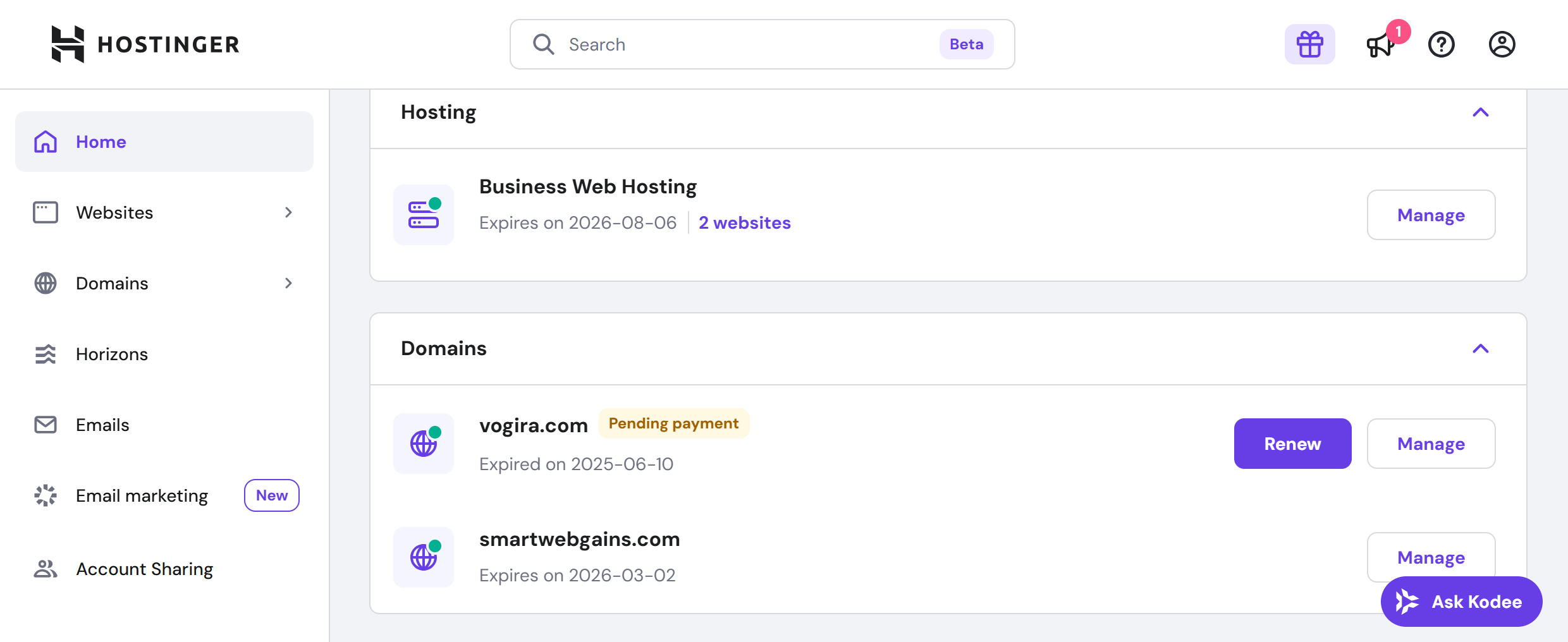
Business Web Hosting, $18.99 renewal, Expired, tied to orange-walrus-700988.hostingersite.com, the same domain PulseWatch was deployed to during the Connector review
Three separate Unlimited Web Hosting entries, all stuck in Pending payment with a Complete Payment button and a delete option
Reach 100 (Email marketing), tagged Free trial, an $11.88 renewal price shown even though nothing is being charged yet, auto-renewal off
A .IO domain, Premium Web Hosting, and a KVM instance, each with its own renewal price and a Renew button
Payment Methods was simpler by comparison, one saved Visa card marked as the default method, a Hostinger Balance sitting at $0.00, and an Add Payment Method screen offering Card, PayPal, Google Pay, or Apple Pay as expandable options.
What I Think
Security, billing, and service-status notices staying locked on while marketing stays opt-in is the right default for an account this consequential to get wrong.
And seeing expired plans and pending payments sit there untouched, rather than a sanitized account with everything green, is more useful to a reader than a polished demo would be.
It shows exactly what the red Expired tag and the Renew button look like when something actually needs attention, not just when everything is working.
Hostinger hPanel
Hostinger hPanel provides a streamlined way to manage your websites and hosting services. Easily control domains, emails, databases, files, backups, SSL certificates, security settings, and performance tools through an intuitive interface.
The Account Sharing screen had already told me most of what I needed to know, but I wanted a second, independent check on it, and hPanel makes that easy without ever leaving the page already open.
Kodee actually shows up in two places, the embedded chat box on Home itself, and a separate Ask AI panel reachable from the top-right corner on every other page.
Functionally they are the same assistant, worth knowing about only so the two do not look like separate tools the first time both show up.
Asking a Real Question
Clicking Ask AI in the top right opens a slide-out panel, not a new page, with its own quick-suggestion chips grouped by category, For You, Websites, Domains, VPS, and a running chat history.
I typed the exact question the Account Sharing screen had left half-answered, whether giving a freelancer access to one website would also expose my billing details or other sites on the account.
The answer came back in under a minute.
Correctly stated that Account Sharing works at the service or order level on standard plans, not the individual website level
Correctly warned that sharing a hosting plan could expose other websites hosted under that same plan
Pointed to the actual fix, an Agency plan for true per-website access, or a separate SSH or CMS user as a workaround on standard hosting
How the Answer Held Up
Walking through the actual Account Sharing screen, the interface matched Kodee’s answer almost exactly, down to the same Agency-plan caveat appearing as a small notice in the UI itself.
This particular test never needed a human. The first answer was accurate, specific, and independently verifiable against the interface itself, so there was nothing left to escalate.
What I Think
That kind of agreement between what an AI assistant says and what the product actually does is the strongest support result across any of the Hostinger tools reviewed on this site so far.
It also says something about where hPanel puts support, not behind a separate portal or a dedicated page, but one click away from wherever you already are, which matters more for a control panel used daily than a help center ever could.
Hostinger hPanel
Manage every aspect of your hosting from one place with Hostinger hPanel. Built for beginners and experienced users alike, it offers convenient access to website management, domains, emails, databases, backups, security, and performance optimization tools.
Yes, hPanel is worth using, and for most Hostinger customers there is no real alternative to consider anyway, it’s the control panel every plan comes with.
The more useful question is not whether to use it, it is whether it actually delivers the ease-of-use reputation Hostinger built its pitch around, and on the evidence from this test, it mostly does.
What stood out most was not any single feature but how consistent the whole thing feels. Favourites and Search both work exactly as described, the nested sidebar structure repeats the same logic from a VPS instance down to a single website, and the Home screen actively surfaces what needs attention instead of leaving you to go looking for it.
Kodee’s answer to a real Account Sharing question was the standout result across every Hostinger review done so far, correct, specific, and independently confirmed by the interface itself rather than resting on the AI’s word alone.
hPanel is the right fit for anyone already hosting with Hostinger who wants a control panel that does not fight them, and especially for account owners managing several services at once, since the consistent navigation pays off most once there is more than one thing to keep track of.
It’s a weaker fit for agencies that need to hand a freelancer or client access to one website at a time, since that requires an Agency-plan upgrade rather than being available on standard hosting.
The account-sharing ceiling and the slightly redundant two-entry-point AI assistant are minor issues next to what the panel gets right. For a tool this central to daily account management, getting navigation and support right matters more than any individual feature would.
The section about renewal pricing is probably the most important takeaway. Introductory prices always look attractive, but it's the renewal cost that determines the real long-term value. I also found another review on Bestecision that breaks down the pricing, performance, and renewal considerations in detail.
I purchased a Hostinger hosting plan worth more than $200 about four months ago, and I had around 8 live stores running on it.
A few days ago, I received a verification email. I contacted Hostinger support, and their team instructed me to upload my verification documents through hostinger.com/upload. I followed their instructions and uploaded the documents within the required 7-day verification period.
Today, I received an email saying my account had been suspended. When I contacted support again, they claimed that I had uploaded my documents to the wrong URL—even though it was the official Hostinger upload URL that their own support team had provided.
As a result, I have lost data from more than 5 stores, and many sales have been lost. This situation could have been avoided if I had been given the correct guidance from the beginning. I am extremely disappointed with how this case has been handled.
Thank you for taking the time to share your experience. Your feedback truly helps us improve, and we appreciate your honesty.
We're happy to see that after a thorough review, the suspension on your account has already been lifted, and your services are available again. We understand how stressful this situation must have been, especially with active stores involved.
Please rest assured that the interactions you had with our team throughout this case will be reviewed internally, and feedback will be shared with the relevant teams to ensure such situations do not recur!
If you notice anything that still needs attention on your account, please don't hesitate to reach out — our Customer Success Team is available 24/7 and ready to help!
Been using Hostinger for over a year for my Instagram analytics tool at https://igunfollowtracker.com — uptime has been rock solid and pages load fast even during traffic spikes. hPanel is clean, support is responsive, and the price point is hard to beat. Renewal pricing is a bit high but overall performance is excellent. Highly recommend
Thanks for taking the time to share your experience with us! We're always working to improve our services, so this partnership keeps getting better every day.
One of the Worst Experiences I Have Ever Had in the Web Hosting Industry
I want to share what has been one of the most frustrating and unacceptable experiences I have encountered in the web industry.
The company managing my domain practically took control of my domain during a valid grace period, without my consent.
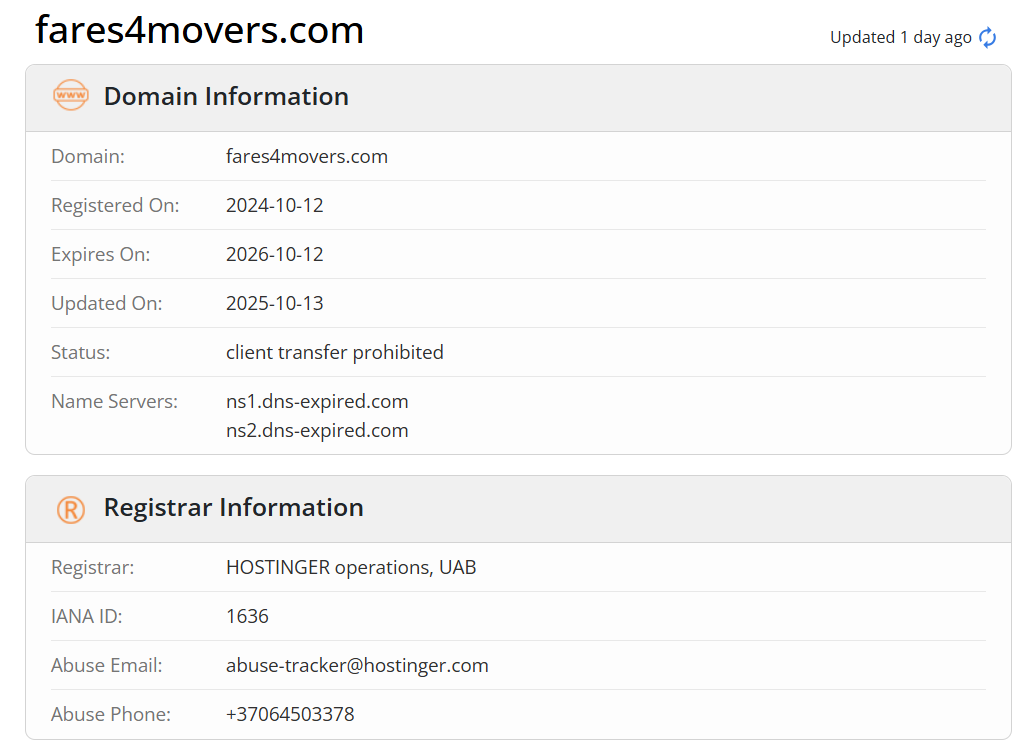
My domain expired on October 12, 2025. Due to banking issues and the sudden freezing of my personal card by my bank, I was unable to renew it immediately. However, I fully relied on the standard ICANN Grace Period, during which any domain owner has the right to renew their domain without extra charges.
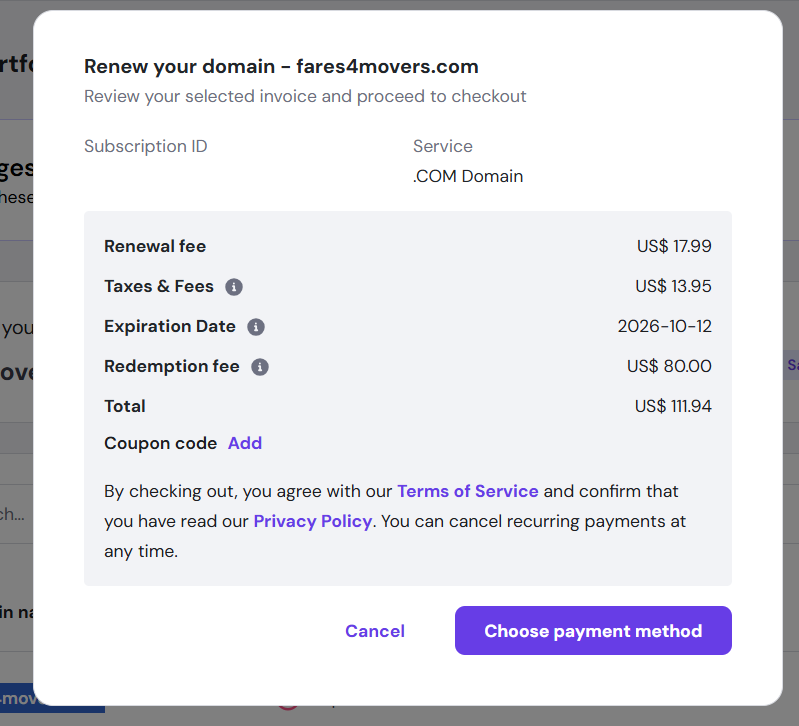
When I finally obtained a new card and attempted to renew the domain, I discovered that the company had renewed the domain on October 13 (one day after expiry) and added a Redemption Fee of $80, along with additional taxes and charges — making the total cost $111.94.
This is completely unacceptable. A domain renewed one day after expiry does not enter the Redemption Grace Period. Charging a redemption fee and acting as if they “rescued” the domain makes no sense, and directly violates standard ICANN lifecycle rules.
You can verify this yourself via WHOIS:
https://www.whois.com/whois/fares4movers.com
For over a month, I have been stuck in endless back-and-forth communication. When I finally contacted support, they claimed they did not renew the domain themselves, but that “their reseller” did — and asked me to wait 48 hours for an update.
After the 48 hours passed with no response, I contacted them again. I received the same generic reply: “The issue is still under investigation.”
What investigation? This is a very simple situation: A domain was renewed one day after expiration, without authorization, and the customer is being forced to pay six times its normal price.
This is a blatant violation of multiple ICANN policies, especially regarding:
Unauthorized renewal of a domain
Misuse of the Grace Period
Improper application of Redemption Fees
Lack of transparency from the registrar
I will not let this go. I am fully prepared to take the matter further — including filing formal complaints with ICANN and pursuing legal action if necessary.
Customers deserve transparency, honesty, and fair treatment. Unfortunately, my experience has shown the exact opposite.
Thanks for sharing your experience with us. Your feedback helps us find ways to improve and keep delivering reliable service.
Our team has investigated everything thoroughly and updated you via live chat. It seems the domain was renewed by the domain registry; however, if the payment is not received during the specific "autoRenewPeriod," it will enter a redemption period, which is what your domain is currently in, as no payment was received.
If any additional questions arise, let us know. We're here for you.
Hostinger completely destroyed my project. They sold me a used/expired domain full of hundreds of toxic spam 1500+ backlinks without any warning. Because of this hidden history, my website’s SEO went from 1000+ daily impressions to ZERO. Months of work and thousands of dollars I invested in tools (Semrush, Ahrefs), content, and development are now wasted.
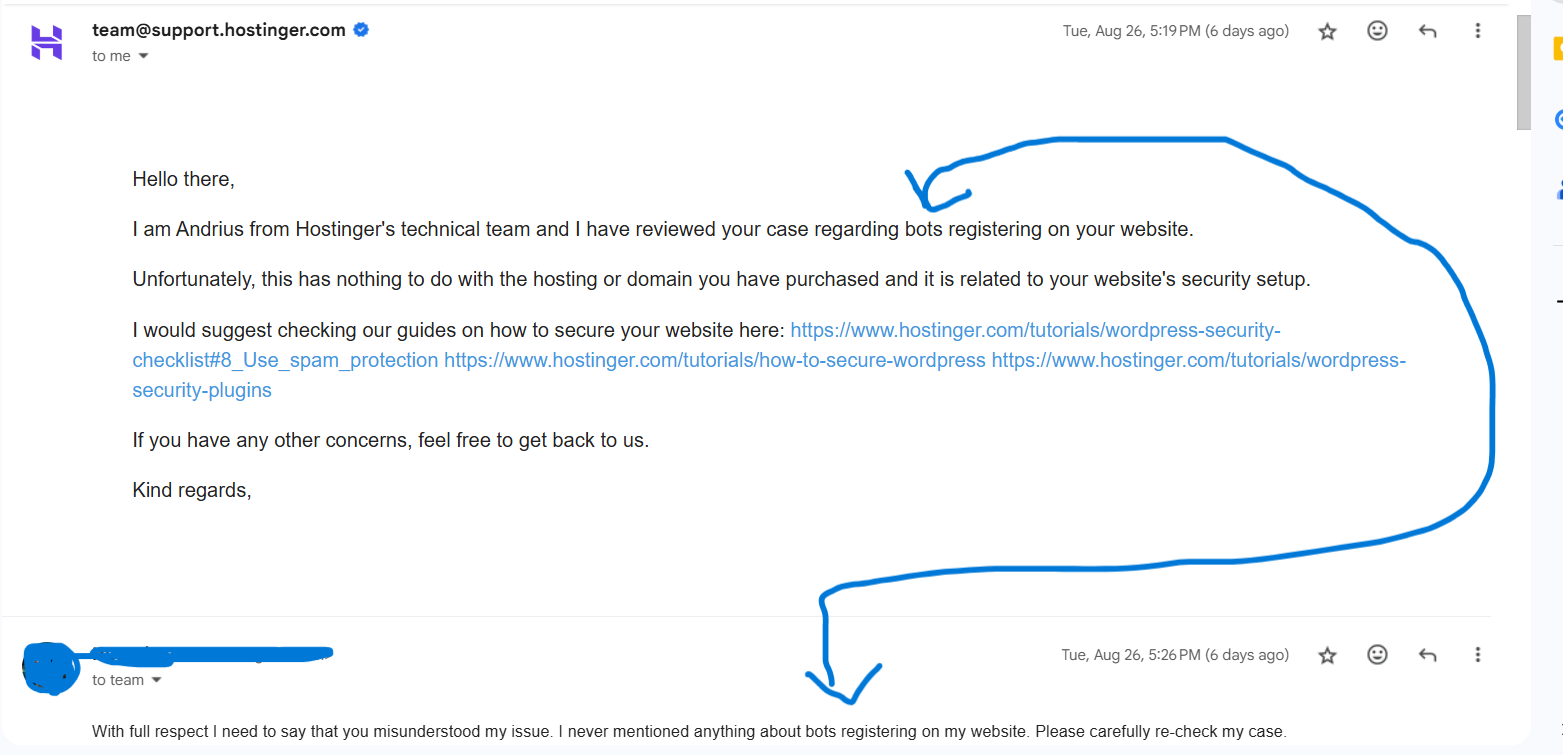
When I contacted support, instead of solving the problem, they gave irrelevant copy-paste replies about WordPress bots and security (which had nothing to do with my issue). After dragging me for weeks, they even tried to lie, claiming they had already extended my hosting — but I have screenshots proving they hadn’t. Only after I exposed them did they suddenly add an extension within 5 minutes. That is not support, that is fraud.
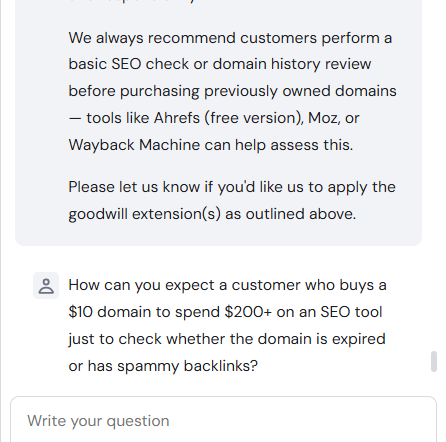
Their “compensation”? A 1-week or 1-month extension — a complete joke compared to the 5+ months of time, SEO, and money I lost. On top of that, they kept blaming me saying “you should check domain history before buying” and even mentioned fake tools like “Ahrefs free version” (which doesn’t exist).
👉 Hostinger = zero transparency, zero accountability, scammy tactics, and fake promises. They wasted my time, destroyed my SEO, and tried to cover it up with lies.
⚠️ If you care about your business, your SEO, or your money — DO NOT TRUST HOSTINGER. They will waste your time, take your money, and leave you with nothing but frustration.
Thanks for sharing your concerns. We understand how important it is to have a reputable domain, and we’d like to clarify the situation.
We are a domain reseller only, and as stated in the Domain Name Registration Agreement you accepted, we’re not responsible for a domain’s prior use, history, or reputation. It’s up to the buyer to research relevant details before purchase, as it isn’t possible for us to audit every domain in advance. As you noted, there are tools to review SEO related aspects when choosing a domain.
The links reported by Google predate your registration, so they stem from the previous owner and fall outside our responsibility scope. Removing them would require access to your Google Search Console, which we can’t obtain.
We aim to provide the best experience possible, but the compensation you’re requesting isn’t possible. If you’d like to continue the conversation, please let the Customer Success Team know, and we’ll be happy to talk with you.
Wrong Expiration Date – Service Ended Earlier Than Shown
For months, my Hostinger panel showed that my hosting was active until 2026. I relied on this date. Suddenly, without any action from my side, the date changed and my service expired much earlier.
I never renewed, never requested any change, and never received any clear warning before the service went offline. For a global company like Hostinger, I expect their system to show accurate information — this kind of error is unacceptable.
Hostinger should:
Display correct expiry dates in the panel.
Notify customers well in advance of any change.
Avoid expiring services earlier than the date shown in the account.
This 2-month glitch in their system caused unnecessary stress and service loss.
We're sorry to hear your experience with Hostinger hasn't been the best, but we really appreciate you letting us know.
After investigating, we noticed that your hPanel was showing the correct expiration date. Once the auto-renewal (active in your account) was triggered, the date was updated while the system made the payment attempts. The attempts weren't successful (as you were notified via e-mail), so the expiration date was shown correctly again. Since the renewal wasn't paid, the plan was suspended.
We've shared your review with the relevant teams for feedback, but also invite you to contact the Customer Success Team if you have questions about renewing your service. We'll be happy to help.
They can just take down your website for no reason it's in their TOS. They took down BetaNet's website without any explanation. And they didn't allow any file backups they just hold your files hostage and hide behind useless AI instead of real customer service.
Thank you for sharing your concerns. We'll be happy to clarify everything.
Be assured that our Abuse Team carefully investigates every report we receive to ensure they have merit. If the content in the account severely breaks our Terms of Service (https://www.hostinger.com/universal-terms-of-service-agreement), we're legally obliged to permanently suspend the services . As the ToS and the Abuse Policy state, in those cases we cannot provide backups or refunds for security reasons.
We hope you understand the need for such actions to ensure a safe internet, and we invite you to contact our Customer Success Team if you have additional questions.
Hostinger: Top-Notch Hosting at Unbeatable Prices!
With excellent speed, reliable uptime, and a user-friendly interface, Hostinger provides premium hosting services without breaking the bank—perfect for all levels of users!
For most day-to-day tasks, hPanel’s navigation is more consistent and less cluttered than cPanel’s, based on hands-on testing across VPS, websites, and account settings in this review. It is a custom-built interface rather than an industry-standard one, so anyone with existing cPanel muscle memory will need a short adjustment period.
Is Hostinger hPanel free?
Reach, Connector, and hosting plans each carry their own cost, but hPanel itself is bundled automatically with every Hostinger plan at no separate charge. There is no standalone hPanel subscription, trial, or tier to purchase, it is simply how you manage whatever service you already pay for.
Can I give someone access to just one website in hPanel?
Not on standard hosting plans. Account Sharing works at the service level, so sharing a hosting plan can expose every website on that plan rather than just one. True single-website access requires an Agency hosting plan, confirmed by both the interface itself and Hostinger’s AI assistant during testing.
Does hPanel have two-factor authentication?
Yes, two-factor authentication is available under Security in the account menu, along with a separate new-or-shared-device verification toggle. Both are off by default and take one click to turn on.
What is Kodee in hPanel?
Kodee is Hostinger’s built-in AI assistant, accessible both from the Home page chat box and a separate Ask AI panel available on every other page. During testing, it gave a correct, specific answer to a real Account Sharing question that matched the product’s own interface.
HostAdvice.com provides professional web hosting reviews fully independent of any other entity. Our reviews are unbiased, honest, and apply the same evaluation standards to all those reviewed.While monetary compensation is received from a few of the companies listed on this site, compensation of services and products have no influence on the direction or conclusions of our reviews. Nor does the compensation influence our rankings for certain host companies.This compensation covers account purchasing costs, testing costs and royalties paid to reviewers.