


Serverless computing changes how we build applications. If you’ve ever wondered what serverless computing is, it’s a model where cloud providers manage servers.
This approach powers modern serverless apps, offering automatic scaling and lower costs. Today, many companies rely on serverless services to simplify infrastructure and speed up development.
Serverless computing simplifies backend management—just like website builders simplify design and hosting. With the right builder, you can create a fast, secure website without worrying about servers or maintenance. Explore our recommended website builders to launch a modern, high-performing website effortlessly.
Build a Modern, Scalable Website with the Best Website Builders
| Provider | User Rating | Recommended For | |
|---|---|---|---|
 | 4.6 | Beginners | Visit Hostinger |
 | 4.4 | Pricing | Visit IONOS |
 | 4.2 | Design | Visit Squarespace |
Understanding Serverless Computing
What is serverless computing? It’s a cloud service model. In this model, a cloud provider takes care of all infrastructure management tasks. You don’t worry about managing servers. Just deploy your code.
Think of it like ordering food instead of cooking at home. All you have to do is focus on the meal (your code). Then, the cloud provider handles the kitchen (the underlying infrastructure).
This serverless architecture hides the servers from you, but they’re still there. The benefit? Less operational overhead, faster scaling, and more time to focus on writing code.
In short, serverless computing enables developers to run apps and serverless functions without the hassle of server management.
How Serverless Computing Works
Serverless computing runs on an event-driven model. When an event like an HTTP request occurs, the cloud provider spins up the needed serverless functions.
Your code executes, returns a response, and the computing resources are released right away. Unlike traditional architecture, you’re not paying for idle servers. You only pay for the exact milliseconds your code runs. You also pay for costs like cloud storage or data transfer.

The serverless platform also handles automatic scaling. If your app gets 10 requests a minute, it runs 10 executions. If that spikes to 1,000, the platform scales instantly. Plus, there’ll be no need for managing servers or infrastructure management.
This frees you to focus on writing code while the cloud service provider handles the backend.
Key Components of Serverless Architecture
Serverless architecture breaks down apps into smaller, event-driven services. To understand how it works, let’s look at the key components that power this modern approach.
Function as a Service (FaaS)
Function as a Service (FaaS) is at the heart of serverless computing. With a serverless platform, you deploy small pieces of code, called serverless functions. These functions run only when triggered by an event.
Each function handles one task, like sending an email, without you managing the underlying infrastructure.
Popular cloud providers such as AWS Lambda, Google Cloud Functions, and Azure Functions enable developers to upload code. You could also set triggers and skip the hassle of managing servers.
This lets you focus on writing code while the provider takes care of scaling and infrastructure management.

Backend as a Service (BaaS)
Backend as a Service gives you fully managed tools for your apps. Instead of managing servers or building cloud storage, you tap into ready serverless platforms.
Services like Firebase, Auth0, or AWS tie in with serverless functions. These functions make it easy to run serverless applications without handling infrastructure management. This way, you focus on writing code and business growth, not backend headaches.
Event Sources and Triggers
Serverless applications respond to various event sources. Common triggers include:
- HTTP requests through API gateways
- File uploads to cloud storage
- Database changes or updates
- Scheduled events (cron jobs)
- Message queue events
- IoT device signals
Each event source can trigger one or more serverless functions. In turn, this creates complex workflows without traditional server management.

Namecheap
Benefits of Serverless Computing
Serverless computing takes away the hassle of managing servers. It lets you focus on building and scaling apps while the cloud provider handles the infrastructure.
Cost Efficiency
One big benefit of serverless is its pay-per-use pricing model. You’re only charged for the actual execution time and computing resources needed.
Traditional physical servers run 24/7 and cost money even when idle. With a serverless platform, you pay only when your code runs. This cuts costs by 70–90% for many web applications.
Automatic Scaling
With serverless computing, your apps can automatically scale from one request to thousands in seconds. You don’t need to handle server management or capacity planning. The cloud provider handles it for you.
This means your serverless platform monitors demand, adjusts resources, and cuts costs during slow traffic. In short, you focus on code, while the serverless architecture ensures smooth performance.
Reduced Operational Overhead
Managing servers takes time and skill. You deal with security updates, monitoring, backups, and capacity management.
With serverless computing, your cloud service handles these server management tasks. This allows you to focus on writing code and delivering value. This serverless model also cuts the need for big DevOps teams and helps projects automatically scale faster.
Faster Time to Market
With serverless computing, you skip server management and focus only on your business logic. This speeds up application development, letting you deploy code faster.
In a serverless environment, built-in cloud service integrations help you launch mobile and web applications quickly. The result? You can automatically scale and release features in less time.
Popular Serverless Platforms
Serverless makes building apps easier by removing server management. Here are the top serverless platforms you should know.
AWS Lambda
AWS Lambda pioneered serverless computing. It is still the most popular function as a service platform. It supports many languages. It also connects easily with S3, DynamoDB, and API Gateway. Plus, it can run functions for up to 15 minutes.

You don’t need to manage virtual servers, since it can automatically scale to thousands of requests. Lambda also gives you monitoring and logging through CloudWatch. This feature makes it one of the top serverless solutions in modern cloud computing.
Google Cloud Functions
Google Cloud Functions gives you a simple way to build and run code without worrying about servers. You can trigger functions with HTTP requests, events, or background tasks.
The big plus? It connects smoothly with Google tools like Firebase and data storage in Cloud Storage. This serverless approach helps you focus on your app while Google manages the heavy lifting of cloud infrastructure.

Azure Functions
Microsoft Azure Functions gives you serverless computing that ties smoothly into the Microsoft ecosystem. You can pick consumption-based or premium plans, so costs match your workload.
It shines in hybrid setups, linking cloud and on-premises systems. With strong security and serverless technologies, you get reliable performance. You’re also letting the platform handle how serverless computing works behind the scenes.
Serverless vs Traditional Hosting
When you compare hosting, it’s key to know how serverless computing differs from traditional hosting. With traditional hosting, you manage virtual machines, operating systems, and server capacity.
In a serverless architecture, you just deploy application code. The provider handles all infrastructure tasks. This makes serverless apps great for event-driven work. Traditional models, on the other hand, still fit steady workloads.
Real-World Use Cases
Here are real-world use cases that show their value across different industries and scenarios.
API Development
With serverless computing, you can build RESTful APIs and microservices without managing your own servers. Each endpoint runs as a separate function. This allows you to independently deploy separate components and scale with ease.
This application development model is popular in e-commerce for catalogs, payments, and logins. The automatic scaling of backend as a service keeps performance steady.
Data Processing

With serverless computing, you can handle batch processing without managing servers. Functions trigger when files hit cloud storage and save results in serverless databases.
Media teams use it for video, images, and content analysis. The pay-per-use model makes serverless services cost-effective for high-volume jobs.
IoT Applications
IoT devices create huge streams of event data. With serverless computing, each sensor reading can trigger fast, automatic actions.
You’ll see it in smart homes. It’s perfect for processing data, sending alerts, and controlling devices. Thanks to the serverless computing architecture, scaling happens on its own. Plus, you don’t have to manage infrastructure resources or cloud resources.
Mobile Backend
Mobile and web apps need backend services. These services are great for things like user login, database management, and push alerts. With serverless architecture, you don’t manage servers. It scales for you.
Social apps use it for image edits, chats, and moderation. This makes it easier for software developers to handle managing data. At the same time, they can solve real business challenges without the burden of a full file system.
Challenges and Considerations
Every solution comes with its hurdles. Here are the key challenges and points to remember.
Cold Starts
One drawback of serverless computing is cold start latency. If a function hasn’t run in a while, the platform must set up a new environment. This can take a few seconds.
That delay hurts user experience when apps need fast responses. To reduce it, most providers give you tools like provisioned concurrency and connection pooling. This way, developers can keep functions ready to go.

Vendor Lock-in
Serverless computing makes you fast, but it often ties you to one provider’s services and APIs. Moving apps later can mean major code changes.
To lower that risk, use abstraction layers or multi-cloud frameworks. Some teams go hybrid, keeping serverless solutions for smaller parts while protecting core systems with platform independence.
Debugging and Monitoring

Traditional debugging tools don’t fit well with serverless computing. Why? Functions run in isolated environments, so you can’t easily reproduce issues locally.
Instead, you’ll need to use the monitoring tools cloud providers offer. The fix: invest in good observability practices. Don’t forget to use distributed tracing to see how your app behaves end to end.

Execution Limits
Most serverless platforms cap serverless functions at 5–15 minutes. This makes them a poor fit for long-running jobs.
For heavy computing resources, break tasks into smaller pieces. You could also switch to traditional infrastructure management. This way, it enables developers to keep a smooth serverless environment.
Serverless and Cloud Infrastructure
Serverless computing changes how you use cloud computing. Instead of managing servers, you run serverless functions inside a serverless environment.
The serverless platform hides the underlying infrastructure. It also takes care of infrastructure management tasks and other operational overhead.
This means you can focus on writing code, not hardware or physical servers. Modern platforms connect to cloud storage and various cloud technologies, unlike managed hosting.
This enables developers to build mobile and web applications faster. And at the same time, you get to enjoy the benefits of serverless.
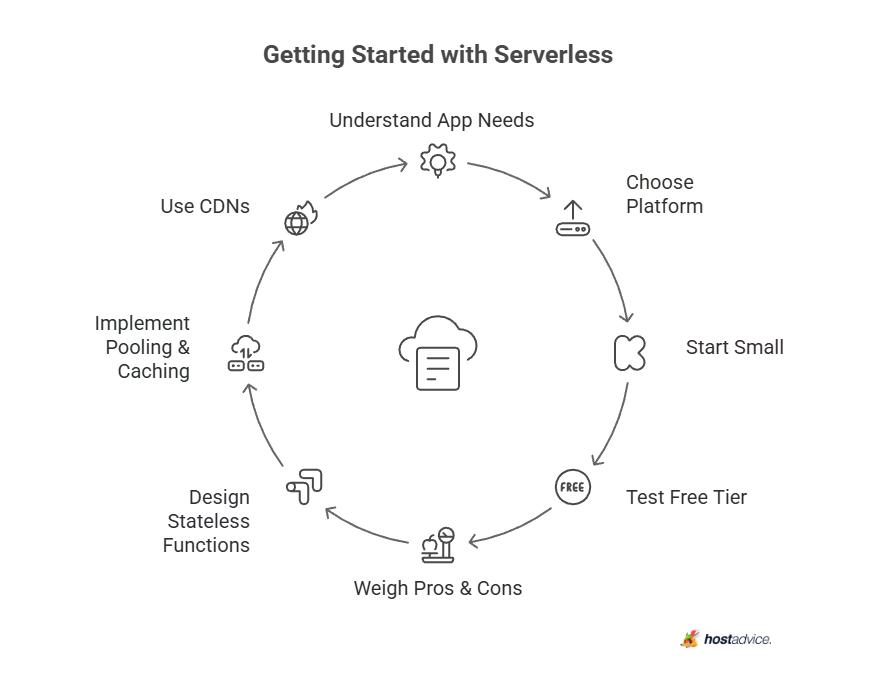

Starting your serverless journey means knowing your app’s needs. It also means picking the right serverless platform. Begin small with serverless functions for API calls or data tasks before moving into complex builds.
Most providers give a free version. This allows you to test serverless technologies without cost and learn workflows.
As you plan, weigh the advantages and disadvantages. It’s not right for every case. The serverless model removes heavy infrastructure management. In this way, you can focus on writing code instead of managing servers.
Design with stateless functions, events, and loose coupling. This allows you to get the most out of a serverless environment.
For better speed, use pooling and caching to cut operational overhead. Reuse connections and store common data in cloud storage. Add CDNs to support your mobile and web applications. It also cuts latency and eases pressure on computing resources.
Serverless Computing and Building Your Website
With serverless computing, you don’t worry about managing servers. The provider handles infrastructure management while you focus on writing code. The same idea applies when you create a website.
Instead of doing heavy, complex setups, you can use the best website builders. You’ll also need hosts that handle the underlying infrastructure. Beginners can use Hostinger and IONOS to launch sites fast with drag-and-drop tools.

In contrast, WordPress gives more control. It’s also important to select the best web hosting provider. A reliable web host ensures your site stays secure, fast, and ready to grow.
Conclusion
Now you know what serverless computing is. You build apps without worrying about servers. It brings automatic scaling and pay-as-you-go pricing, so you focus on value instead of hardware.
Of course, cold starts and vendor lock-in can cause issues. But here’s the thing: developers access faster releases more time to ship features that matter.
Need an app to get the best of serverless computing services? Check out this carefully curated list of no-code app builders.

Next Steps: What Now?
Now that you understand how serverless computing works, the next step is putting it into practice. Here’s how:
- Pick a platform
- Start small
- Test costs
- Plan for scale
- Stay flexible
- Optimize early
Further Reading & Useful Resources
Check out these quick guides to sharpen your skills in AI, websites, and content:
- Machine Learning: Basics of machine learning and AI.
- Create Website Templates: Tips for building effective templates.
- What is an AI Chatbot?: How chatbots improve user experience.
- Blog vs Website: See which suits your goals best.
- About Us Page: Write pages that connect with readers.

