As someone who’s evaluated various hosting providers over the years, I’ve come to expect a lot regarding performance, reliability, and affordability. After testing Fornex’s Cloud NVMe 1 VPS, I’m impressed by how well it balances all three. The pricing is incredibly competitive, and the NVMe-powered hosting ensures fast performance.
Plus, Fornex’s global presence with data centers in multiple countries adds significant value for those needing reliable hosting across regions.
When I tested Fornex VPS products, their performance stood out. The system was responsive, and the disk I/O and network speeds were more than adequate for my needs. Can Fornex deliver the speed and reliability you need at a great price? Keep reading to see how it fared in my tests.
To provide an in-depth and fair evaluation, we have created a rating methodology that helps us objectively assess each hosting provider. This methodology considers several key parameters such as Prices, Features, Performance, Ease of Use, and Support.
Below is the table with our ratings for Fornex, based on our review of their offerings:
| Parameter | Score | Why We Gave This Score |
| Prices | 9.0 | Fornex offers competitive pricing, with options starting at $4.10 for web hosting. While the entry-level pricing is attractive, higher-tier plans can get a bit pricier than other providers. |
| Features | 9.2 | An extensive set of features, including ultra-fast NVMe drive-powered hosting, scalable VPS servers, and flexible OS configurations. |
| Performance | 9.0 | Fornex delivered solid performance across CPU, RAM, disk I/O, and network tests. While the performance is strong for typical workloads, higher disk space might be needed for more resource-heavy tasks. |
| Ease of Use | 9.3 | The registration process and dashboard were very intuitive, with a simple flow for server management. The control panel and features are designed to make hosting easy to manage. |
| Support | 9.6 | Live chat and email support were quick and informative. Phone support added a personal touch, and the contact form had an automated response but didn’t offer immediate answers. Overall, the support was professional and helpful across all channels. |
| Overall | 9.2 | Fornex provides competitive pricing, a solid feature set, strong performance, ease of use, and exceptional support, making it a reliable hosting provider for various needs. |
Fornex hosting types include Web Hosting, VPS, and Dedicated Servers, with each option designed to provide robust performance and flexibility.
If you want to try the service, Fornex offers refunds for unused services after cancellation. Refunds can either be credited to your Fornex account for use on other services, transferred to another client, or they may be refunded back to the original payment source.
Fornex accepts a variety of payment methods to make transactions easier. These include Bank Cards (Visa, MasterCard), WebMoney, PayPal, and even Bitcoin, giving customers the flexibility to choose the best method.
Let’s dive into the pricing and plans Fornex offers for each hosting type.
Fornex provides a variety of Web Hosting plans tailored to websites of all sizes. The options include:
Features included in all Web Hosting plans:
Recommended Plan: WEB-50 – Ideal balance between cost and resources for growing websites.
Fornex’s VPS Hosting is divided into two main categories: Preset Plans and Custom Plans. Here’s a more detailed explanation of each:
Preset Plans
These are ready-made configurations that Fornex has pre-set for users who need a quick and simple solution. They come with specific CPU, RAM, storage, and bandwidth limits, making them easy to use without any customization. You simply select the plan that best suits your needs.
Features:
| Plan Name | Space | CPU | RAM | OS | Price | |
|---|---|---|---|---|---|---|
| CLOUD NVMe 1 | 10 GB | 1 x 3GHz | 1 GB | A$10.48 | Details | |
| CLOUD NVMe 2 | 20 GB | 2 x 3GHz | 2 GB | A$13.70 | Details | |
| CLOUD NVMe 4 | 40 GB | 2 x 3GHz | 4 GB | A$25.79 | Details | |
| CLOUD NVMe 6 | 80 GB | 4 x 3GHz | 6 GB | A$48.35 | Details | |
| CLOUD NVMe 8 | 120 GB | 4 x 3GHz | 8 GB | A$61.24 | Details |
Custom Plans
With Custom VPS, you can create a more tailored server setup by selecting your own CPU, RAM, disk size, and minimum CPU clock rate. It’s great for more advanced users or businesses that need customized performance.
For example, you can choose a custom configuration starting at $9.01/month for:
Features:
Recommended Plan: Cloud NVMe 2 – Offers a good balance of resources for most users, but consider Custom VPS if you need full flexibility.
Like the VPS hosting type, Fornex offers Preset and Custom Plans for Dedicated Servers, providing flexibility and performance for businesses and advanced users.
Preset Plans
These are predefined configurations that Fornex offers with fixed CPU, RAM, storage, and other specifications. They’re perfect if you need a dedicated server with a stable setup and don’t require customization. Each plan is set up for specific performance levels, so you don’t need to worry about configuration – just select the one that fits your needs.
Features:
| Plan Name | Space | CPU | RAM | OS | Price | |
|---|---|---|---|---|---|---|
| 1C:START | 480 GB | 4 x 3.4GHz | 32 GB | A$161.16 | Details | |
| DS BASE2236SED | 480 GB | 6 x 3.4GHz | 32 GB | A$193.40 | Details | |
| RZN: START | 960 GB | 6 x 3.8GHz | 32 GB | A$240.13 | Details | |
| BP:SMALL | 240 GB | 4 x 3.8GHz | 32 GB | A$256.25 | Details | |
| LX:MEDIUM | 240 GB | 10 x 2.2GHz | 32 GB | A$288.48 | Details | |
| BP:MEDIUM | 240 GB | 4 x 3.8GHz | 32 GB | A$288.48 | Details | |
| 2x SILVER 4110 | 1.88 TB | 16 x 2.1GHz | 64 GB | A$369.07 | Details |
Custom Plans
The Custom Dedicated Server plans allow you to configure your server from scratch. You can select the CPU type, number of cores, clock speed, RAM volume, storage type (SSD/NVMe), and storage volume based on your exact needs.
This is perfect for those who need high customization, whether for specific workloads or scalability.
With Custom Plans, you can also choose your server location from Fornex’s global data centers and request additional hardware like RAID setups.
Features:
To evaluate whether Fornex is a solid hosting provider, I purchased the Cloud NVMe 1 VPS plan to conduct performance tests and see how it handles various workloads. The server properties for this VPS are as follows:
I ran several tests to assess the performance across different aspects, including CPU, RAM, disk I/O, disk throughput, and network speed. Below are the tests I conducted and their results, followed by an interpretation of each.
The goal of this test is to evaluate how well the VPS handles multi-threaded workloads. By running this test with 4 threads, I was able to measure the CPU’s ability to perform complex computations in parallel. The test calculates prime numbers up to 100,000.
Command:
sysbench cpu –cpu-max-prime=100000 –threads=4 run
Results:

This test measures the server’s ability to handle multiple tasks simultaneously. The fact that the VPS maintained around 48.35 events per second with 4 threads shows that it can handle moderate multi-threaded tasks fairly well. Latency was on the higher end, which is expected with a single-core CPU, but it still performed decently for a VPS in this price range.
The CPU performance is good for lighter applications but might struggle with more CPU-intensive tasks.
This test measures the speed at which the system can read and write data to the memory, which is important for operations that involve large datasets or frequent access to memory.
Command:
sysbench memory –memory-block-size=8k –memory-total-size=10G run
Results:

The VPS handled the RAM performance test with impressive results, showing a high transfer rate of 14,869.43 MiB/sec. Latency was extremely low, indicating that the system can efficiently manage memory access.
While the VPS only has 1 GB of RAM, it can handle light to medium memory tasks well. However, memory-intensive applications may require more RAM to avoid performance degradation.
The next test measures the performance of the SSD disk using random write operations. This is important for understanding how the server handles file writing and reading in real-world applications.
Command:
sysbench fileio –file-total-size=10G –file-test-mode=seqwr run
Results:

With 231.90 MiB/s of write throughput, the SSD performs well for a VPS at this price point. The write speed is solid, thanks to the NVMe SSD technology. Latency remains low, which is great for applications that require fast access to data stored on disk.
For standard workloads, this VPS will handle disk-intensive tasks like file storage, database operations, and web applications without significant issues. However, larger disk-intensive operations may require more storage.
I ran a quick disk throughput test using the dd command to measure both read and write speeds.
Write Speed Test:
dd if=/dev/zero of=testfile bs=64k count=16k conv=fdatasync
Results:

Read Speed Test:
dd if=testfile of=/dev/null bs=64k
Results:

The write speed of 488 MB/s and read speed of 883 MB/s are impressive, showcasing that the NVMe SSD delivers fast throughput. The write speed is particularly good, but the read speed outperforms the write operation, which is typical for NVMe disks.
This VPS is ideal for read-heavy workloads like serving static content, but write-heavy applications may see some limitations based on disk space.
To test the network performance, I used speedtest-cli to measure download and upload speeds from the VPS.
Command:
speedtest-cli
Results:

The network performance is strong, with download speeds of 109.57 Mbit/s and upload speeds of 99.75 Mbit/s. The ping is relatively low at 7.637 ms, which is excellent for responsive connections, particularly for serving websites or handling real-time applications.
The network speed is adequate for most use cases, including web hosting and online applications.
One thing I noticed during testing is that the disk space on the Cloud NVMe 1 plan (10 GB SSD) was quite limited. I faced some challenges trying to install additional testing tools due to the limited disk capacity.
Fortunately, Fornex makes it easy to upgrade your disk space directly from the dashboard, which is a huge plus. You can quickly add more storage if needed without going through complex processes.
On your dashboard, click “+” under Hardware next to “SSD disk” to purchase more space.

The Cloud NVMe 1 VPS from Fornex delivers solid performance across most areas:
Overall, I found the Fornex VPS to be a strong performer for lightweight to medium workloads, but if you plan on running large databases or handling heavy file storage, you may want to upgrade your disk space.
To see if Fornex lives up to its reputation for quality service, I decided to test its support methods.
I explored live chat, email, contact form, phone, and ticket support to understand better how quickly and effectively they respond to customer inquiries.
Here’s a breakdown of each support channel and my impressions.
The live chat support feature is readily accessible via a button on the bottom right corner of the Fornex website.
I decided to give it a go and clicked the chat button to ask my first question. I inquired about the scalability of their VPS plans, especially regarding CPU and storage upgrades for a growing e-commerce site.
The response was incredibly fast—under a minute. The support agent confirmed that I could scale the server anytime, but for storage upgrades, I would need to restart the server. The interaction was clear and concise, and I appreciated how quickly they responded.

Overall, I found the live chat to be a convenient and efficient way to get answers in real time, especially for immediate, straightforward questions.
Next, I decided to test their email support. I reached out around 10:10 AM with a question about the flexibility of their web hosting plans. Specifically, I wanted to know how easy it would be to upgrade to a higher-tier plan if my website’s needs grew unexpectedly.
I was pleasantly surprised to receive a reply at 11:21 AM, just over an hour later. The support team explained that I could start with their minimum tariff plan and easily upgrade through my personal account as my website grew without losing any data.
This response was informative and assured me that Fornex is flexible when it comes to scaling your hosting needs.

Overall, I found the email support timely, professional, and helpful.
To test the response time via the contact form, I sent an inquiry at 10:17 AM asking about their backup options for web hosting accounts. I wanted to know how often backups are performed.
I quickly received an automated response confirming that my message had been received. The system assured me that I’d receive an answer shortly. This was a good touch as it kept me informed that my inquiry was in the system and being processed. While I didn’t get an immediate response to my specific question, the automated acknowledgment helped set expectations.
Finally, I tested the phone support to assess their direct communication method. I called the number on their website and was greeted by a professional who quickly answered my questions. I asked a general question about their hosting plans and whether I could easily scale if my needs increased.
The representative was friendly, helpful, and provided clear information on how to upgrade my hosting plan if necessary. The call experience was smooth, and I appreciated the human touch after interacting with the online support methods.
I found the phone support to be useful for a more personal interaction, though I didn’t have any urgent issues that required it.
After testing these methods, I was generally impressed with Fornex’s support system. Each communication channel performed well and had its strengths:
As part of my review, I wanted to get a feel for how easy Fornex is to use. I decided to take a closer look at the registration process, the dashboard, and the control panel to see how intuitive everything is from a user perspective. Let’s break it down step by step.
I found signing up for Fornex to be surprisingly easy and intuitive. The process is straightforward, and there are no confusing steps.
To register, I started by heading to the Fornex homepage and clicking on the top menu. From there, I selected the type of hosting I wanted. For this test, I chose VPS hosting.

After selecting the hosting type, I scrolled down to see the available plans. I decided to go with Cloud NVMe 1 and clicked Select. This took me to the checkout page, where I had to complete a few more steps.
The Configuration Settings page was first, letting me customize my server setup. Here’s what I saw:

Once I clicked Proceed, I moved to the Account Access page. I entered my email address and password to log in, but you can sign up here if you’re a new user. After signing up, you must provide your personal details, such as First Name, Last Name, Country, Zip, and Address. Once these are filled in, I clicked Send to continue.

Finally, the last step asked me to choose a payment method and the currency I wanted to use. After making my payment, I received an email confirming my purchase and an important note: Your email address is not verified for your account. To activate new orders, you must confirm your email address.

In short, the registration process is clear and simple. The step-by-step flow was easy to follow, and I had no issues completing it.
After completing the payment and registration, I was directed to the Fornex dashboard. I was pleased to find that it was simple, clean, and very easy to navigate.
The layout was intuitive, and I didn’t have to search for long to find the information I needed.
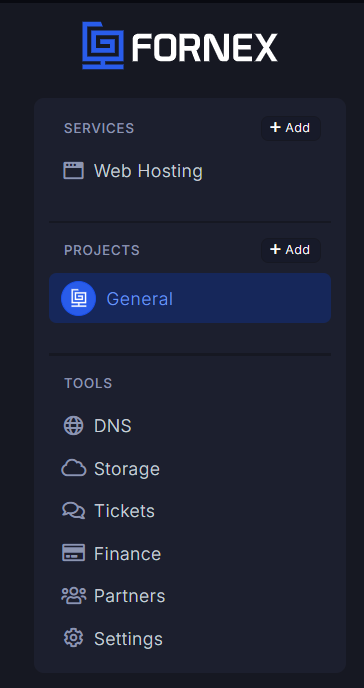
The left-hand panel houses all the key sections that help you manage your hosting experience. Here’s a breakdown of what you can access:

The right-hand panel provides a more detailed look at your orders. For example, under Orders, I could see the details of my Cloud NVMe 1 VPS, along with information such as:
Additionally, I had the option to search for specific servers or filter the list to find what I needed quickly. You can also sort by name or remaining resources, which helps you stay organized if you have multiple services.
Overall, the dashboard offers a clean user interface with easy-to-navigate sections. It felt responsive, and I encountered no problems while exploring the different options.
Next, I wanted to check how easy it was to manage my server, so I clicked on the server name under Orders to open it. The control panel is where you’ll find all the server management options. I will go into more detail about this later, but from what I saw, managing the server was straightforward.
After running a series of tests on Fornex’s VPS, from registration to performance benchmarks, it’s evident that this hosting provider delivers a solid mix of affordability, high-speed performance, and scalability that caters to a range of needs.
The pricing is incredibly competitive, especially for those just starting, and you can easily scale up as your needs grow. The support is responsive, with multiple channels like live chat and email, making getting help easy.
While there were a few minor challenges—like limited disk space for larger applications—Fornex provides an easy-to-use dashboard that allows you to purchase additional disk space directly.
All things considered, I highly recommend Fornex for those looking for reliable, high-performance hosting at a budget-friendly price. Whether you are a small business owner or running a personal blog, Fornex offers everything you need to get started and grow.


| Plan Name | Space | CPU | RAM | OS | Price | |
|---|---|---|---|---|---|---|
| CLOUD NVMe 1 | 10 GB | 1 x 3GHz | 1 GB | A$10.48 | Details | |
| CLOUD NVMe 2 | 20 GB | 2 x 3GHz | 2 GB | A$13.70 | Details | |
| CLOUD NVMe 4 | 40 GB | 2 x 3GHz | 4 GB | A$25.79 | Details | |
| CLOUD NVMe 6 | 80 GB | 4 x 3GHz | 6 GB | A$48.35 | Details | |
| CLOUD NVMe 8 | 120 GB | 4 x 3GHz | 8 GB | A$61.24 | Details |
| Plan Name | Space | CPU | RAM | OS | Price | |
|---|---|---|---|---|---|---|
| 1C:START | 480 GB | 4 x 3.4GHz | 32 GB | A$161.16 | Details | |
| DS BASE2236SED | 480 GB | 6 x 3.4GHz | 32 GB | A$193.40 | Details | |
| RZN: START | 960 GB | 6 x 3.8GHz | 32 GB | A$240.13 | Details | |
| BP:SMALL | 240 GB | 4 x 3.8GHz | 32 GB | A$256.25 | Details | |
| LX:MEDIUM | 240 GB | 10 x 2.2GHz | 32 GB | A$288.48 | Details | |
| BP:MEDIUM | 240 GB | 4 x 3.8GHz | 32 GB | A$288.48 | Details | |
| 2x SILVER 4110 | 1.88 TB | 16 x 2.1GHz | 64 GB | A$369.07 | Details |
| Plan Name | Space | CPU | RAM | Bandwidth | OS | Price | |
|---|---|---|---|---|---|---|---|
| CLOUD NVMe 1 | 10 GB | 1 x 3GHz | 1 GB | Unlimited | A$11.28 | Details | |
| CLOUD NVMe 2 | 15 GB | 1 x 3GHz | 2 GB | Unlimited | A$16.12 | Details | |
| CLOUD NVMe 3 | 25 GB | 2 x 3GHz | 2 GB | Unlimited | A$24.17 | Details | |
| CLOUD NVMe 4 | 25 GB | 2 x 3GHz | 4 GB | Unlimited | A$30.62 | Details | |
| CLOUD NVMe 5 | 35 GB | 4 x 3GHz | 4 GB | Unlimited | A$38.68 | Details | |
| CLOUD NVMe 6 | 40 GB | 4 x 3GHz | 6 GB | Unlimited | A$48.35 | Details | |
| CLOUD NVMe 7 | 50 GB | 4 x 3GHz | 8 GB | Unlimited | A$61.24 | Details | |
| CLOUD NVMe 8 | 50 GB | 4 x 3GHz | 12 GB | Unlimited | A$70.91 | Details | |
| CLOUD STORE 1 | 100 GB | 2 x 3GHz | 4 GB | Unlimited | A$82.19 | Details | |
| CLOUD NVMe 9 | 60 GB | 4 x 3GHz | 16 GB | Unlimited | A$93.48 | Details | |
| CLOUD STORE 2 | 160 GB | 2 x 3GHz | 4 GB | Unlimited | A$106.37 | Details |
Fornex has data centers in Germany, Switzerland, the Netherlands, USA, and Spain. These strategic locations ensure fast, reliable hosting with excellent geographic diversity for businesses targeting multiple regions.
Fornex provides refunds for unused services, but only after the service is canceled. Refunds are credited to your account on Fornex and can be used for future services or transferred to another user. Note that refunds are processed after cancellation, and some service plans may have a deduction for used time.
Yes! Fornex offers scalable VPS plans, allowing you to upgrade your server easily when your website or application grows. You can adjust CPU, storage, and bandwidth without facing downtime, making it perfect for businesses that need flexibility.
Fornex allows you to test their Virtual Hosting or VPS plans for a month. If you cancel within the first 7 days, they’ll issue a full refund. For Dedicated Servers, you can also get a 7-14 day test period at a special price by creating a ticket to discuss the conditions.
Fornex uses KVM (Kernel-based Virtual Machine) virtualization for its VPS hosting. This ensures complete resource isolation, higher security, and more control over virtual environments.

Answer a few simple questions and find the perfect solution for you!
Start Hosting Search