HostZealot has been operating since 2009. After testing their Amsterdam VPS extensively, I found performance metrics that rival providers charging 2-3x more. But does their minimalist approach work for everyone? Let me break down what I found.
To ensure consistency and fairness across all our hosting reviews, we’ve developed a comprehensive rating methodology that guides our evaluation process.
This framework examines five critical aspects of hosting services: pricing competitiveness, feature offerings, raw performance, user experience, and customer support quality.
You can learn more about our detailed evaluation criteria on our rating methodology page.
| Category | Score | Why We Gave this Score |
|---|---|---|
| Prices | 9.5/10 | HostZealot offers exceptional value with VPS starting at ~$6 and dedicated servers from $30. Their annual billing discounts and transparent pricing with no hidden fees make them highly competitive in the market. |
| Features | 9.0/10 | Comprehensive feature set including 16 IPv6 addresses, VNC console access, flexible storage options, RDNS configuration, and Emergency Remote Hands support. The two-tier management system provides both quick actions and granular control. |
| Performance | 9.5/10 | HostZealot delivers exceptional performance that punches well above its price point, with particularly impressive disk and network speeds. |
| Ease of Use | 9.0/10 | The registration and server ordering process is exceptionally well-designed with sophisticated filtering and payment flexibility. However, the dashboard prioritizes functionality over visual appeal, which may feel intimidating to absolute beginners. |
| Support | 9.0/10 | Impressive 77-minute response time for technical tickets, multiple contact channels including dedicated Microsoft Teams support, and security-conscious credential handling. The professional, direct communication style suits experienced users well. |
| Overall | 9.2/10 | HostZealot excels as a professional-grade hosting provider offering excellent value, robust features, and responsive support. Best suited for developers and businesses who prioritize technical control and transparency over simplified interfaces. |
HostZealot offers a comprehensive range of hosting solutions, including VPS hosting, dedicated servers, colocation services, domain registration, and specialized services such as DevOps, DDoS protection, and dedicated storage.
I need to be upfront here. They don’t offer a money-back guarantee or a free trial for any of their services because of fraud prevention measures. While this might seem restrictive, their thousands of satisfied customers demonstrate confidence in the quality of their service.
What impressed me most is their payment flexibility with over 50 accepted methods:
The provider maintains complete transparency with no hidden fees. However, if you’re considering a dedicated server, I’d strongly recommend checking with your account manager about traffic overage pricing for your selected location. These rates vary by data center.
HostZealot’s billing system generates invoices two weeks before the due date, and you can use the Add Funds feature to maintain an account balance for automatic payments. Just note that overdue payments result in suspension after two days and termination after ten days, though you can restore from backup within one month for $2.36.
Now let’s explore the specific pricing plans HostZealot offers.
| Plan Name | Space | CPU | RAM | OS | Price | |
|---|---|---|---|---|---|---|
| KVM 512 | 10 GB | 2 x 3.3GHz | 512 MB | A$7.93 | Details | |
| KVM 1024 | 20 GB | 3 x 3.3GHz | 1 GB | A$10.07 | Details | |
| KVM 2048 | 30 GB | 4 x 3.3GHz | 2 GB | A$12.65 | Details | |
| wKVM 2048 | 75 GB | 4 x 3.3GHz | 2 GB | A$15.60 | Details | |
| KVM 4096 | 50 GB | 4 x 3.3GHz | 4 GB | A$24.33 | Details | |
| wKVM 4096 | 100 GB | 4 x 3.3GHz | 4 GB | A$28.44 | Details | |
| KVM 8192 | 100 GB | 4 x 3.3GHz | 8 GB | A$39.42 | Details | |
| wKVM 8192 | 100 GB | 4 x 3.3GHz | 8 GB | A$43.36 | Details | |
| KVM 16384 | 150 GB | 6 x 3.3GHz | 16 GB | A$76.23 | Details | |
| wKVM 16384 | 150 GB | 6 x 3.3GHz | 16 GB | A$83.16 | Details |
| Plan Name | Space | CPU | RAM | OS | Price | |
|---|---|---|---|---|---|---|
| Atom C2750 8x2.4GHz | 250 GB | 8 x 2.4GHz | 4 GB | A$43.09 | Details | |
| Atom C2750/8c/2.4GHz | 250 GB | 2 x 2.4GHz | 8 GB | A$43.09 | Details | |
| Core i3-4350/2c/3.7GHz | 1.02 TB | 2 x 3.6GHz | 8 GB | A$58.88 | Details | |
| Core i3-4350 | 2 TB | 2 x 3.6GHz | 8 GB | A$60.32 | Details | |
| Core i3-3220/2c/3.3GHz | 512 GB | 2 x 3.3GHz | 8 GB | A$84.74 | Details | |
| Core i3-2120 | 1000 GB | 2 x 3.3GHz | 8 GB | A$89.04 | Details | |
| Xeon E3-1241v3 | 480 GB | 4 x 3.3GHz | 32 GB | A$109.15 | Details | |
| Xeon E3-1230v2/4c/3.3GHz | 512 GB | 4 x 3.3GHz | 32 GB | A$113.46 | Details | |
| Xeon E3-1220v3/4c/3.1GHz | 2 TB | 4 x 3.1GHz | 32 GB | A$113.46 | Details | |
| Xeon E-2234 | 240 GB | 4 x 1.8GHz | 32 GB | A$117.77 | Details | |
| Xeon E-2224 | 480 GB | 4 x 3.4GHz | 32 GB | A$117.77 | Details | |
| Xeon E3-1230v3/4c/3.3GHz | 2 TB | 4 x 3.3GHz | 32 GB | A$122.08 | Details | |
| Xeon E3-1230v3/4c/3.3GHz | 2 TB | 4 x 3.3GHz | 32 GB | A$122.08 | Details | |
| Xeon E3-1230v3/4c/3.3GHz | 2 TB | 4 x 3.3GHz | 32 GB | A$122.08 | Details | |
| Xeon E3-1230v3/4c/3.3GHz | 120 GB | 4 x 3.3GHz | 32 GB | A$122.08 | Details | |
| Xeon E3-1230v3/4c/3.3GHz | 240 GB | 4 x 3.3GHz | 32 GB | A$122.08 | Details | |
| Xeon E3-1230v3/4c/3.3GHz | 2 TB | 4 x 3.3GHz | 32 GB | A$122.08 | Details | |
| Xeon E3-1230v3/4c/3.3GHz | 120 GB | 4 x 3.3GHz | 32 GB | A$122.08 | Details | |
| Xeon E3-1230v3/4c/3.3GHz | 240 GB | 4 x 3.3GHz | 32 GB | A$122.08 | Details | |
| Xeon E3-1230v2/4c/8t/3.3GHz | 1 TB | 4 x 3.3GHz | 16 GB | A$127.82 | Details | |
| Xeon E3-1230v2/4c/8t/3.3GHz | 1 TB | 4 x 3.3GHz | 16 GB | A$127.82 | Details | |
| Xeon E3-1230v6/4c/3.5GHz | 2 TB | 4 x 3.5GHz | 16 GB | A$142.18 | Details | |
| Xeon E3-1230v6/4c/3.5GHz | 2 TB | 4 x 3.5GHz | 16 GB | A$142.18 | Details | |
| Xeon E3-1231v3/4c/3.4GHz | 2 TB | 4 x 3.4GHz | 32 GB | A$142.18 | Details | |
| Xeon E3-1231v3/4c/3.4GHz | 2 TB | 4 x 3.4GHz | 32 GB | A$142.18 | Details | |
| Xeon E3-1241v3/4c/3.5GHz | 2 TB | 4 x 3.5GHz | 32 GB | A$142.18 | Details | |
| Xeon E3-1230v2/4c/3.3GHz | 512 GB | 4 x 3.3GHz | 8 GB | A$156.55 | Details | |
| Xeon E3-1230v6/4c/3.5GHz | 960 GB | 4 x 3.5GHz | 16 GB | A$170.91 | Details | |
| 2xXeon E5-2620/6c/12t/2GHz | 620 GB | 6 x 2GHz | 16 GB | A$185.27 | Details | |
| Xeon E3-1230v2/4c/3.3GHz RAM: | 512 GB | 4 x 3.3GHz | 32 GB | A$213.99 | Details | |
| 2xXeon E5-2620/6c/2GHz | 2 TB | 6 x 2GHz | 64 GB | A$213.99 | Details | |
| 2xXeon E5-2620/6c/2GHz | 1000 GB | 6 x 2GHz | 64 GB | A$213.99 | Details | |
| Xeon E3-1230v6/4c/3.5GHz | 960 GB | 4 x 3.5GHz | 64 GB | A$271.44 | Details | |
| 2xXeon E5-2630v4/10c/2.2GHz | 2 TB | 10 x 2.2GHz | 64 GB | A$328.89 | Details | |
| 2xXeon E5-2620v2/6c/2.1GHz | 4 TB | 6 x 2.1GHz | 128 GB | A$357.61 | Details | |
| 2xXeon E5-2630v4/10c/2.2GHz | 4.84 TB | 10 x 2.2GHz | 64 GB | A$357.61 | Details | |
| 2xXeon E5-2630v4/10c/2.2GHz | 2.89 TB | 10 x 2.2GHz | 64 GB | A$357.61 | Details | |
| 2xXeon E5-2620/6c/12t/2GHz | 8 TB | 6 x 2GHz | 128 GB | A$357.61 | Details | |
| 2xXeon E5-2620v2/6c/12t/2.1GHz | 5 TB | 6 x 2.1GHz | 64 GB | A$357.61 | Details | |
| 2xXeon E5-2620v3/6c/2.4GHz | 4 TB | 6 x 2.4GHz | 128 GB | A$400.70 | Details | |
| 2xXeon E5-2630v4/10c/2.2GHz | 4 TB | 10 x 2.2GHz | 64 GB | A$415.06 | Details | |
| 2xXeon E5-2670v3/12c/24t/2.3GHz | 2.89 TB | 12 x 2.3GHz | 64 GB | A$415.06 | Details | |
| 2xXeon E5-2690v3/12c/24t/2.6GHz | 2 TB | 12 x 2.6GHz | 64 GB | A$429.42 | Details | |
| 2xXeon E5-2690v4/14c/2.6GHz | 4.84 TB | 14 x 2.6GHz | 128 GB | A$429.42 | Details | |
| CPU: 2xXeon E5-2690v3/12c/24t/2.6GHz | 1.88 TB | 12 x 2.6GHz | 64 GB | A$529.96 | Details | |
| 2xXeon E5-2690v3/12c/2.6GHz | 1.88 TB | 12 x 2.6GHz | 64 GB | A$529.96 | Details | |
| 2xXeon E5-2695v4/18c/36t/2.1GHz | 6 TB | 18 x 2.1GHz | 64 GB | A$644.85 | Details |
Raw specifications like “6 CPU cores” or “100GB SSD” mean nothing if the underlying hardware is oversubscribed or the network is congested.
I decided to put HostZealot through a comprehensive battery of industry-standard benchmarks to see how their servers perform under real-world conditions.
For my testing, I used their KVM-SSD 8192 VPS located in Amsterdam with the following specifications:
I ran tests across five critical areas: CPU performance, memory speed, disk I/O, network throughput, and system stability under stress. Here’s what I found.
This test measures raw computational power by calculating prime numbers up to 20,000. It shows how well the CPU handles both single-threaded applications (such as many web servers) and multi-threaded workloads (such as video encoding or data processing).
Results:


What this shows: The single-threaded performance of 1,529 events/sec is solid for a VPS, indicating minimal CPU steal from other virtual machines on the host.
The multi-threaded result of 8,779 events/sec demonstrates excellent scaling across all 6 cores, nearly perfect 5.7x scaling factor from single to multi-threaded workload.
This tells me HostZealot isn’t oversubscribing its physical CPUs, a common cost-cutting practice among budget providers that destroys performance.
Memory tests measure how quickly a server can read from and write to RAM. Critical for database operations, caching layers like Redis, and applications that process large datasets in memory.
Results:


What this shows: These are exceptional memory speeds for a VPS. Over 6 GB/sec read throughput and over 5 GB/sec write throughput indicate that HostZealot is using quality DDR4 RAM with minimal virtualization overhead.
For context, these speeds are more than sufficient for high-performance applications like in-memory databases (Redis, Memcached) or real-time data processing pipelines.
Most budget VPS providers struggle to break 3,000 MiB/sec, so HostZealot is clearly not cutting corners on memory infrastructure.
Disk performance is often the bottleneck for web applications, especially database-heavy sites or file-intensive workloads. I tested both random and sequential read/write operations to simulate different real-world scenarios.
Results:


What this shows: The random read performance is absolutely stellar. Over 436,000 IOPS (I/O operations per second) is enterprise-grade NVMe territory, far exceeding what you’d expect from a “SSD” labeled plan.
The sequential read speed of nearly 9 GB/sec is remarkable and suggests they’re using high-quality NVMe drives despite the plan being labeled “KVM-SSD.”
However, the random write performance shows the expected VPS behavior with periodic fsync operations limiting throughput to about 4,368 writes/sec. This is normal and acceptable. Random writes are the most demanding operation on shared storage. The sequential write speed of 167 MiB/sec is perfectly adequate for log files, backups, and streaming media.
For real-world context: these disk speeds can easily handle high-traffic WordPress sites, e-commerce platforms with frequent database queries, or even moderate-scale analytics workloads.
Network speed determines how quickly your server can deliver content to users or communicate with external APIs. I tested download/upload speeds and latency using Ookla’s Speedtest.
Results:

What this shows: Nearly symmetrical gigabit speeds (842 Mbps down / 837 Mbps up) demonstrate that HostZealot delivers on their 1 Gbps port promise without artificial throttling.
The 1.02 ms latency to a nearby Amsterdam server is exceptional. This low latency is critical for real-time applications, APIs, and websocket connections.
Zero packet loss during the test indicates stable network infrastructure without congestion issues. For comparison, many budget providers show 5-15% packet loss during peak hours. These network results position HostZealot competitively with premium providers while maintaining budget-friendly pricing.
Stress testing pushes all system resources to their limits simultaneously to see whether the server remains stable under extreme load, simulating what happens during traffic spikes or resource-intensive operations.
Results:

What this shows: The server maintained stable performance throughout the 2-minute stress test with all 6 CPU cores running at maximum capacity.
The system achieved over 2,000 operations per second sustained throughput, and the fact that it remained responsive (I could still execute commands) indicates proper resource isolation from other VPS instances on the physical host.
This stability under extreme load gives me confidence that HostZealot’s infrastructure can handle real-world traffic spikes, scheduled batch jobs, or deployment processes without service interruptions.
I found HostZealot’s performance to be impressive across every metric I tested, often exceeding expectations for their price point.
The standout results were the exceptional disk I/O (particularly random reads at 436K IOPS), excellent memory throughput (6+ GB/sec), and reliable gigabit network connectivity with sub-2ms latency. The CPU performance showed minimal virtualization overhead with near-perfect multi-core scaling, and the stress test confirmed the infrastructure remains stable under sustained heavy load.
What really impressed me is that HostZealot delivers enterprise-grade performance characteristics, particularly in disk and memory subsystems, at budget-friendly VPS pricing. The random read IOPS would typically cost 2-3x more with mainstream providers.
The only area where performance is “merely good” rather than “excellent” is random write operations, which is entirely normal for shared storage environments and won’t impact most real-world workloads.
HostZealot offers several ways to get in touch, catering to an international audience:
While live chat is great for quick billing questions, the Ticket System is the gold standard for technical troubleshooting. It provides a documented trail and allows you to set priority levels. I decided to test them with a common “new user” hurdle: finding SSH credentials.
I started by clicking “SUPPORT” in the sidebar and selecting “Open New Ticket.”

The interface walked me through a logical 3-step process:

The Result and Response Time
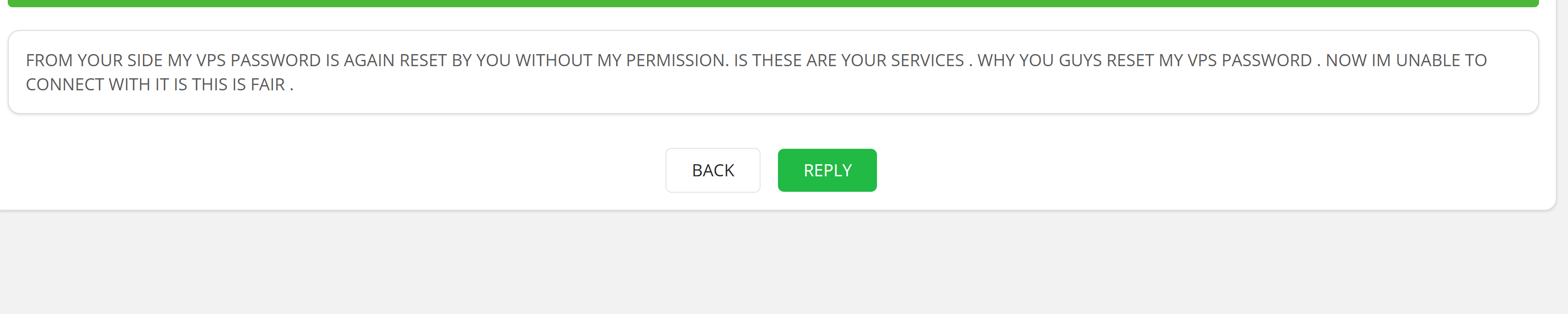
The response came from Alexey C. His reply was short and to the point: “Hello, Check email for credentials.”

I found HostZealot’s support to be highly responsive and security-conscious.
A wait time of under 80 minutes for a technical ticket is very impressive. While some might find the reply brief, it actually highlights a key security practice: HostZealot delivers sensitive root credentials via your secure email rather than storing them in a potentially vulnerable browser dashboard.
The ticket interface itself is a model of efficiency. I liked that I could see the status change to “Answered” and that I had a clear rating system (the stars in the corner) to provide feedback.
When reviewing a hosting provider, I believe the ease of use deserves just as much scrutiny as raw performance specs.
After all, what good is a powerful server if you can’t configure it properly or navigate a clunky dashboard?
I decided to evaluate HostZealot’s user experience by focusing on four critical touchpoints: the registration process, server ordering workflow, dashboard interface, and server management capabilities.
My probe began on the HostZealot homepage, which felt very professional and data-center focused.
I clicked “Select” under the VPS section and was immediately impressed by their filtering system.

HostZealot doesn’t just throw a generic list of plans at you. They provide a sophisticated filtering toolkit that lets you pinpoint exactly what you need. I could filter by:

The location list is one of the most comprehensive I’ve seen, including standard hubs like London and Dallas alongside harder-to-find regions like Dubai, Manama, Riyadh, and Tel Aviv. I settled on a KVM-SSD 8192 instance in Amsterdam for my test.
Once I selected a plan, I was taken to the product configuration page. This is a single-screen layout that packs in a lot of technical detail:

The Order Summary remained pinned on the right side as I scrolled through configuration options.
This gave me a real-time, itemized breakdown of every selection I made, from datacenter location to the specific backup tier. Seeing the total cost of $330.55 for the annual plan upfront meant no surprises or hidden “processing fees” at checkout. I really appreciate this level of transparency.
The final “Review & Checkout” page is where HostZealot truly differentiated itself from competitors. The registration form itself is straightforward, but I noticed they include optional fields for IM/Jabber handles. This tells me they’re built for a tech-savvy, international clientele that values direct communication channels beyond email.

The real standout feature is the Payment Method section, easily the most comprehensive I’ve encountered in the hosting industry. They support:
This payment flexibility is essential for international developers and businesses operating in regions where traditional payment methods face restrictions.
My Take on the Registration Process
I found HostZealot’s registration and setup process to be technical, transparent, and exceptionally accessible.
The interface is clearly designed for users who know their requirements. People who need a specific OS, precise geographic placement, or specialized network configurations. The filtering system makes finding niche setups effortless, and the payment flexibility is genuinely world-class.
After completing the registration process, I was redirected to the HostZealot “Overview” dashboard.
If you’re expecting a flashy interface with colorful graphics and animated widgets, you won’t find it here.
Instead, HostZealot delivers a high-functionality, data-driven “command center” that feels purpose-built for developers and system administrators who prioritize substance over style.
The most striking element of the dashboard is the Notification Board positioned prominently at the top. It functions as a central communication hub for everything happening on the platform. I immediately noticed 226 announcements, which highlighted HostZealot’s proactive approach to communicating network updates, infrastructure improvements, and platform news.

What really caught my attention were the dedicated rows for Alerts and Maintenance. For anyone running production-grade servers, having maintenance indicators front and center is absolutely vital.
This transparency feature ensures you won’t be blindsided by scheduled downtime that could impact your applications. I can’t overstate how valuable this is compared to providers who bury maintenance notices in email threads you might miss.
The Finance widget on the left side is exceptionally detailed and goes far beyond what most hosting dashboards offer. Here’s what stood out to me:
This level of financial transparency builds trust immediately, and the ability to maintain a pre-paid balance ensures your services never expire due to payment processing delays.
The right side of the dashboard is dedicated to Support & Knowledge Base functionality, designed for maximum interactivity.

I saw an immediate indicator stating “1 ticket requires your attention,” which brings pending support threads to your attention the moment you log in.
What impressed me is the dual support approach HostZealot offers:
HostZealot isn’t trying to hide its human support staff behind walls of documentation, though they still respect users who prefer self-service troubleshooting. This balanced approach respects both your time and different support preferences.
The sidebar navigation is logically organized into clear sections like Finance, Settings, and C&C (Command & Control). I also noticed communication icons in the top header.
This reinforces my earlier observation that HostZealot is built for high-touch, international business relationships where direct communication is standard practice rather than an exception.
My Take on the Dashboard
I found the HostZealot dashboard to be a professional, information-dense environment that prioritizes technical oversight and operational transparency over visual flourishes.
It succeeds by placing the “boring but important” details exactly where you need to see them without hunting through nested menus.
Finally, I wanted to get into the “engine room” to see how much technical sovereignty HostZealot actually gives its users.
For an unmanaged server, the quality of the management tools can be the difference between a quick fix and a total disaster. HostZealot groups these tools under a menu appropriately named C&C (Command & Control).
Navigating to C&C > Virtual Servers brought up a clean, tabular view of my active instances.

I appreciated the immediate visibility of technical identifiers: the dedicated IPv4 address, the specific datacenter (Amsterdam), and a clear “Active” status. Clicking the wrench icon took me into the server management.
The primary management page is built for speed. It features a row of high-priority buttons that handle the most common tasks:

While the main dashboard handles the basics, clicking the “Control Panel” button opens a secondary, much deeper interface.

This feels like a dedicated virtualization manager (similar to Virtualizor) and is where the real technical heavy lifting happens.
Inside this panel, I found an impressive array of tabs:

How I Found the Management Experience
I found HostZealot’s server management exceptionally thorough and designed for professional users.
It uses a logical, two-tier system: the first tier handles daily operations (reboots, monitoring), and the second handles deep system configurations (drivers, ISO mounting, API access). I was particularly impressed by the abundance of IPv6 addresses (16 included by default) and the transparency of the traffic monitoring.
If you value technical depth and control, HostZealot’s panel is a benchmark for VPS management.
After thoroughly testing HostZealot’s infrastructure and services, I can confidently recommend them, especially for developers and businesses who prioritize technical control and transparent pricing over hand-holding support.
What impressed me most was the performance-to-price ratio. Getting 436K random read IOPS and nearly symmetrical gigabit network speeds on a €4.88/month VPS is remarkable.
The two-tier management system provides the granular control I need without unnecessary complexity, and the 77-minute support response time exceeded my expectations.
The lack of a money-back guarantee might concern some users, but HostZealot’s 15+ years in business and overwhelmingly positive reviews demonstrate their confidence in service quality. Their comprehensive global coverage with 15+ locations and acceptance of 50+ payment methods makes them exceptionally accessible for international projects.
If you’re comfortable managing your own servers and want enterprise-grade performance without enterprise pricing, HostZealot delivers exactly that.


| Plan Name | Space | CPU | RAM | OS | Price | |
|---|---|---|---|---|---|---|
| KVM 512 | 10 GB | 2 x 3.3GHz | 512 MB | A$7.93 | Details | |
| KVM 1024 | 20 GB | 3 x 3.3GHz | 1 GB | A$10.07 | Details | |
| KVM 2048 | 30 GB | 4 x 3.3GHz | 2 GB | A$12.65 | Details | |
| wKVM 2048 | 75 GB | 4 x 3.3GHz | 2 GB | A$15.60 | Details | |
| KVM 4096 | 50 GB | 4 x 3.3GHz | 4 GB | A$24.33 | Details | |
| wKVM 4096 | 100 GB | 4 x 3.3GHz | 4 GB | A$28.44 | Details | |
| KVM 8192 | 100 GB | 4 x 3.3GHz | 8 GB | A$39.42 | Details | |
| wKVM 8192 | 100 GB | 4 x 3.3GHz | 8 GB | A$43.36 | Details | |
| KVM 16384 | 150 GB | 6 x 3.3GHz | 16 GB | A$76.23 | Details | |
| wKVM 16384 | 150 GB | 6 x 3.3GHz | 16 GB | A$83.16 | Details |
| Plan Name | Space | CPU | RAM | OS | Price | |
|---|---|---|---|---|---|---|
| Atom C2750 8x2.4GHz | 250 GB | 8 x 2.4GHz | 4 GB | A$43.09 | Details | |
| Atom C2750/8c/2.4GHz | 250 GB | 2 x 2.4GHz | 8 GB | A$43.09 | Details | |
| Core i3-4350/2c/3.7GHz | 1.02 TB | 2 x 3.6GHz | 8 GB | A$58.88 | Details | |
| Core i3-4350 | 2 TB | 2 x 3.6GHz | 8 GB | A$60.32 | Details | |
| Core i3-3220/2c/3.3GHz | 512 GB | 2 x 3.3GHz | 8 GB | A$84.74 | Details | |
| Core i3-2120 | 1000 GB | 2 x 3.3GHz | 8 GB | A$89.04 | Details | |
| Xeon E3-1241v3 | 480 GB | 4 x 3.3GHz | 32 GB | A$109.15 | Details | |
| Xeon E3-1230v2/4c/3.3GHz | 512 GB | 4 x 3.3GHz | 32 GB | A$113.46 | Details | |
| Xeon E3-1220v3/4c/3.1GHz | 2 TB | 4 x 3.1GHz | 32 GB | A$113.46 | Details | |
| Xeon E-2234 | 240 GB | 4 x 1.8GHz | 32 GB | A$117.77 | Details | |
| Xeon E-2224 | 480 GB | 4 x 3.4GHz | 32 GB | A$117.77 | Details | |
| Xeon E3-1230v3/4c/3.3GHz | 2 TB | 4 x 3.3GHz | 32 GB | A$122.08 | Details | |
| Xeon E3-1230v3/4c/3.3GHz | 2 TB | 4 x 3.3GHz | 32 GB | A$122.08 | Details | |
| Xeon E3-1230v3/4c/3.3GHz | 2 TB | 4 x 3.3GHz | 32 GB | A$122.08 | Details | |
| Xeon E3-1230v3/4c/3.3GHz | 120 GB | 4 x 3.3GHz | 32 GB | A$122.08 | Details | |
| Xeon E3-1230v3/4c/3.3GHz | 240 GB | 4 x 3.3GHz | 32 GB | A$122.08 | Details | |
| Xeon E3-1230v3/4c/3.3GHz | 2 TB | 4 x 3.3GHz | 32 GB | A$122.08 | Details | |
| Xeon E3-1230v3/4c/3.3GHz | 120 GB | 4 x 3.3GHz | 32 GB | A$122.08 | Details | |
| Xeon E3-1230v3/4c/3.3GHz | 240 GB | 4 x 3.3GHz | 32 GB | A$122.08 | Details | |
| Xeon E3-1230v2/4c/8t/3.3GHz | 1 TB | 4 x 3.3GHz | 16 GB | A$127.82 | Details | |
| Xeon E3-1230v2/4c/8t/3.3GHz | 1 TB | 4 x 3.3GHz | 16 GB | A$127.82 | Details | |
| Xeon E3-1230v6/4c/3.5GHz | 2 TB | 4 x 3.5GHz | 16 GB | A$142.18 | Details | |
| Xeon E3-1230v6/4c/3.5GHz | 2 TB | 4 x 3.5GHz | 16 GB | A$142.18 | Details | |
| Xeon E3-1231v3/4c/3.4GHz | 2 TB | 4 x 3.4GHz | 32 GB | A$142.18 | Details | |
| Xeon E3-1231v3/4c/3.4GHz | 2 TB | 4 x 3.4GHz | 32 GB | A$142.18 | Details | |
| Xeon E3-1241v3/4c/3.5GHz | 2 TB | 4 x 3.5GHz | 32 GB | A$142.18 | Details | |
| Xeon E3-1230v2/4c/3.3GHz | 512 GB | 4 x 3.3GHz | 8 GB | A$156.55 | Details | |
| Xeon E3-1230v6/4c/3.5GHz | 960 GB | 4 x 3.5GHz | 16 GB | A$170.91 | Details | |
| 2xXeon E5-2620/6c/12t/2GHz | 620 GB | 6 x 2GHz | 16 GB | A$185.27 | Details | |
| Xeon E3-1230v2/4c/3.3GHz RAM: | 512 GB | 4 x 3.3GHz | 32 GB | A$213.99 | Details | |
| 2xXeon E5-2620/6c/2GHz | 2 TB | 6 x 2GHz | 64 GB | A$213.99 | Details | |
| 2xXeon E5-2620/6c/2GHz | 1000 GB | 6 x 2GHz | 64 GB | A$213.99 | Details | |
| Xeon E3-1230v6/4c/3.5GHz | 960 GB | 4 x 3.5GHz | 64 GB | A$271.44 | Details | |
| 2xXeon E5-2630v4/10c/2.2GHz | 2 TB | 10 x 2.2GHz | 64 GB | A$328.89 | Details | |
| 2xXeon E5-2620v2/6c/2.1GHz | 4 TB | 6 x 2.1GHz | 128 GB | A$357.61 | Details | |
| 2xXeon E5-2630v4/10c/2.2GHz | 4.84 TB | 10 x 2.2GHz | 64 GB | A$357.61 | Details | |
| 2xXeon E5-2630v4/10c/2.2GHz | 2.89 TB | 10 x 2.2GHz | 64 GB | A$357.61 | Details | |
| 2xXeon E5-2620/6c/12t/2GHz | 8 TB | 6 x 2GHz | 128 GB | A$357.61 | Details | |
| 2xXeon E5-2620v2/6c/12t/2.1GHz | 5 TB | 6 x 2.1GHz | 64 GB | A$357.61 | Details | |
| 2xXeon E5-2620v3/6c/2.4GHz | 4 TB | 6 x 2.4GHz | 128 GB | A$400.70 | Details | |
| 2xXeon E5-2630v4/10c/2.2GHz | 4 TB | 10 x 2.2GHz | 64 GB | A$415.06 | Details | |
| 2xXeon E5-2670v3/12c/24t/2.3GHz | 2.89 TB | 12 x 2.3GHz | 64 GB | A$415.06 | Details | |
| 2xXeon E5-2690v3/12c/24t/2.6GHz | 2 TB | 12 x 2.6GHz | 64 GB | A$429.42 | Details | |
| 2xXeon E5-2690v4/14c/2.6GHz | 4.84 TB | 14 x 2.6GHz | 128 GB | A$429.42 | Details | |
| CPU: 2xXeon E5-2690v3/12c/24t/2.6GHz | 1.88 TB | 12 x 2.6GHz | 64 GB | A$529.96 | Details | |
| 2xXeon E5-2690v3/12c/2.6GHz | 1.88 TB | 12 x 2.6GHz | 64 GB | A$529.96 | Details | |
| 2xXeon E5-2695v4/18c/36t/2.1GHz | 6 TB | 18 x 2.1GHz | 64 GB | A$644.85 | Details |
| Plan Name | Warranty | Price | |
|---|---|---|---|
| Comodo PositiveSSL | A$0.00 | A$14.29 | Details |
| Comodo PositiveSSL Multi-Domain | A$0.00 | A$43.01 | Details |
| Comodo PositiveSSL Wildcard | A$0.00 | A$114.82 | Details |
No, HostZealot does not offer a money-back guarantee or free trial on any services, including VPS, dedicated servers, and domains. This policy is in place to prevent fraud, but their competitive pricing and strong track record provide confidence in service quality.
HostZealot accepts over 50 payment methods, including PayPal, credit cards, Revolut, wire transfers, cryptocurrencies (via Coingate and CoinPayments), and regional options like UnionPay, Alipay, Advcash, Capitalist, and Paxum.
HostZealot operates 15+ data center locations across Europe (Amsterdam, London, Frankfurt, Stockholm, Warsaw, Brussels, Marseille, Venice, Limassol, Tbilisi, Tallinn, Tel Aviv), North America, and Asia, providing extensive global coverage.
Based on our testing, HostZealot responded to a technical support ticket in 77 minutes (1 hour and 17 minutes). Their support team is available from 8:00 to 22:00 UTC/GMT via tickets, live chat, phone, email, and Microsoft Teams.
Yes, HostZealot allows you to upgrade or downgrade your server configuration at any time through the control panel. This flexibility ensures your infrastructure can scale with your business needs without service interruption.

Answer a few simple questions and find the perfect solution for you!
Start Hosting Search