As a website owner, I often help people choose the right web hosting service. I generally recommend focusing on performance rather than popularity. BlueServers has captured my attention with its impressive offerings and competitive pricing.
In this BlueServers review, I’ll share my honest thoughts and experiences, discussing the key aspects that make BlueServers stand out in the crowded hosting market.
First, I was impressed by the performance of their dedicated servers. The company’s cutting-edge technology, combined with its high-performance Intel Xeon and AMD EPYC processors, ensures that websites and applications hosted on their platform load quickly and run smoothly, even under heavy traffic.
In terms of value for money, BlueServers is hard to beat. Their pricing plans are highly competitive, offering a range of options to suit different budgets and requirements.
At HostAdvice, we have developed a comprehensive rating methodology to guide us in evaluating various VPS hosting providers objectively and consistently.
To learn more about our approach and the factors we consider when rating VPS hosting providers, see how we rate hosting providers.
| Parameter | Score | Why We Gave This Score |
| Price | 9.0 | BlueServers offers competitive pricing with a variety of plans to suit different budgets. Their cheapest dedicated server starts at $59 monthly, which is affordable for most users. |
| Features | 9.1 | It offers features that are competitive with those of other dedicated hosting providers, such as multiple OS options. |
| Performance | 8.5 | The server exhibited an impressive average requests per second (RPS) of 2347.19. The average time per request was 4.260 milliseconds. |
| Ease of Use | 8.5 | BlueServers offers a user-friendly control panel, making it easier to manage your server. However, compared to shared hosting, dedicated hosting requires some technical knowledge, so if you’re new to dedicated hosting, there may be a learning curve. |
| Support | 9.5 | It offers excellent technical support with a team that can be reached 24/7. Customers have praised BlueServers for their prompt responses and willingness to go the extra mile to resolve any issues. |
BlueServers offers a robust selection of dedicated servers designed to meet the needs of diverse users.
Its plans provide a range of options and cater to various budgets and workload requirements.
Its plans are categorized into:
Each plan is built around specific Intel Xeon or AMD EPYC processors, with options ranging from the Intel Xeon E3-1230v2 for basic needs to the high-end Dual Intel Xeon Gold 6248R for more demanding applications.
| Plan Name | Space | CPU | RAM | OS | Price | |
|---|---|---|---|---|---|---|
| Intel Xeon E3-1230v2 | 500 GB | 4 x 3.3GHz | 32 GB | A$84.58 | Details | |
| Intel Xeon E5-2630v3 | 8 x 2.4GHz | 32 GB | A$113.25 | Details | ||
| Intel Xeon E-2286G | 6 x 4GHz | 32 GB | A$141.92 | Details | ||
| Dual Intel Xeon E5-2630v3 | 16 x 2.1GHz | A$184.92 | Details | |||
| Intel Xeon E5-2697Av4 | 16 x 2.6GHz | 32 GB | A$199.25 | Details | ||
| Intel Xeon Gold 6152 | 22 x 2.1GHz | 32 GB | A$242.26 | Details | ||
| Intel Xeon Gold 6154 | 18 x 3GHz | 32 GB | A$270.93 | Details | ||
| Dual Intel Xeon E5-2680v4 | 28 x 2.4GHz | 32 GB | A$270.93 | Details | ||
| Dual Intel Xeon Silver 4114 | 20 x 2.2GHz | 32 GB | A$788.42 | Details |
This selection allows you to choose the appropriate level of processing power necessary for your operations.
For example, the Dual Intel Xeon Silver 4114 plan offers a balanced performance with its 20 cores and 40 threads, suitable for medium-scale enterprise applications. In contrast, the AMD EPYC 7702P, with its 64 cores and 128 threads, is ideal for tasks requiring substantial parallel processing capabilities, such as large databases or extensive virtual environments.
Memory options in these plans are equally versatile, starting from 32 GB and extending up to 1.5 TB of DDR4 RAM.
Network connectivity is another strong point for BlueServers, with port speeds ranging from 100 Mbit to 2×10 Gbps and both public and private bandwidth options providing the same range.
Additionally, BlueServers offers full access to iDRAC/IPMI, so you have full control over your servers remotely.
BlueServers also offers a couple of unique offerings. It uses high-performance Intel Xeon Silver and AMD EPYC processors, which can handle demanding workloads and are perfect for resource-intensive business applications.
Another unique offering of BlueServers is its comprehensive range of server customization options that cater to specialized server uses. These include:
For instance, their GPU servers are equipped with powerful RTX 3060 or RTX A5000 GPUs, making them suitable for graphics-intensive applications such as video rendering, AI research, and 3D modeling.
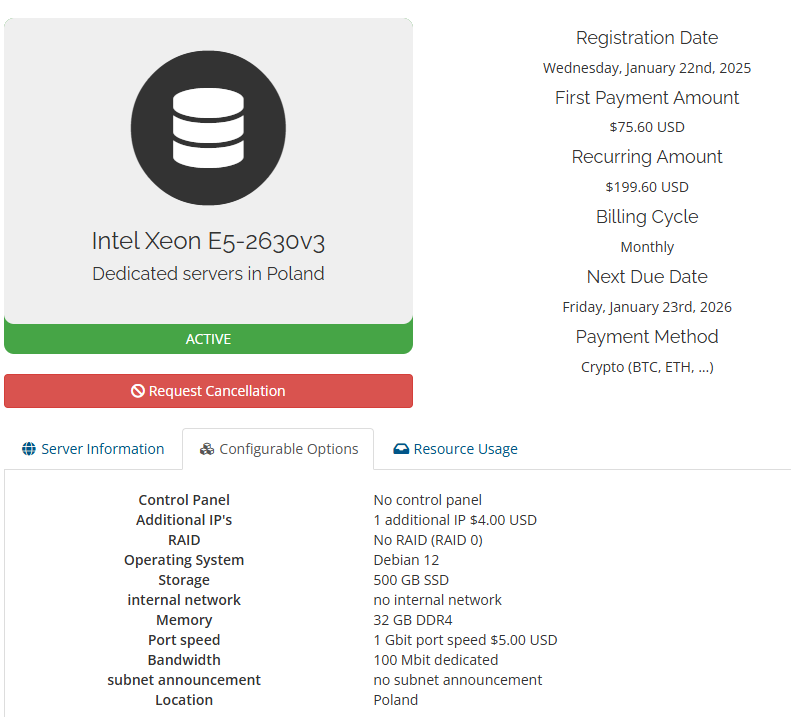
To assess the performance of BlueServers hosting, I tested a dedicated server with the following configuration:
To test the server’s performance for BlueServers, I first accessed the server through the PuTTY SSH client. Once connected, I installed Apache Bench, a command-line tool for benchmarking HTTP server performance.
This lets you simulate multiple concurrent connections to the server, enabling us to assess its responsiveness and throughput under load.
With Apache Bench in place, I initiated a performance test using the command:
ab -n 1000 -c 10 https://server-ip-address/
This instructs Apache Bench to send 1000 requests with a concurrency of 10 connections to the server’s IP address over HTTPS. The goal is to gauge how well the server handles moderate simultaneous requests.
I observed that of the 1000 requests sent, approximately 500 failed to complete successfully due to SSL read failures.
While this may raise concerns, I delved deeper into the context.
Upon further investigation, I found these SSL read failures stemmed from network issues and misconfigurations.
Despite the SSL read failures encountered, the successful requests showcased very good performance metrics. The server handled an impressive 2347.19 requests per second on average, with a mean time per request of just 4.260 milliseconds.

This indicates that the BlueServers server can handle a high traffic volume without significant latency.
The connection times were also very fast, with a minimum of 0ms and a maximum of 259ms. The median connection time was 0ms, meaning half of the requests were processed almost instantly.
Even the longest request took only 259ms, a very reasonable response time.
Overall, the BlueServers server demonstrated strong performance under heavy load testing.
BlueServers provides multiple channels for users to contact their support team, including email, phone, and live chat.
BlueServers offers phone support to users who require immediate assistance.
The support is 24/7 throughout the year, ensuring you can get help when needed.
I found the platform very user-friendly and straightforward, making it easy to sign up and get started with their VPS hosting services.
Visit the BlueServers homepage and choose the plan that best suits your business needs.

Once you’ve found the ideal plan, click the “Order Now” button to proceed. On the next page, you’ll be asked to configure your desired options before continuing to checkout.
The configuration page presents you with a range of options, including:
After configuring your options, review the order summary to ensure everything is correct.
Then click “Continue” to proceed with the payment and complete your registration.
The server management panel provided by BlueServers is the DCI Manager. After exploring the interface, I found it intuitive and easy to use.

The main dashboard displays essential information such as the server name, primary IP address, MAC address, host, location, network, operating system, power status, and relevant notes.
When you click to open the server, you get options to access the server through various methods. For example, you can use the BMC (Baseboard Management Controller) or IPMI (Intelligent Platform Management Interface) to manage the server remotely.

The DCI Manager also provides basic power management options, such as restarting the server or powering it off.
However, if you opt for a different control panel during the BlueServers setup process, such as DirectAdmin, cPanel, ISPmanager, VirtualMin, VestaCP, or HestiaCP, you will have access to a separate server management panel.
These control panels offer their features and tools for managing your VPS.
After thoroughly exploring and testing BlueServers’ dedicated hosting, I can recommend this provider to anyone seeking a reliable, high-performance, and affordable dedicated hosting solution.
What impressed me the most about BlueServers is its commitment to delivering top-notch performance. With powerful hardware, fast network speeds, and optimized server configurations, websites and applications hosted on BlueServers perform remarkably well.
The company’s global network of data centers ensures you can choose a location that best suits your needs, minimizing latency and maximizing speed.


| Plan Name | Space | CPU | RAM | OS | Price | |
|---|---|---|---|---|---|---|
| Intel Xeon E3-1230v2 | 500 GB | 4 x 3.3GHz | 32 GB | A$84.58 | Details | |
| Intel Xeon E5-2630v3 | 8 x 2.4GHz | 32 GB | A$113.25 | Details | ||
| Intel Xeon E-2286G | 6 x 4GHz | 32 GB | A$141.92 | Details | ||
| Dual Intel Xeon E5-2630v3 | 16 x 2.1GHz | A$184.92 | Details | |||
| Intel Xeon E5-2697Av4 | 16 x 2.6GHz | 32 GB | A$199.25 | Details | ||
| Intel Xeon Gold 6152 | 22 x 2.1GHz | 32 GB | A$242.26 | Details | ||
| Intel Xeon Gold 6154 | 18 x 3GHz | 32 GB | A$270.93 | Details | ||
| Dual Intel Xeon E5-2680v4 | 28 x 2.4GHz | 32 GB | A$270.93 | Details | ||
| Dual Intel Xeon Silver 4114 | 20 x 2.2GHz | 32 GB | A$788.42 | Details |
BlueServers has a global presence, with data centers located in various countries, including Canada, Sweden, the Netherlands, Estonia, Poland, Cyprus, Israel, Hong Kong, and Singapore.
Yes, BlueServers allows you to install your custom operating system on its VPS. It also offers options, including Windows and popular Linux distributions like CentOS, Ubuntu, Debian, and FreeBSD.
BlueServers focuses primarily on dedicated server hosting, providing various configurable plans based on your performance, storage, and networking needs. It also offers specialized types of dedicated servers, including storage servers, streaming servers, game servers, unmetered servers, and GPU servers.

Answer a few simple questions and find the perfect solution for you!
Start Hosting Search